
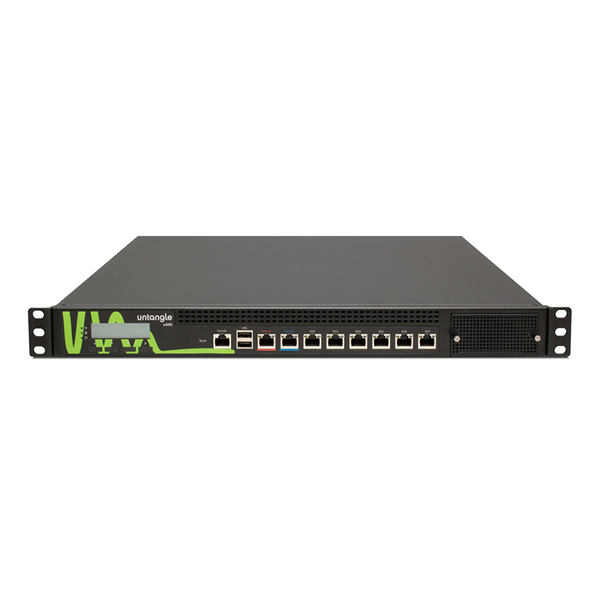
Untangle Firewall: An Overview
Untangle firewall is a network security platform designed to help organisations control internet access, protect devices and manage traffic passing through their networks. It is best known for its modular approach: administrators can combine firewalling with additional security and monitoring tools to suit their requirements.
The product was historically known as Untangle NG Firewall. Following Untangle’s acquisition by Arista Networks, it has also been referred to as Arista NG Firewall. Product names, features and licensing can change, so check the provider’s current documentation before choosing or deploying it.
What Does Untangle Firewall Do?
At its core, a firewall monitors network traffic and applies rules to decide what should be allowed or blocked. Untangle extends this role with tools that can help administrators inspect traffic, manage users’ access to online services and respond to potential threats.
Depending on the edition and configuration, available capabilities may include:
- Firewall rules: Control traffic by factors such as source, destination, service or network interface.
- Intrusion prevention: Inspect traffic for patterns associated with known attacks.
- Web filtering: Restrict access to websites by category or policy.
- Application control: Identify or manage the use of selected applications and online services.
- VPN access: Connect remote users or sites to a protected network, subject to the available configuration.
- Reporting and monitoring: Review traffic and security events to support troubleshooting and policy decisions.
Not every capability is necessarily included in every version or subscription. Administrators should confirm which features are available and how they are licensed.
How Its Modular Design Works
Untangle’s interface has traditionally presented many security functions as separate applications or modules. This can make it easier to enable only the tools a network needs, rather than managing a single, fixed set of features.
That flexibility also calls for careful planning. Enabling several inspection and filtering tools may affect performance, particularly on a busy network or on hardware with limited resources. A sensible deployment starts with the organisation’s security requirements, expected traffic levels and available hardware.
Deployment Options
Untangle firewall has been available for deployment on dedicated appliances and compatible hardware, as well as in virtualised environments. The right option depends on the size and layout of the network, the organisation’s IT skills and its approach to maintenance.
Before installation, plan where the firewall will sit in the network, how internal and external connections will be configured, and how administrators will reach the management interface. It is also important to have a recovery plan in case a change disrupts access to the internet or business systems.
Potential Benefits
- Centralised administration: Firewall and related security settings can be managed through a shared interface.
- Configurable protection: Modular tools can help tailor policies to different users, devices or network needs.
- Traffic visibility: Reports can help teams understand network use and investigate unusual activity.
- Support for smaller IT teams: A combined platform may reduce the need to administer several separate products, depending on the organisation’s setup.
Points to Consider
A firewall is only one part of a broader security strategy. It cannot replace secure passwords, multi-factor authentication, timely software updates, endpoint protection, reliable backups or staff awareness. Nor does installing a firewall guarantee that a network is secure.
Organisations should also assess performance, update frequency, support arrangements, licensing costs and integration with existing systems. Security features need to be configured and maintained; default settings may not meet an organisation’s requirements. Regularly reviewing firewall rules and investigating alerts can help keep the deployment effective.
Is Untangle Firewall Right for Your Organisation?
Untangle firewall may be worth considering for organisations seeking a centrally managed platform that combines firewall controls with additional network security functions. Whether it is the right choice depends on the required features, the size of the network, available hardware, budget and the level of technical support needed.
Before committing, compare the current product offering with other firewall platforms, test it in a controlled environment where possible, and confirm that it meets your security and compliance requirements. A well-planned deployment, supported by ongoing monitoring and maintenance, is essential to getting value from any firewall solution.
Untangle Firewall FAQs: Features, Pricing, Setup and Suitability
- What is Untangle Firewall, and how does it work?
- What features does Untangle Firewall include?
- Is Untangle Firewall free to use?
- How do I install and configure Untangle Firewall?
- Is Untangle Firewall suitable for small businesses and home networks?
What is Untangle Firewall, and how does it work?
Untangle Firewall, now associated with Arista NG Firewall, is a network security platform that helps organisations control and monitor traffic between their network and the internet. It applies rules to allow or block connections and can provide additional tools—depending on the version and configuration—for tasks such as web filtering, intrusion prevention, application control and VPN access. Administrators manage these settings through a central interface, tailoring them to the organisation’s users, devices and security needs.
What features does Untangle Firewall include?
Untangle Firewall, also known as Arista NG Firewall, combines core firewall controls with a range of network security tools. Depending on the version and subscription, features may include intrusion prevention, web filtering, application control, VPN access, traffic monitoring and reporting. These tools help administrators manage network access, inspect traffic and investigate potential security events. Available features can vary, so check the current product documentation and licensing details before choosing a solution.
Is Untangle Firewall free to use?
Untangle Firewall may offer free or trial options, but the features available can depend on the product version, subscription and deployment type. Some advanced security tools or support services may require a paid licence. As plans and product names can change, check the current Arista NG Firewall pricing and licensing information before deploying it to confirm what is included.
How do I install and configure Untangle Firewall?
To install and configure Untangle Firewall, first check the current system requirements and download the appropriate installation image or prepare a supported appliance. Back up important settings, then install the software on the chosen device and connect its network interfaces to the internet and internal network as directed by the setup guide. Use the initial configuration wizard to set administrator credentials, network interfaces, IP settings and any required internet connection details. Once the firewall is online, configure and test rules, user access, VPN and any security or filtering features you need; then apply updates and review logs to confirm everything is working as intended. Exact steps can vary by product version and deployment, so follow the current official documentation and keep a recovery plan in case a configuration change interrupts access.
Is Untangle Firewall suitable for small businesses and home networks?
Yes, Untangle Firewall can be suitable for small businesses and home networks that need more control over traffic, web filtering, VPN access or security monitoring than a standard router provides. Its suitability depends on the features required, the hardware available and any licensing or support costs; setup and ongoing maintenance may also require some technical knowledge. For a simpler home network, a modern router’s built-in security features may be enough, while small businesses should assess their security and compliance needs before choosing a firewall.