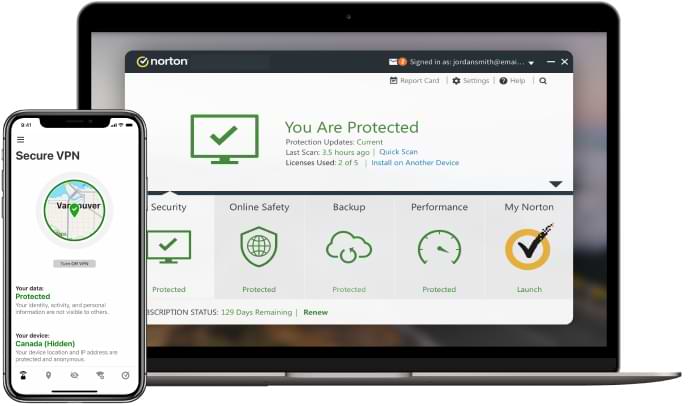
Norton Secure VPN: What It Is and How It Works

Norton Secure VPN is a virtual private network (VPN) service from Norton. It is designed to help protect your internet connection, particularly when you use public Wi-Fi, and to make it harder for websites and other online services to see your device’s public IP address.

A VPN can be a useful part of an online security toolkit, but it is not a complete solution. It does not make every online activity anonymous or protect a device from every type of threat. Here is what to know before using Norton Secure VPN.

How Norton Secure VPN works

When you connect to a VPN, your device creates an encrypted connection to a VPN server. Internet traffic travels through that connection before reaching its destination. This can help prevent other people on the same public Wi-Fi network from easily inspecting your traffic, and websites will generally see the VPN server’s IP address rather than your usual one.

Norton Secure VPN offers apps for supported devices and operating systems. Available features and settings can vary by platform, subscription and region, so check Norton’s current product information for the details that apply to your device.

Key features

  • Encrypted connection: Encryption helps protect data travelling between your device and the VPN server, especially on networks you do not control.
  • IP address masking: Websites and services will usually see the IP address of the VPN server, rather than your home or mobile connection’s address.
  • Public Wi-Fi protection: A VPN can add a layer of privacy when connecting through public hotspots in places such as cafés, hotels and airports.
  • Multiple server locations: Depending on the plan and app, you may be able to select a server location. This can affect which version of a website or service is presented to you.
  • Additional privacy settings: Norton may offer features such as an ad tracker blocker or a kill switch on selected platforms. Availability can differ, so confirm what is included before subscribing.

Benefits of using Norton Secure VPN

For people who want a straightforward VPN from a familiar security provider, Norton Secure VPN may be convenient to set up and use. It can be particularly helpful for adding protection to connections on public Wi-Fi, where the network is shared with other users.

A VPN may also reduce the amount of location information revealed through your public IP address. However, websites can still identify or track you through other means, such as cookies, account sign-ins, browser settings and device information.

What a VPN cannot do

A VPN should not be treated as a replacement for antivirus software, software updates, strong passwords or multi-factor authentication. It does not automatically stop phishing, remove malware or make unsafe downloads safe.

Nor does changing your IP address guarantee anonymity. Norton, your internet provider, websites and other services may each have access to different information about your connection or activity. Read the service’s current privacy policy to understand what data is collected, how it is used and how long it is retained.

Some websites and streaming services may restrict access when they detect a VPN connection. A VPN can also affect connection speed because your traffic takes an additional route through a server. The impact varies with the server, your location, your device and the quality of your internet connection.

Using Norton Secure VPN safely

  1. Download the app from Norton’s official website or your device’s recognised app store.
  2. Sign in and review the available privacy and connection settings.
  3. Connect to a suitable server before using a public Wi-Fi network or carrying out sensitive online tasks.
  4. Keep the app and your operating system up to date.
  5. Continue to use unique passwords and multi-factor authentication for important accounts.

Is Norton Secure VPN right for you?

Norton Secure VPN may suit users looking for a simple way to encrypt their connection and reduce exposure of their public IP address. Before choosing it, compare the current subscription price, supported devices, server locations, feature availability and cancellation terms with those of other VPN providers.

Consider your main reason for using a VPN. If you primarily want extra protection on public Wi-Fi, a VPN can be a practical addition. If you need specialised features, such as particular server locations or advanced network controls, check that Norton Secure VPN offers them on your device and plan.

Final thoughts

Norton Secure VPN provides an encrypted route for internet traffic and can add a layer of privacy when browsing, particularly on shared networks. Its protection has limits: it does not make users completely anonymous or replace broader security practices. Reviewing the latest product details and privacy terms will help you decide whether it meets your needs.


9 Essential Tips for Using Norton Secure VPN Safely and Effectively

  1. Use Norton Secure VPN on public Wi-Fi.
  2. Switch it on before browsing or banking.
  3. Choose a nearby server for better speeds.
  4. Use a different location when you need it.
  5. Keep the app updated.
  6. Check that the VPN connection is active.
  7. Use split tunnelling only when needed.
  8. A VPN does not replace antivirus protection.
  9. Turn it off when you no longer need it.

Use Norton Secure VPN on public Wi-Fi.

When using public Wi-Fi in places such as cafés, hotels or airports, switch on Norton Secure VPN before browsing or signing in to accounts. It encrypts the connection between your device and the VPN server, helping to protect your internet traffic from being viewed by others on the same network. A VPN is an additional safeguard, not a guarantee of complete privacy, so keep your device and apps up to date and avoid clicking suspicious links.

Switch it on before browsing or banking.

Switch on Norton Secure VPN before you start browsing or accessing online banking, especially when using public Wi-Fi. Connecting first helps encrypt your internet traffic from the outset and can reduce the exposure of your connection on shared networks. A VPN adds a layer of privacy, but it does not replace your bank’s security measures or safe browsing habits, so always check that you’re using the official website or app.

Choose a nearby server for better speeds.

For better speeds with Norton Secure VPN, choose a server that is geographically close to you. Your internet traffic has less distance to travel, which can help reduce delays and improve connection performance. If a nearby server feels slow or unreliable, try another close location and compare the results.

Use a different location when you need it.

Choose a different server location in Norton Secure VPN when it suits your needs. Connecting through another location can change the IP address that websites see and may help when you’re travelling or having trouble accessing a service. Keep in mind that some websites may restrict VPN connections, and changing locations does not guarantee access or make your browsing anonymous.

Keep the app updated.

Keep Norton Secure VPN updated to ensure you have the latest security improvements, bug fixes and features. Updates can also help the app work properly with newer versions of your device’s operating system. Turn on automatic updates if available, or check your app store or Norton’s official website regularly for the latest version.

Check that the VPN connection is active.

Before browsing or sharing sensitive information, check that Norton Secure VPN shows you as connected. Look for the VPN status in the app and confirm that it indicates an active connection; if it is disconnected or still connecting, reconnect and wait for confirmation. If the connection keeps dropping, check your internet access and VPN settings before continuing, especially when using public Wi-Fi.

Use split tunnelling only when needed.

Use split tunnelling only when needed. This feature lets you choose which apps use Norton Secure VPN and which connect directly to the internet. It can be useful if a trusted app or service does not work properly through the VPN, but excluding apps means their traffic will not receive the VPN’s encrypted connection or IP address masking. Keep split tunnelling disabled unless there is a clear reason to use it, and check which apps are excluded before connecting to sensitive accounts or networks.

A VPN does not replace antivirus protection.

A VPN does not replace antivirus protection: Norton Secure VPN helps encrypt your internet connection and can improve privacy, particularly on public Wi-Fi, but it does not scan for or remove malware. Keep reputable antivirus software enabled and up to date, and continue to use safe browsing habits to protect your devices.

Turn it off when you no longer need it.

Turn it off when you no longer need it

Norton Secure VPN can help protect your connection on public Wi-Fi, but you may not need it all the time. Disconnecting when you no longer need the extra privacy can help avoid potential slowdowns or problems with websites and services that restrict VPN connections. Reconnect whenever you want to use its protection again, especially before joining an unfamiliar or public network.

The Benefits of Using Norton VPN

Virtual Private Networks (VPNs) have become essential tools for ensuring online privacy and security in today’s digital age. Norton, a trusted name in cybersecurity, offers its own VPN service to provide users with a secure and private browsing experience. Let’s explore the benefits of using Norton VPN:

Enhanced Security

Norton VPN encrypts your internet connection, making it virtually impossible for hackers or third parties to intercept your data. This added layer of security is crucial, especially when using public Wi-Fi networks where cyber threats are more prevalent.

Privacy Protection

With Norton VPN, your online activities are shielded from prying eyes, including your Internet Service Provider (ISP). By masking your IP address and location, you can browse the web anonymously without compromising your privacy.

Access to Restricted Content

Many websites and streaming platforms restrict access based on geographical locations. Norton VPN allows you to bypass these restrictions by masking your IP address with one from a different region, giving you access to geo-blocked content.

Secure Online Transactions

When making online transactions or accessing sensitive information, it’s crucial to ensure a secure connection. Norton VPN encrypts your data transmissions, providing peace of mind that your financial details are protected from potential cyber threats.

Multi-Device Compatibility

Norton VPN is compatible with various devices and operating systems, including Windows, Mac, Android, and iOS. Whether you’re using a laptop, smartphone, or tablet, you can enjoy the benefits of a secure and private connection across all your devices.

User-Friendly Interface

Norton VPN offers an intuitive interface that makes it easy to connect to servers and customise settings according to your preferences. Whether you’re a tech-savvy user or new to VPNs, Norton ensures a seamless user experience for all.

In Conclusion

Choosing Norton VPN not only enhances your online security but also grants you the freedom to browse the web without limitations. With its robust encryption protocols and user-friendly features, Norton VPN is a reliable solution for safeguarding your digital presence in an increasingly interconnected world.


Top 5 Tips for Maximising Your Norton VPN Security and Performance

  1. Ensure your Norton VPN is always turned on when connecting to public Wi-Fi networks.
  2. Regularly update your Norton VPN software to benefit from the latest security features.
  3. Choose a server location close to your actual location for faster connection speeds.
  4. Use strong and unique passwords for both your Norton account and VPN service for added security.
  5. Consider enabling the kill switch feature in Norton VPN settings to prevent data leaks if the VPN connection drops.

Ensure your Norton VPN is always turned on when connecting to public Wi-Fi networks.

When utilising public Wi-Fi networks, it is imperative to ensure that your Norton VPN is consistently activated. By keeping your Norton VPN turned on while connecting to public Wi-Fi hotspots, you fortify your online security and privacy. This precautionary measure encrypts your internet traffic, safeguarding your sensitive data from potential cyber threats lurking on unsecured networks. Protecting your online activities with Norton VPN’s encryption ensures a secure browsing experience even in vulnerable environments, giving you peace of mind when accessing the internet on the go.

Regularly update your Norton VPN software to benefit from the latest security features.

To maximise the security benefits of Norton VPN, it is essential to regularly update the software to access the latest security features. By keeping your Norton VPN software up to date, you ensure that your online activities remain protected with the most advanced encryption protocols and security enhancements. Regular updates not only strengthen your defence against cyber threats but also provide you with peace of mind knowing that you are utilising the most current technology to safeguard your privacy and data while browsing the internet.

Choose a server location close to your actual location for faster connection speeds.

When using Norton VPN, it is advisable to select a server location that is in close proximity to your actual location. By choosing a server nearby, you can experience faster connection speeds and reduced latency. This ensures a smoother browsing experience and quicker data transfers, enhancing the overall performance of your VPN connection. Opting for a server close to you not only improves speed but also maintains a reliable and stable connection for your online activities.

Use strong and unique passwords for both your Norton account and VPN service for added security.

When utilising Norton VPN, it is advisable to employ strong and unique passwords for both your Norton account and VPN service to bolster security measures. By using complex passwords that are not easily guessable and ensuring they differ between your accounts, you enhance the protection of your sensitive information. This practice minimises the risk of unauthorised access to your accounts and strengthens the overall security of your online activities while using Norton VPN.

Consider enabling the kill switch feature in Norton VPN settings to prevent data leaks if the VPN connection drops.

When using Norton VPN, it is advisable to consider enabling the kill switch feature in the settings. This feature acts as a safeguard against potential data leaks in the event of a VPN connection drop. By activating the kill switch, you ensure that your online activities remain protected and confidential even if the VPN connection is interrupted. This additional layer of security enhances your overall browsing experience and minimises the risk of sensitive information being exposed to unauthorised parties.

Enhance Your Online Security with Norton’s Secure VPN Service

The Importance of Secure VPN with Norton

In today’s digital age, ensuring your online security and privacy is more crucial than ever. With the increasing number of cyber threats and data breaches, using a secure Virtual Private Network (VPN) like Norton Secure VPN can provide you with peace of mind when browsing the internet.

Norton Secure VPN offers a robust and reliable solution to protect your online activities from prying eyes. By encrypting your internet connection, it prevents hackers, ISPs, and other malicious entities from intercepting your sensitive information such as passwords, financial details, and personal data.

One of the key features of Norton Secure VPN is its ability to mask your IP address and location. This not only enhances your privacy but also allows you to access geo-restricted content and websites that may be blocked in your region.

Moreover, using Norton Secure VPN when connecting to public Wi-Fi networks – such as those in cafes, airports, or hotels – adds an extra layer of security. Public Wi-Fi hotspots are often targeted by cybercriminals looking to steal personal information, but with Norton Secure VPN encrypting your data transmissions, you can browse safely without worrying about potential threats.

With Norton’s reputation for providing top-notch cybersecurity solutions, you can trust that their Secure VPN service adheres to the highest standards of encryption protocols and security measures. Whether you’re using a desktop computer, laptop, smartphone or tablet, Norton Secure VPN offers multi-device support to ensure all your online activities are protected.

In conclusion, investing in a secure VPN like Norton Secure VPN is a wise decision to safeguard your online privacy and security. With its advanced encryption technology and user-friendly interface, you can browse the web with confidence knowing that your data is shielded from cyber threats. Stay safe and secure online with Norton Secure VPN.


9 Essential Tips for Maximising Security with Norton Secure VPN

  1. Ensure your Norton Secure VPN is always up to date.
  2. Choose strong and unique passwords for your VPN account.
  3. Enable two-factor authentication for an added layer of security.
  4. Avoid connecting to public Wi-Fi networks without using the VPN.
  5. Regularly review the devices connected to your VPN account.
  6. Be cautious of phishing attempts that may try to steal your VPN login details.
  7. Use a reputable antivirus software alongside Norton Secure VPN for comprehensive protection.
  8. Consider using a dedicated IP address for increased anonymity and security.
  9. Familiarise yourself with the logging policy of Norton Secure VPN to understand how your data is handled.

Ensure your Norton Secure VPN is always up to date.

To maintain optimal security and protection while using Norton Secure VPN, it is essential to ensure that the software is always kept up to date. Regular updates provided by Norton include important security patches, bug fixes, and enhancements that help fortify the VPN’s defences against emerging cyber threats. By staying current with the latest version of Norton Secure VPN, you can rest assured that you are benefiting from the most robust security features and protocols available, keeping your online activities safe and private.

Choose strong and unique passwords for your VPN account.

When using Norton Secure VPN, it is essential to choose strong and unique passwords for your account. By selecting a password that is complex and not easily guessable, you add an extra layer of security to your VPN connection. Avoid using common passwords or reusing passwords from other accounts to minimise the risk of unauthorised access. Strong passwords help protect your VPN account from potential breaches and ensure that your online activities remain secure and private. Take the time to create a robust password for your Norton Secure VPN account to enhance the overall security of your internet browsing experience.

Enable two-factor authentication for an added layer of security.

By enabling two-factor authentication for your Norton Secure VPN account, you can significantly enhance the security of your online activities. This additional layer of protection ensures that even if your login credentials are compromised, malicious actors would still need a secondary verification method to access your account. Two-factor authentication adds an extra barrier against unauthorised access, making it a valuable tool in safeguarding your privacy and data when using Norton Secure VPN.

Avoid connecting to public Wi-Fi networks without using the VPN.

To enhance your online security and protect your sensitive information, it is advisable to avoid connecting to public Wi-Fi networks without using a VPN like Norton Secure VPN. Public Wi-Fi hotspots are often targeted by cybercriminals seeking to intercept data transmissions and steal personal details. By utilising a VPN when accessing public Wi-Fi networks, you can encrypt your internet connection and prevent potential threats from compromising your privacy. Stay safe and secure online by always activating your VPN before connecting to public Wi-Fi networks.

Regularly review the devices connected to your VPN account.

It is essential to regularly review the devices connected to your VPN account when using Norton Secure VPN. By monitoring and managing the devices that have access to your VPN, you can ensure that only trusted devices are connected and detect any unauthorized access promptly. This practice enhances the security of your online activities and helps prevent potential breaches or misuse of your VPN account. Stay vigilant by routinely checking and updating the list of connected devices to maintain a secure and protected VPN environment with Norton.

Be cautious of phishing attempts that may try to steal your VPN login details.

It is important to exercise caution and remain vigilant against phishing attempts that may target your VPN login credentials. Cybercriminals often use deceptive tactics to trick users into disclosing their sensitive information, including VPN usernames and passwords. Be wary of unsolicited emails, messages, or websites that prompt you to provide your VPN login details. Always verify the authenticity of the communication and ensure that you are entering your credentials only on the official Norton Secure VPN platform. By staying alert and practising good cybersecurity habits, you can help protect yourself from falling victim to phishing attacks and safeguard your online privacy with Norton Secure VPN.

Use a reputable antivirus software alongside Norton Secure VPN for comprehensive protection.

For comprehensive protection when using Norton Secure VPN, it is advisable to complement it with a reputable antivirus software. While Norton Secure VPN secures your online activities and encrypts your internet connection, a trusted antivirus programme can provide an additional layer of defence against malware, viruses, and other cyber threats. By combining the robust security features of Norton Secure VPN with the real-time scanning and threat detection capabilities of a reputable antivirus software, you can ensure that your devices are safeguarded from a wide range of online risks, offering you peace of mind as you browse the web securely.

Consider using a dedicated IP address for increased anonymity and security.

When utilising Norton Secure VPN, it is advisable to consider using a dedicated IP address to enhance both anonymity and security. By opting for a dedicated IP address, you can further safeguard your online activities from potential threats and prying eyes. This additional layer of protection ensures that your internet traffic remains confidential and secure, providing you with peace of mind while browsing the web. With Norton’s Secure VPN service and a dedicated IP address, you can enjoy heightened privacy and anonymity online.

Familiarise yourself with the logging policy of Norton Secure VPN to understand how your data is handled.

It is advisable to familiarise yourself with the logging policy of Norton Secure VPN to gain insight into how your data is managed and stored. By understanding the logging practices of the VPN service, you can make informed decisions about your online privacy and security. Knowing whether Norton Secure VPN keeps logs of your online activities can help you assess the level of anonymity and confidentiality it provides, ensuring that your sensitive information remains protected while browsing the internet.