
GlassWire Firewall: A Visual Way to Monitor Network Activity
GlassWire is a network-monitoring application with firewall controls designed to make it easier to see which programmes are connecting to the internet. Rather than presenting network activity as a dense list of technical data, it uses charts, alerts and app-level information to help users understand what is happening on their devices.
How GlassWire works
On Windows, GlassWire works with the built-in Windows Firewall. Its interface provides a more accessible way to view network activity and manage whether individual applications can connect. When a programme accesses the network, GlassWire can show it in its activity timeline and let the user block or allow its connections through the firewall.
This distinction matters: GlassWire is not simply a replacement for Windows Firewall. Its firewall controls provide a convenient interface for managing Windows’ existing firewall, while its monitoring features help explain which applications are using the network and when.
Key features
- Network activity graphs: View incoming and outgoing traffic over time and see which applications are using the connection.
- Application controls: On Windows, manage network access for individual programmes through the firewall interface.
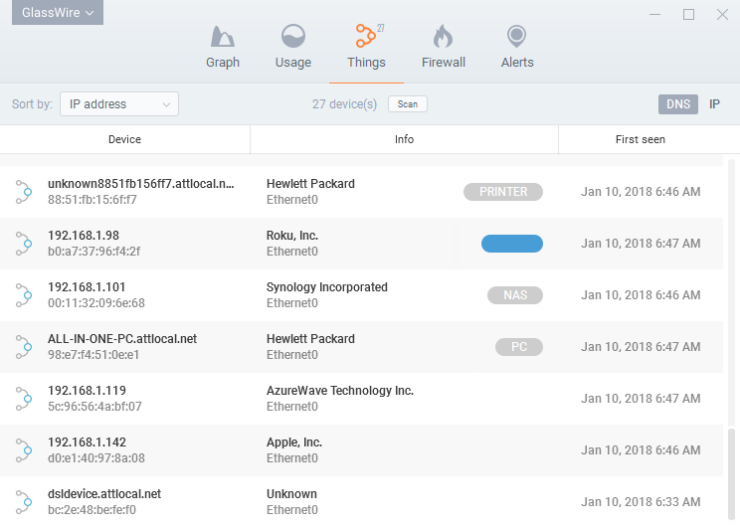
- Connection details: Review information about network connections, including the applications involved and, where available, the remote hosts they contact.
- Alerts: Receive notifications about selected changes or network events, such as a new application connecting to the internet.
- Data-usage monitoring: Track network consumption and, depending on the version and platform, review usage over different periods.
GlassWire on Windows and Android
GlassWire is available for Windows and Android, but its features differ between platforms. The Windows edition includes firewall controls that work with Windows Firewall. The Android app focuses on monitoring network and mobile-data usage; Android’s system restrictions mean it does not provide the same app-blocking firewall controls as the Windows version.
Check GlassWire’s current product information before installing, as supported features, plan options and availability can change over time.
Who might find it useful?
GlassWire may suit people who want a clearer picture of their computer’s network activity without having to inspect technical logs manually. It can also be useful for investigating unexpected data use or checking which applications communicate online. Its visual presentation can make routine monitoring more approachable for home users and small organisations.
Things to consider
GlassWire’s alerts and graphs can help draw attention to unusual activity, but they do not prove that a connection is malicious. Legitimate applications often contact remote servers for updates, cloud services or other features. Review alerts in context and avoid blocking programmes unless you understand the possible consequences.
GlassWire should also be considered one part of a wider security approach, not a substitute for keeping software up to date, using reputable security tools and following safe online practices. Some features may depend on the edition or subscription, so compare current plans if you are considering it for regular use.
Conclusion
GlassWire combines an easy-to-read network monitor with firewall management on Windows, giving users a practical way to see which applications are communicating online. Its visual approach can make network activity easier to understand, while its alerts can help highlight changes worth checking. As with any monitoring tool, the information is most useful when interpreted carefully and used alongside other sound security measures.
GlassWire Firewall FAQs: Features, Safety and Pricing
- Is GlassWire free to use?
- How much does GlassWire cost?
- What is GlassWire used for?
- Is GlassWire safe?
- Is GlassWire a firewall?
- What is the purpose of GlassWire?
Is GlassWire free to use?
Yes, GlassWire offers a free version, although some features and usage limits may differ from its paid plans. The free edition can be useful for basic network monitoring, while advanced tools and additional capabilities may require a subscription. As plans and features can change, check GlassWire’s official website for the latest details.
How much does GlassWire cost?
GlassWire offers a free version, alongside paid plans with additional features; pricing can vary by plan, platform and billing period. Check the official GlassWire website for current prices and a comparison of what each option includes before choosing.
What is GlassWire used for?
GlassWire is used to monitor network activity and help users see which applications are connecting to the internet, how much data they are using and when connections occur. Its charts and alerts can make unusual activity easier to spot. On Windows, GlassWire also provides a convenient way to manage app access through Windows Firewall; its Android features differ and do not offer the same firewall controls.
Is GlassWire safe?
GlassWire is a legitimate network-monitoring application that can help you see which programmes are using your internet connection and, on Windows, manage their access through Windows Firewall. As with any software, download it from the official GlassWire website or a trusted app store, check the permissions it requests, and keep it up to date. GlassWire can help you review network activity, but it is not a guarantee against malware or other security threats, so use it alongside reputable security software and sensible online practices.
Is GlassWire a firewall?
Yes, GlassWire includes firewall controls on Windows, using the built-in Windows Firewall to help you allow or block individual applications’ network access. It also monitors and displays network activity, so you can see which programmes are connecting to the internet. GlassWire is not a standalone replacement for Windows Firewall, and its features vary by platform: the Android app focuses on monitoring and does not offer the same firewall controls.
What is the purpose of GlassWire?
GlassWire is designed to help you monitor and understand your device’s network activity. It shows which applications are using the internet, displays data usage and can alert you to certain network changes. On Windows, it also provides an interface for managing app access through Windows Firewall. GlassWire helps make network activity easier to review, but it is not a substitute for a complete security solution.