
Firewall Software: A Guide to Protecting Your Devices and Network
Firewall software helps protect computers and networks by monitoring incoming and outgoing internet traffic. It applies a set of security rules to decide which connections are allowed and which should be blocked. Used alongside other security measures, a firewall can help reduce exposure to unauthorised access and suspicious activity.
What Is Firewall Software?
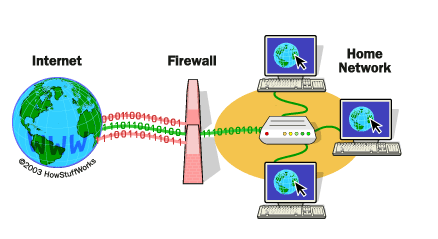
A firewall acts as a barrier between a trusted device or network and other networks, including the internet. When data is sent or received, the firewall checks it against its rules. Depending on those rules, it may allow the traffic, block it or alert the user or administrator.
Firewalls are available as software, hardware or a combination of both. Firewall software runs on an individual computer or server, while a network firewall protects multiple devices by filtering traffic at the network boundary. Many routers also include basic firewall capabilities.
How Does a Firewall Work?
Firewalls use different methods to assess network traffic. Common approaches include:
- Packet filtering: Checks details such as the source, destination and type of network traffic against predefined rules.
- Stateful inspection: Tracks active connections and assesses traffic in the context of those connections.
- Application-level filtering: Examines traffic associated with particular applications or services, rather than relying only on basic connection details.
- Host-based monitoring: Runs on a device and can control which programmes are permitted to communicate over a network.
The capabilities available vary between products. Some firewall software focuses on straightforward connection controls, while more advanced solutions may offer central management, detailed logging and additional threat-detection features.
Types of Firewall Software
Personal Firewalls
Personal firewalls are designed for individual computers. They can help control connections made by applications and provide alerts about unfamiliar network activity. They are often included with an operating system or security suite.
Business and Enterprise Firewalls
Organisations may use centrally managed firewall software to apply consistent rules across computers, servers or cloud environments. These products can help administrators monitor activity, manage access and investigate security events. The right configuration depends on the organisation’s network, users and security requirements.
Cloud Firewalls
Cloud firewalls filter traffic to, from or between cloud-based services. They can be managed through a provider’s platform and configured to protect workloads that may not be located in a traditional office network.
Why Is Firewall Software Important?
A firewall can help organisations and individuals:
- Block unwanted network connections.
- Restrict communications to approved applications and services.
- Reduce the risk of unauthorised access to devices and systems.
- Monitor network activity and support security investigations.
- Apply access rules that reflect business or household needs.
A firewall is not a complete security solution. It cannot, on its own, prevent every cyber attack, detect every harmful file or protect against unsafe behaviour. It should form part of a broader approach that includes software updates, strong authentication, secure backups and appropriate endpoint protection.
How to Choose Firewall Software
Before selecting firewall software, consider how it will be used and who will manage it. Useful factors to assess include:
- Compatibility: Check that the software supports your operating systems, devices and network environment.
- Management: Consider whether you need controls for one device or central administration across many devices.
- Visibility: Look for clear logs and alerts that make it possible to understand what the firewall is blocking or allowing.
- Usability: Rules should be manageable without making legitimate work unnecessarily difficult.
- Support and updates: Check how the provider handles security updates, product maintenance and technical support.
- Cost and licensing: Review the total cost, including subscriptions, deployment and ongoing administration.
For business use, it is also important to consider regulatory obligations, internal security policies and how the firewall will fit with existing monitoring and incident-response processes.
Firewall Best Practices
Careful configuration is essential. A firewall that is poorly maintained or set up with overly broad rules may offer less protection than expected. Good practices include:
- Keep the firewall software and related systems up to date.
- Use a default-deny approach where appropriate, allowing only the traffic required for legitimate tasks.
- Review rules regularly and remove those that are no longer needed.
- Limit administrative access and protect it with strong authentication.
- Check logs and investigate unexpected activity.
- Test rule changes to make sure essential services continue to work.
- Document important settings and have a process for responding to alerts.
Firewall Software and Other Security Measures
Firewalls work best as part of a layered security strategy. They can be combined with antivirus or endpoint detection tools, multi-factor authentication, secure configuration, staff awareness training and regular backups. Network segmentation can also help limit the spread of an incident by separating systems according to their purpose and level of sensitivity.
For organisations using directory services such as Microsoft Active Directory, firewall rules should be planned carefully. Overly restrictive settings can disrupt authentication and other essential services, while overly permissive rules may expose systems unnecessarily. Changes should be tested and documented before being applied widely.
Conclusion
Firewall software is an important tool for controlling network traffic and reducing unwanted connections. Its effectiveness depends on choosing a solution that suits your environment, configuring it carefully and keeping its rules up to date. Combined with other security controls, a well-managed firewall can contribute to a more resilient approach to protecting devices, users and business systems.
Essential FAQs on Firewall Software: Understanding, Choosing, and Configuring Your Digital Defence
- What is firewall software and how does it work?
- Why do I need firewall software?
- What is the difference between a software firewall and a hardware firewall?
- Is the firewall built into my computer enough to protect me?
- Can firewall software slow down my computer or internet connection?
- How do I choose the right firewall software for my needs?
- How do I configure firewall software safely?
- Can firewall software protect me from viruses, malware and phishing attacks?
What is firewall software and how does it work?
Firewall software monitors incoming and outgoing network traffic and applies security rules to decide which connections to allow or block. It acts as a barrier between your device or network and other networks, such as the internet. Depending on the software, it may filter traffic based on details such as its source, destination, connection status or the application involved. By blocking unauthorised or suspicious connections, a firewall can help reduce security risks, although it should be used alongside other protections such as software updates, strong passwords and antivirus tools.
Why do I need firewall software?
Firewall software helps protect your computer or network by checking incoming and outgoing connections and blocking traffic that does not meet your security rules. It can reduce the risk of unauthorised access and help control which applications communicate online. A firewall is not a complete security solution, but alongside regular updates, strong passwords and other security tools, it adds an important layer of protection.
What is the difference between a software firewall and a hardware firewall?
A software firewall is installed on an individual computer or server and controls the network traffic entering and leaving that device. A hardware firewall is a physical appliance, or a firewall built into a router, that filters traffic between networks and can protect several devices at once. Software firewalls offer device-level control, while hardware firewalls provide network-wide protection; many organisations use both as part of a layered security approach.
Is the firewall built into my computer enough to protect me?
The firewall built into your computer provides a useful first layer of protection by controlling incoming and outgoing network connections, but it is not enough on its own to protect you from every online threat. Keep it switched on and up to date, and use it alongside other safeguards, such as regularly updated software, reputable anti-malware protection, strong passwords and multi-factor authentication. For businesses or people with more complex networks, additional firewall controls may also be appropriate.
Can firewall software slow down my computer or internet connection?
Firewall software can use some of your computer’s resources, but for most modern devices the impact is usually small. You may notice slower performance or internet speeds if the software is resource-intensive, poorly configured, out of date or running alongside several other security tools. If this happens, check for updates, review the firewall’s settings and close unnecessary programmes. Avoid switching off the firewall as a quick fix; if the problem continues, consult the software provider or your IT administrator.
How do I choose the right firewall software for my needs?
To choose the right firewall software, consider what you need to protect: a single computer, a home network or an organisation’s devices and cloud services. Check that the software is compatible with your systems, easy to manage and provides clear alerts and activity logs. Businesses may also need centralised controls, reporting and support for compliance requirements. Compare the features, ongoing costs, update policy and level of technical support, and make sure the firewall can work alongside your existing security tools. Choose a solution you can configure and maintain properly, as even capable software may offer limited protection if its rules are out of date or too permissive.
How do I configure firewall software safely?
Configure firewall software by starting with its recommended settings and allowing only the connections and applications you need. Keep the software updated, use strong authentication for administrator access, and avoid disabling the firewall to solve connection problems; instead, create a specific rule for the required traffic. Review rules and activity logs regularly, remove outdated permissions, and test changes to ensure essential services still work. For business networks, document changes and follow your organisation’s security policies.
Can firewall software protect me from viruses, malware and phishing attacks?
Firewall software can help block suspicious network connections and prevent unauthorised access, but it cannot protect you from every virus, malware infection or phishing attack. Some firewalls include extra security features, yet harmful files may still arrive through email, downloads or removable media, and phishing often relies on tricking people into revealing information. Use a firewall alongside reputable antivirus or endpoint protection, keep your software updated, and take care with unexpected links, attachments and requests for sensitive details.