
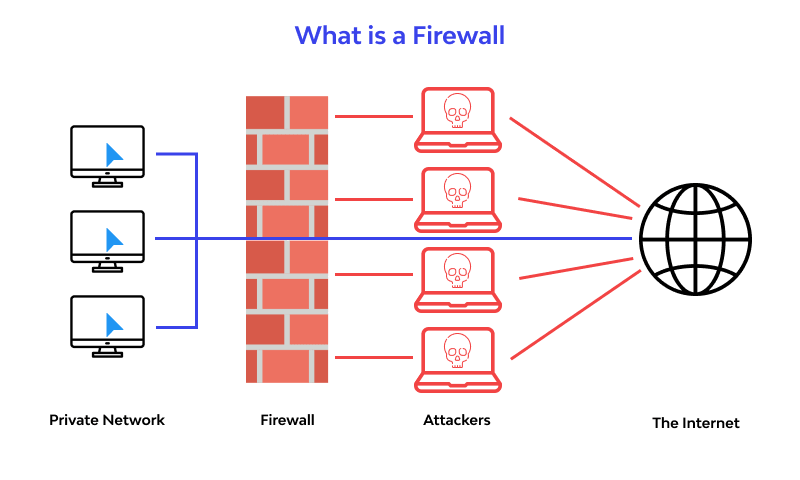
Firewall Protection: A Guide to Keeping Your Network Secure
A firewall is one of the foundations of network security. It helps control the traffic entering and leaving a device or network, allowing authorised connections while blocking traffic that may be harmful or unwanted. Used alongside other security measures, firewall protection can reduce the risk of cyber attacks and help safeguard sensitive information.
What is a firewall?
A firewall is a security system that checks network traffic against a set of rules. Depending on its configuration, it can permit, block or restrict connections based on factors such as the source or destination of the traffic, the application being used, or the type of connection.
Firewalls can be installed on individual devices, built into network equipment, or provided as a cloud-based service. Many computers and routers include basic firewall features, while organisations may use more advanced systems to protect larger or more complex networks.
How does firewall protection work?
When data travels across a network, a firewall assesses it before allowing it through. It applies security rules to decide whether the traffic is expected and permitted. For example, a firewall might allow an employee to access an approved business service while blocking an attempt to connect to an unauthorised system.
Modern firewalls can do more than filter traffic by network address or port. Depending on the product, they may also inspect applications, monitor connections, detect suspicious activity and apply different rules to different users or devices.
Common types of firewalls
- Network firewalls: Protect a network by controlling traffic between it and other networks, including the internet.
- Host-based firewalls: Run on individual computers or servers and manage traffic to and from that device.
- Next-generation firewalls: Offer more advanced inspection and security features, such as application awareness and intrusion prevention.
- Cloud firewalls: Help protect cloud-based services, applications and infrastructure.
- Web application firewalls: Focus on protecting web applications by filtering and monitoring web traffic.
These categories can overlap, and the right choice depends on the systems being protected, the level of risk and the organisation’s security requirements.
Why is a firewall important?
Firewall protection can help prevent unauthorised access to devices and networks. It can also reduce exposure to malicious traffic, limit access to unnecessary services and make it easier to monitor connections.
For organisations, carefully managed firewall rules can support network segmentation. This means separating parts of a network so that a security incident in one area is less likely to affect everything else. Firewall logs may also provide useful information for investigating unusual activity.
What a firewall cannot do
A firewall is not a complete security solution. It cannot reliably prevent every threat, particularly when a user opens a harmful attachment, enters credentials on a fraudulent website or approves a malicious connection. Nor can it replace secure software, strong authentication, regular updates or staff awareness.
Firewalls may also be less effective if they are poorly configured, out of date or left with unnecessary rules. Treat firewall protection as one layer in a wider security strategy rather than a guarantee that a network is safe.
Firewall best practices
- Use a default-deny approach where practical: Allow only the connections needed for legitimate work, rather than permitting everything by default.
- Review rules regularly: Remove rules that are outdated, duplicated or no longer required.
- Limit access: Restrict administrative access to trusted users and devices, and use multi-factor authentication where available.
- Keep systems updated: Apply security updates to firewalls, routers, operating systems and related software.
- Monitor logs and alerts: Investigate unusual connection attempts and repeated blocked traffic.
- Separate network zones: Use segmentation to limit unnecessary communication between systems, such as guest Wi-Fi and business devices.
- Test changes carefully: Check that rule updates work as intended and do not create avoidable access or security problems.
- Back up configurations: Keep secure copies so settings can be restored if a device fails or a change causes issues.
Firewall protection for businesses
Businesses should choose firewall controls that fit their environment, including remote working arrangements, cloud services and the sensitivity of the data they handle. Clear ownership is important: someone should be responsible for approving rule changes, checking alerts and arranging updates.
Organisations should also consider how firewall management fits with other controls, such as endpoint protection, identity and access management, secure backups and incident response plans. A well-maintained firewall can help reduce risk, but its effectiveness depends on consistent configuration and review.
Conclusion
Firewall protection helps control network traffic and block connections that do not meet defined security rules. It can be an important barrier against unauthorised access, but it works best as part of a broader approach that includes regular updates, strong authentication, monitoring and good security practices. Reviewing firewall settings routinely helps ensure that protection remains appropriate as devices, users and services change.
Essential FAQs About Firewall Protection: Understanding, Choosing, and Enabling Your Defence
- What is firewall protection?
- What are the 5 steps of firewall protection?
- Which is best firewall protection?
- Do I need antivirus if I have a firewall?
- What are the 3 types of firewalls?
- What is firewall and its uses?
- How do I turn on firewall protection?
What is firewall protection?
Firewall protection is a security measure that monitors and controls the network traffic entering and leaving a computer, device or network. It uses rules to allow legitimate connections and block unauthorised or suspicious traffic, helping reduce the risk of cyber attacks and unauthorised access. A firewall is an important part of online security, but it works best alongside other measures such as software updates, strong passwords and multi-factor authentication.
What are the 5 steps of firewall protection?
The five steps of firewall protection are to assess which devices, systems and data need protecting; choose a firewall suited to your network and security requirements; configure rules to allow necessary traffic and block unauthorised connections; monitor firewall logs and alerts for suspicious activity; and regularly review, update and test the settings as your network changes. A firewall is most effective when combined with other security measures, such as software updates, strong authentication and staff awareness.
Which is best firewall protection?
There is no single “best” firewall protection for everyone: the right choice depends on the devices, network, risks and level of control required. For most people, a built-in firewall on an up-to-date computer, combined with a secure router and sensible settings, provides a useful baseline. Businesses may need a centrally managed network or next-generation firewall with features such as application monitoring, intrusion prevention and detailed reporting. Whichever option you choose, keep it updated, allow only necessary connections and review its settings regularly.
Do I need antivirus if I have a firewall?
Yes. A firewall and antivirus software protect against different threats, so having one does not make the other unnecessary. A firewall controls network traffic to help block unauthorised connections, while antivirus software detects, blocks and removes malicious files and programmes on your device. Use both, keep them up to date and follow good security practices for more complete protection.
What are the 3 types of firewalls?
The three commonly recognised types of firewall are packet-filtering, stateful inspection and proxy firewalls. Packet-filtering firewalls assess traffic using details such as IP addresses and port numbers; stateful inspection firewalls also track active connections to determine whether traffic is expected; and proxy firewalls act as intermediaries between users and online services, inspecting requests before passing them on. Modern firewalls may combine features from more than one type.
What is firewall and its uses?
A firewall is a security system that monitors and controls incoming and outgoing network traffic according to a set of rules. It can be built into a computer or router, installed on a network, or delivered as a cloud service. Its main uses include blocking unauthorised connections, helping protect devices and data from malicious traffic, restricting access to certain services, and recording network activity for monitoring. A firewall is an important layer of protection, but it should be used alongside measures such as software updates, strong passwords and anti-malware tools.
How do I turn on firewall protection?
To turn on firewall protection, open the security or network settings on your device and enable its built-in firewall. On Windows, go to Windows Security, select Firewall & network protection, choose each network profile you use and switch Microsoft Defender Firewall on. On a Mac, open System Settings, select Network, then Firewall, and turn it on. Menu names may vary by operating system or version. If you use a router or business network, check its settings or ask your IT administrator before making changes, as existing security rules may be managed centrally.