
Cisco Secure Firewall: An Overview
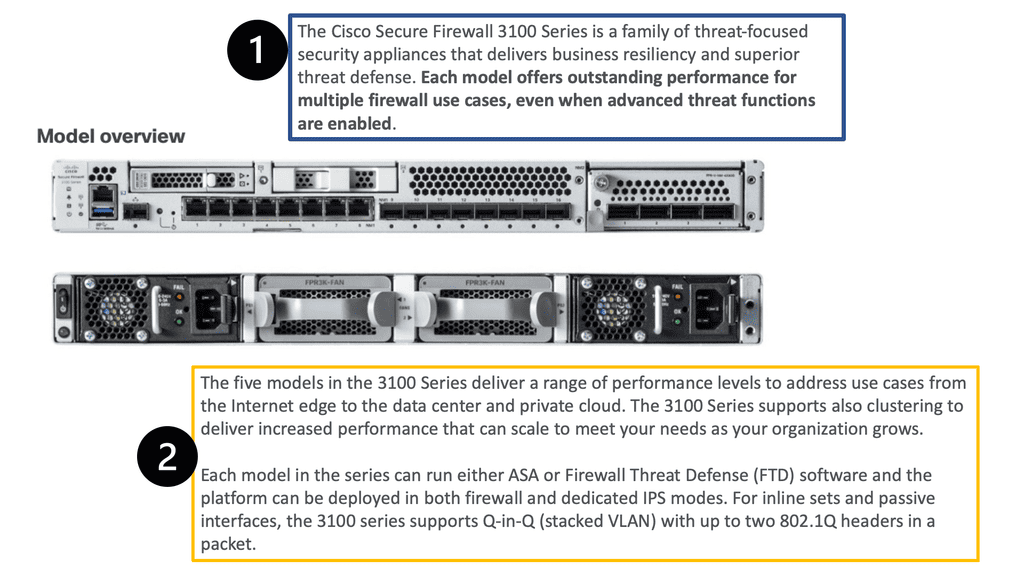
Cisco Secure Firewall is a family of network security products designed to control traffic entering, leaving and moving within an organisation’s network. It combines traditional firewall functions with capabilities such as intrusion prevention, application visibility and, depending on the model and licences in use, threat detection and URL filtering.
It is used by organisations ranging from smaller businesses to large enterprises and service providers. Deployments may use physical appliances, virtual appliances or cloud-based options, depending on the environment and the organisation’s requirements.
What does Cisco Secure Firewall do?
At its core, a firewall applies rules to network traffic. These rules can allow or block connections based on factors such as source and destination addresses, ports, protocols and network zones. Cisco Secure Firewall can also provide more detailed inspection to help security teams understand what applications are in use and identify potentially harmful activity.
Depending on the product configuration and subscriptions, capabilities may include:
- Access control: Rules to manage which users, devices and networks can communicate.
- Intrusion prevention: Inspection to detect and help block known attack patterns and suspicious traffic.
- Application visibility and control: Information about applications using the network, with options to apply policies to them.
- Threat and malware features: Additional analysis and protection options available through relevant Cisco services and licences.
- URL filtering: Controls for access to websites, subject to the selected features and licensing.
- VPN connectivity: Support for secure connections between sites and, where configured, remote users.
- Logging and reporting: Records and dashboards to help administrators investigate events and review policy activity.
Available functions vary by appliance, software version, licence and deployment. Organisations should confirm the capabilities of the specific model and subscription before planning a rollout.
Management and deployment
Cisco Secure Firewall appliances can be managed using different Cisco management options. These include local device management for certain deployments and centralised management through Cisco Secure Firewall Management Center. Cisco also offers cloud-managed approaches for supported environments. The right choice depends on the size of the network, the number of devices, operational preferences and the features required.
Centralised management can be useful when teams need to apply consistent policies across multiple firewalls, review events in one place or manage changes through a shared workflow. Local management may suit simpler environments with fewer devices. Administrators should check current Cisco documentation for supported combinations of hardware, software and management tools.
How it fits into a security strategy
A firewall is an important security control, but it is not a complete security strategy on its own. Effective protection also relies on well-designed network rules, timely software updates, secure identity practices, endpoint protection, monitoring and incident response procedures.
For example, a firewall may restrict access to sensitive systems, while identity controls help ensure that only authorised users can connect. Logging and monitoring can then help a security team investigate unusual behaviour. Combining these controls can provide a clearer picture of network risk than relying on a single product.
Planning a Cisco Secure Firewall deployment
Before selecting or upgrading a firewall, organisations should establish what the network needs to support. Useful questions include:
- How much traffic must the firewall inspect, including encrypted traffic?
- Which applications and services are business-critical?
- Are high availability and resilient internet connections required?
- Will the firewall protect a branch office, data centre, campus or cloud environment?
- Which security features are needed, and what licences do they require?
- How will policies, alerts and logs be managed day to day?
- What is the plan for testing, maintenance and software updates?
Performance planning is especially important. Inspection features can affect throughput, and actual capacity depends on traffic patterns, enabled services and appliance configuration. Sizing should therefore be based on realistic requirements rather than headline figures alone.
Migration and ongoing management
Moving from an existing firewall requires careful preparation. Teams should review current rules, remove obsolete or overly broad access, map network zones and identify dependencies between systems. A staged migration, supported by testing and a rollback plan, can reduce disruption. Where older Cisco platforms or configurations are involved, compatibility and migration paths should be checked against Cisco’s current guidance.
After deployment, regular review remains essential. Administrators should monitor alerts, verify that rules still reflect business needs, apply updates in line with change-control procedures and test recovery arrangements. Clear ownership of firewall policies helps prevent unnecessary exceptions from accumulating over time.
Is Cisco Secure Firewall right for your organisation?
Cisco Secure Firewall may be suitable for organisations seeking a firewall platform with options for centralised management and additional network security features. The best fit depends on the required protection, existing Cisco infrastructure, staff expertise, licensing costs and the organisation’s operating model.
A careful assessment of network design, security requirements and total cost of ownership can help determine whether a particular Cisco Secure Firewall appliance and configuration is appropriate. Comparing it with other available solutions—and validating performance in the intended environment—can support a more informed decision.
Top 5 Tips for Optimising Your Cisco Secure Firewall
- Use least-privilege rules and remove unused access policies.
- Keep firewall software and threat definitions up to date.
- Enable logging for important traffic and security events.
- Review intrusion-prevention and malware settings regularly.
- Back up configurations before changes and test them afterwards.
Use least-privilege rules and remove unused access policies.
Apply the principle of least privilege to Cisco Secure Firewall rules by allowing only the traffic, users and services required for business operations. Review access policies regularly, remove rules that are obsolete or unused, and document the purpose of those that remain. This helps reduce unnecessary exposure, makes policies easier to manage and can support more effective security monitoring. Before removing a rule, check for dependencies and test the change to avoid disrupting legitimate services.
Keep firewall software and threat definitions up to date.
Keep Cisco Secure Firewall software and threat definitions up to date to help protect your network against newly discovered vulnerabilities and emerging threats. Apply updates in line with your organisation’s change-management process: review Cisco’s release notes, check compatibility with your appliances and management tools, and test changes where possible before deploying them across your environment. Regular updates help ensure that security features and detection capabilities continue to work as intended.
Enable logging for important traffic and security events.
Enable logging for important traffic and security events on Cisco Secure Firewall to give your team useful information for monitoring activity and investigating potential threats. Record events such as blocked connections, access to sensitive network segments and suspected intrusion attempts, while avoiding excessive logging that could obscure significant alerts or consume resources. Review logs regularly, set up appropriate alerts and ensure records are retained securely for as long as your organisation’s policies and compliance requirements demand.
Review intrusion-prevention and malware settings regularly.
Review intrusion-prevention and malware settings regularly to ensure they reflect current threats and your organisation’s security needs. Check that relevant policies and signatures are up to date, investigate alerts and confirm that protection is enabled where required. Regular reviews can help identify gaps, reduce unnecessary alerts and keep Cisco Secure Firewall working effectively as your network and risks change.
Back up configurations before changes and test them afterwards.
Before making changes to a Cisco Secure Firewall, back up the current configuration so you can restore it if something goes wrong. Once the update is complete, test the firewall thoroughly to confirm that security policies, network connections and essential services are working as expected. This simple step can help minimise disruption and make changes easier to reverse.