
How to Choose the Best Internet Security Provider
Choosing the best internet security provider is about more than picking the biggest name. The right option should protect the devices you use, suit the way you go online and offer support you can rely on. Features, prices and performance vary, so it is worth comparing what each provider includes before you subscribe.
What does an internet security provider do?
Internet security providers offer software and services designed to reduce online risks. Depending on the package, these may include protection against viruses, ransomware, phishing and harmful websites. Some providers also offer a firewall, parental controls, password management, identity monitoring or a virtual private network (VPN).
Security software can help spot and block threats, but it cannot prevent every risk. Keeping your devices and apps up to date, using unique passwords and being cautious with unexpected links remain important.
What to look for
- Strong malware protection: Look for independent test results that assess how well the product detects and blocks threats.
- Coverage for your devices: Check whether the subscription supports Windows, macOS, Android or iOS, and how many devices you can protect.
- Useful features: Choose features that match your needs. A family may value parental controls, while someone who often uses public Wi-Fi may want a VPN.
- Ease of use: Clear alerts and straightforward settings make it easier to manage your protection.
- Performance: Security software should protect your devices without noticeably slowing them down.
- Price and renewal terms: Compare the introductory price with the renewal cost. Check what is included and how cancellation works.
- Customer support: Find out how to contact support and whether help is available when you need it.
- Privacy practices: Read the provider’s privacy information to understand what data it collects and how it is used.
Providers worth comparing
Several established brands offer consumer security products. The best fit depends on your devices, budget and the features you actually need.
Bitdefender
Bitdefender offers security packages for individuals and families, with options that can include malware protection, web security and additional privacy tools. Compare the features in each plan, as the entry-level package may differ from higher tiers.
Norton
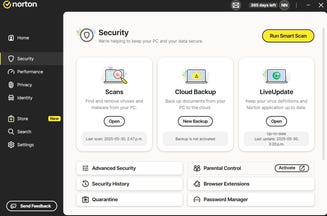
Norton provides a range of security subscriptions, some of which bundle features such as a VPN, password management or identity-related services. Check which features are available in the UK and whether they are included in the plan you are considering.
ESET
ESET is another provider to consider, particularly if you want a security product with configurable settings. Compare its device support and package features with your requirements before choosing.
Trend Micro
Trend Micro offers protection focused on areas such as malware and online threats. As with any provider, check independent test results and make sure the plan covers the operating systems and devices you use.
Malwarebytes
Malwarebytes offers products for detecting and blocking malicious software and other online threats. Review the current package details to see which protections are included and whether they meet your needs as a primary security solution.
These examples are not a definitive ranking. Products change over time, and independent testing can vary by test date, device and threat type. Check recent results from reputable testing organisations before making a decision.
Free security software or a paid subscription?
Free security tools may provide a useful baseline, while paid plans often add features such as protection for multiple devices, parental controls or a VPN. However, a longer feature list does not automatically make a product better. Consider whether you will use the extras and whether they are already available through your operating system, browser or another service.
Be cautious of unsolicited pop-ups claiming that your device is infected or urging you to call a support number. Use the provider’s official website or app to check your subscription and contact support.
How to make the final choice
- List the devices and operating systems you need to protect.
- Decide which features matter to you, such as parental controls or a VPN.
- Compare recent independent test results and product reviews.
- Check the full price, renewal terms and cancellation process.
- Download software only from the provider’s official website or an authorised app store.
So, which internet security provider is best?
There is no single provider that is best for everyone. A good choice is one that offers dependable protection for your devices, includes features you will use, is easy to manage and has clear pricing and privacy terms. Compare current plans and recent independent test results rather than choosing on brand name alone.
Top 5 Tips for Choosing the Best Internet Security Provider
- Choose a provider with strong, independently tested protection.
- Check that updates and customer support are reliable.
- Look for clear privacy policies and minimal data collection.
- Compare prices, renewal costs and device limits.
- Pick a plan with features suited to your devices and needs.
Choose a provider with strong, independently tested protection.
Choose an internet security provider with strong protection that has been independently tested by reputable organisations. These tests assess how effectively a product detects and blocks threats such as malware and phishing, giving you a clearer basis for comparison than marketing claims alone. Check recent results, as performance can change over time, and make sure the product supports your devices and operating systems.
Check that updates and customer support are reliable.
When choosing an internet security provider, check that its software receives regular, timely updates to respond to new threats and keep protection effective. Reliable customer support is equally important: look for clear contact options, helpful guidance and support hours that suit your needs. Recent user reviews can offer useful insight into how quickly the provider resolves problems.
Look for clear privacy policies and minimal data collection.
When choosing an internet security provider, look for a clear privacy policy that explains what information is collected, why it is needed and how long it is kept. A provider that collects only the data required to deliver its service can help limit unnecessary exposure of your personal information. Check whether data is shared with third parties, and look for straightforward options to manage or delete your information.
Compare prices, renewal costs and device limits.
Before choosing an internet security provider, compare more than the introductory price. Check the renewal cost, as a discounted first year may be followed by a higher subscription fee, and make sure you understand how to cancel or change your plan. Also review the device limit: a cheaper package may cover only one or two devices, while a household may need protection for several computers, phones and tablets. Comparing the total cost against the number of devices covered can help you find a plan that offers good value.
Pick a plan with features suited to your devices and needs.
Choose an internet security plan that matches the devices you use and the risks you want to manage. Check that it supports your operating systems and covers enough devices, then consider which extras are genuinely useful—such as parental controls for a family, a VPN for using public Wi-Fi or identity monitoring for added reassurance. There’s little benefit in paying for features you won’t use, so compare plans carefully and check what’s included in the price.