
Web-Based Compliance Management System: A Practical Guide
Keeping up with regulatory requirements, internal policies and industry standards can be challenging. A web-based compliance management system helps organisations bring these activities together in one accessible platform. It can support the management of policies, risks, evidence, audits and corrective actions, giving teams a clearer view of their compliance responsibilities.
What is a web-based compliance management system?
A web-based compliance management system is software accessed through a web browser. Rather than relying on scattered spreadsheets, email chains and paper records, an organisation can use the system to organise compliance information and processes in a central location.
Depending on the product, users may be able to manage regulatory obligations, assign tasks, record evidence, monitor risks and prepare for audits. Access can usually be provided to relevant employees, managers, auditors or external partners, subject to permissions set by the organisation.
How can it help an organisation?
Compliance work often involves many people and repeated tasks. A central system can make responsibilities more visible and help teams keep records up to date. Common benefits include:
- Centralised information: Policies, controls, evidence and audit records can be stored in one organised location.
- Clear ownership: Tasks can be assigned to named individuals or teams, with deadlines and progress tracked.
- Improved visibility: Dashboards and reports can help managers identify overdue actions, emerging risks and areas requiring attention.
- Consistent processes: Standard workflows can help teams follow the same steps for reviews, approvals and corrective actions.
- Audit preparation: Well-organised records can make it easier to demonstrate how controls are designed, maintained and reviewed.
A system can support compliance activities, but it does not guarantee compliance. Organisations remain responsible for understanding which requirements apply to them and for ensuring that their processes are appropriate.
Key features to look for
The right system depends on an organisation’s size, sector and compliance needs. Useful features may include:
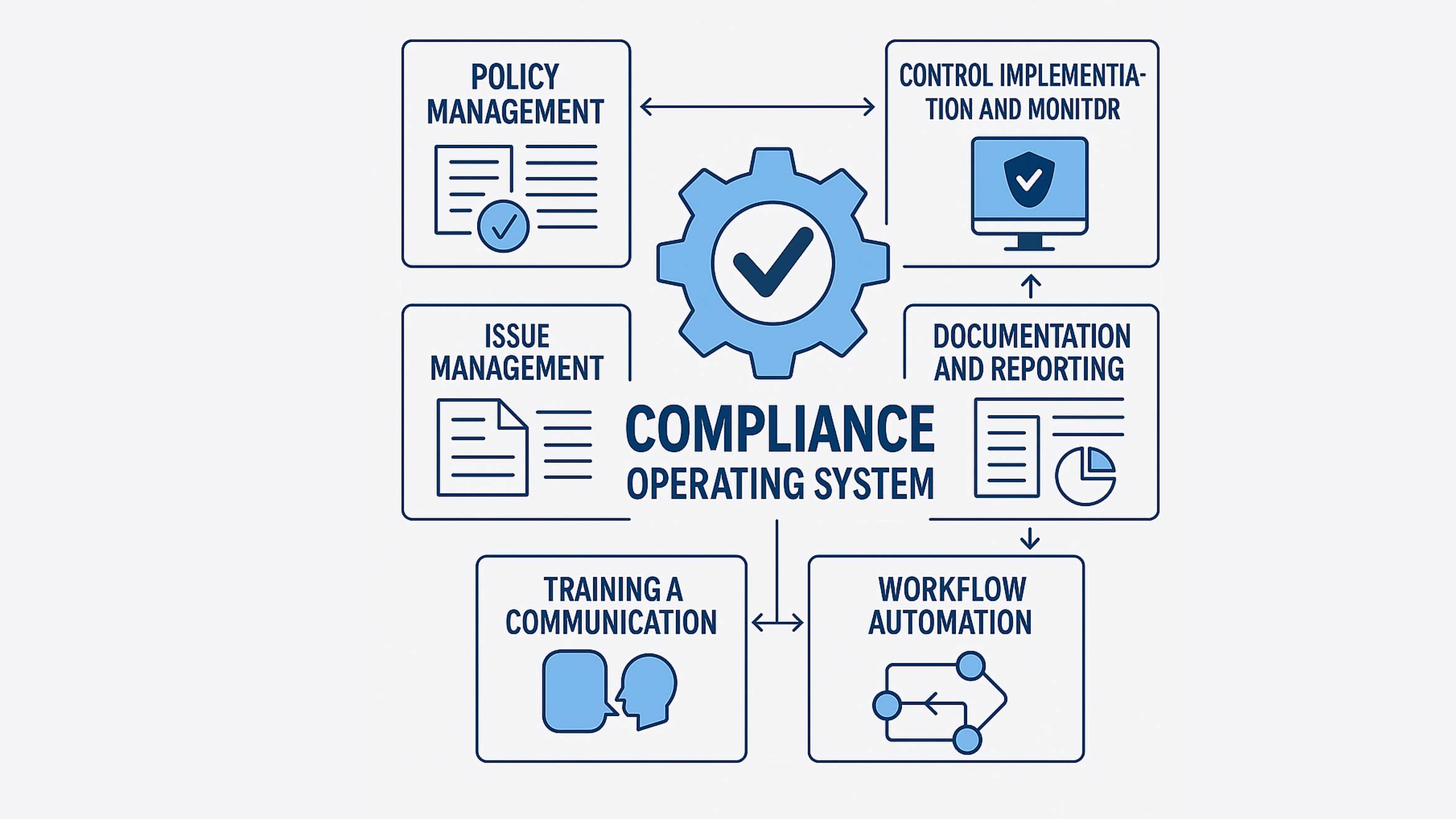
- Obligation and control registers for recording requirements, internal controls, owners and review dates.
- Policy management to manage drafting, approval, publication and periodic review.
- Risk management to assess risks, document treatment plans and track changes over time.
- Audit management to plan reviews, record findings, collect evidence and follow up on actions.
- Automated reminders and workflows to prompt users about deadlines, approvals and scheduled reviews.
- Reporting tools to provide a useful overview for operational teams and senior management.
- Access controls and audit trails to help protect sensitive information and record key user activity.
- Integrations with systems such as identity platforms, document stores, ticketing tools or security monitoring products.
Security and data protection considerations
Because a compliance platform may contain sensitive business information, security should be a central part of the evaluation. Organisations should review how the provider protects data, manages access and responds to security incidents. It is also worth understanding where data is stored, how it is backed up and what options are available for exporting or deleting it.
Look for appropriate user permissions, multi-factor authentication, encryption and detailed activity logs. The precise safeguards required will depend on the information being stored and the organisation’s legal, regulatory and contractual obligations.
Choosing the right system
Before comparing products, identify the problems the system needs to solve. A small organisation may prioritise simple policy management and task tracking, while a larger or regulated organisation may need support for multiple frameworks, complex approval processes and detailed reporting.
Consider the following questions during selection:
- Which regulations, standards and internal policies need to be managed?
- Who will use the system, and what access should each role have?
- Can the system be configured to match existing processes without becoming unnecessarily complex?
- Can information be imported from current tools and exported if the organisation changes provider?
- What training, technical support and ongoing maintenance are included?
- How will the provider handle data security, availability and service updates?
A product demonstration or trial can help teams assess whether the system is straightforward to use. Involving the people who will manage and use it day to day can also reveal practical requirements that may be missed during a high-level review.
Implementing a web-based compliance system
Successful implementation is about more than installing software. Start by agreeing on the objectives, defining responsibilities and deciding which information should be included. It may be helpful to begin with a focused area, such as policy reviews or audit actions, before expanding to other compliance processes.
Keep records accurate, set realistic review schedules and make sure task owners understand what is expected of them. Training should reflect users’ roles, while regular reviews can help identify unnecessary steps or gaps in the process. Compliance requirements and business operations change, so the system should be reviewed and updated as needed.
Conclusion
A web-based compliance management system can provide a structured way to organise obligations, evidence, audits and follow-up actions. By improving visibility and clarifying responsibilities, it can help organisations manage compliance work more consistently. The best results come from choosing a system that fits the organisation’s needs, protecting the information it contains and keeping the people and processes behind it actively involved.
Essential Tips for Effective Web-Based Compliance Management Systems
- Choose a system that meets your industry’s compliance needs.
- Use role-based access to protect sensitive information.
- Set reminders for audits, reviews and renewal dates.
- Keep policies and evidence organised in one place.
- Train staff to use the system consistently.
- Review access logs and system settings regularly.
Choose a system that meets your industry’s compliance needs.
Choose a web-based compliance management system that reflects the regulations, standards and reporting requirements relevant to your industry. Different sectors face different obligations, so check that the system can help you track the requirements that apply to your organisation, manage supporting evidence and prepare clear reports. Confirm that it can adapt as rules change, and involve compliance staff in the selection process to make sure its features suit your day-to-day work.
Use role-based access to protect sensitive information.
Use role-based access controls to ensure people can view or change only the compliance information needed for their role. For example, policy owners may be able to update assigned documents, while auditors can review evidence without changing it. Regularly check permissions and remove access when someone changes role or leaves the organisation. This helps protect sensitive information and reduces the risk of accidental changes or unauthorised access.
Set reminders for audits, reviews and renewal dates.
Set reminders for audits, policy reviews and renewal dates to help keep compliance tasks on schedule. A web-based compliance management system can notify the right people in advance, giving them time to gather evidence, complete reviews and renew certifications or licences before they expire. Regular reminders also make it easier to spot overdue actions and reduce the risk of important deadlines being missed.
Keep policies and evidence organised in one place.
Keep policies and supporting evidence organised in one secure, central place within your web-based compliance management system. This makes it easier for staff to find the latest approved documents, helps prevent outdated versions from being used and gives auditors a clear record of how requirements are being met. Use consistent naming and folder structures, assign ownership and review dates, and apply suitable access permissions to keep information accurate and protected.
Train staff to use the system consistently.
Training staff to use a web-based compliance management system consistently helps keep records accurate and processes reliable. Show employees how to complete relevant tasks, upload evidence, update records and follow approval workflows, tailoring guidance to their roles. Provide clear instructions and refresher training when the system or procedures change, so everyone knows what is expected and compliance information remains up to date.
Review access logs and system settings regularly.
Review access logs and system settings regularly to help keep your web-based compliance management system secure and reliable. Checking who has accessed the platform, what changes have been made and whether any unusual activity has occurred can help you spot potential issues early. Periodically review user permissions, authentication requirements and security settings too, removing access that is no longer needed and ensuring controls still reflect your organisation’s policies.