
Law Firm Compliance Software: A Practical Guide for UK Firms
Law firms handle sensitive information, manage complex client relationships and operate within a demanding regulatory environment. Keeping policies, records and processes up to date can be challenging, particularly when information is spread across spreadsheets, email inboxes and separate systems. Law firm compliance software can bring these activities together, helping firms organise their compliance work and maintain clearer records.
Software does not replace professional judgement or legal advice, and it cannot guarantee compliance. It can, however, help a firm manage tasks consistently, identify gaps and demonstrate how its procedures are being followed.
What is law firm compliance software?
Law firm compliance software is a set of digital tools designed to help legal practices manage regulatory obligations, internal policies and operational risk. Depending on the product, it may support areas such as client and matter onboarding, anti-money laundering (AML) checks, risk assessments, policy management, training records, incident reporting and audit preparation.
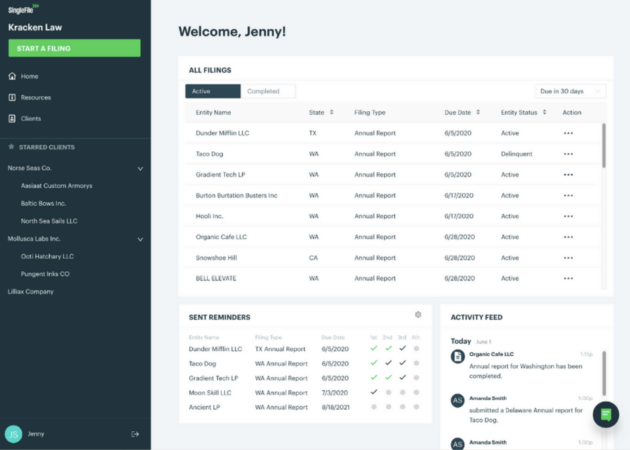
Some platforms focus on a specific task, such as client due diligence. Others provide a broader compliance management system, with workflows, reminders, reporting and document storage in one place.
Why might a law firm use it?
Compliance responsibilities affect firms of different sizes, although the nature and scale of those responsibilities will vary. A central system can help a practice:
- Keep compliance records in a consistent, searchable format.
- Assign responsibilities and track outstanding actions.
- Schedule reviews of policies, matters and risk assessments.
- Record staff training and acknowledgements of internal policies.
- Maintain an audit trail of relevant decisions and changes.
- Prepare information for internal reviews, external audits or regulatory enquiries.
- Reduce reliance on manual reminders and duplicated data entry.
The value comes not just from storing information, but from making it easier for the right people to complete the right checks at the right time.
Common features to look for
Client and matter onboarding
Onboarding tools can help staff follow a consistent process when opening a new client or matter. Workflows may include identity checks, conflict checks, risk questions, approvals and requests for supporting documents. The firm should be able to configure these steps to reflect its own procedures and the relevant requirements.
AML and client due diligence support
Some systems help organise customer due diligence, enhanced due diligence, screening and ongoing reviews. Before choosing a product, establish what checks it performs, which data sources it uses and how results are recorded. Automated screening can assist with a process, but potential matches and risk indicators still require appropriate review.
Risk assessments and registers
Software may provide templates and workflows for recording firm-wide, client or matter-level risks. A useful system lets authorised users document the reasoning behind an assessment, record mitigating actions and set review dates. Templates should be adaptable rather than treated as a substitute for the firm’s own assessment.
Policies, procedures and training
A central policy library can make approved documents easier to find and help firms manage version control. Some platforms also record who has completed training or confirmed that they have read a policy. These records can support oversight, but they should reflect genuine training and communication rather than a tick-box exercise.
Incident reporting and action tracking
Reporting workflows can give staff a clear way to raise concerns, record incidents and refer them to the appropriate person. Action tracking helps managers see what has been assigned, what remains unresolved and whether follow-up is needed.
Reporting and audit trails
Dashboards and reports can help compliance staff monitor overdue reviews, incomplete checks and recurring issues. Audit trails can show when records were created or amended and by whom. When assessing this feature, ask how records are protected, retained and exported.
Choosing the right software
The best option depends on the firm’s size, practice areas, existing technology and compliance arrangements. Before speaking to suppliers, map the processes that need support and identify where the current approach causes delays, inconsistencies or gaps.
When comparing products, consider:
- Fit with your workflows: Can the system reflect how your firm works, without creating unnecessary steps?
- Ease of use: Can fee earners and support staff complete tasks without extensive technical knowledge?
- Configuration: Can forms, permissions, reminders and approval routes be tailored to your needs?
- Integration: Does it connect with your practice management, document management or identity-checking systems?
- Information security: Ask about access controls, encryption, backups, security testing and incident response.
- Data protection: Understand how personal data is processed, where it is stored, who can access it and how it can be exported or deleted.
- Supplier support: Check the onboarding process, user support, service levels and arrangements for updates.
- Total cost: Include implementation, training, integrations, ongoing licences and any charges for additional users or features.
A demonstration should use realistic examples from the firm’s day-to-day work. It is also sensible to involve the people who will use the system, as well as those responsible for compliance, information security and data protection.
Implementation: people and processes matter
Introducing new software is a change to the firm’s working practices, not just a technology project. Start with clear ownership: decide who will administer the system, approve changes and monitor whether workflows are working as intended.
Clean up existing records before migrating them where practical, and agree which information should be transferred. Set user permissions carefully, provide role-specific training and explain how staff should handle exceptions. A pilot with one team or workflow can reveal practical issues before a wider rollout.
After launch, review the system regularly. Check whether tasks are being completed, whether alerts are useful and whether records are sufficiently clear. Update workflows when the firm’s services, risks or applicable requirements change.
Common pitfalls to avoid
- Assuming software guarantees compliance: Responsibility remains with the firm and its relevant individuals.
- Automating a weak process: Technology can make an inefficient or unclear workflow happen faster without fixing it.
- Overlooking staff adoption: A system will have limited value if people continue to keep separate, unofficial records.
- Collecting unnecessary information: Consider what data is needed, why it is needed and how long it should be retained.
- Failing to review permissions: Access should be appropriate to each person’s role and reviewed when responsibilities change.
- Relying on generic templates: Forms and guidance should be checked against the firm’s circumstances and current obligations.
Conclusion
Law firm compliance software can help UK practices organise records, coordinate checks and strengthen oversight. Its effectiveness depends on choosing a system that fits the firm’s needs, configuring it carefully and making sure staff understand how to use it.
Before adopting a platform, assess the firm’s processes, security and data protection requirements, and the support available from the supplier. Use the software as part of a wider compliance framework, alongside clear policies, trained staff and regular review.
Essential FAQs About Compliance Software and Technology for UK Law Firms
- What is compliance in law firm?
- What is the best CRM for a law firm?
- What legal tech do law firms use?
- What is the best compliance software?
- What software do most law firms use?
- What is compliance software?
- What is a legal practice management software?
- What software do UK law firms use?
What is compliance in law firm?
Compliance in a law firm means meeting the legal, regulatory and professional obligations that govern how the firm operates and serves its clients. This can include following the rules of the Solicitors Regulation Authority (SRA), carrying out anti-money laundering checks, protecting personal and confidential information, managing conflicts of interest, keeping accurate records and maintaining appropriate staff training. Compliance also involves having clear policies and processes to identify risks, address concerns and review whether requirements are being met.
What is the best CRM for a law firm?
The best CRM for a law firm is the one that fits its practice areas, size and client-care processes. Look for features such as secure contact and matter management, enquiry tracking, conflict-check workflows, follow-up reminders, reporting and integration with your practice management and document systems. Check how the provider protects personal and confidential information, controls user access and supports data export. Before deciding, compare total costs and trial the system with the staff who will use it; a CRM should support the firm’s procedures, not replace legal or compliance judgement.
What legal tech do law firms use?
Law firms use a range of legal technology, depending on their size, practice areas and needs. Common tools include practice and case management systems, document and matter management platforms, legal research services, time-recording and billing software, e-signature tools, secure client portals and software for client onboarding, conflict checks, anti-money laundering checks and wider compliance management. These systems can help organise work, protect information and streamline routine processes, but firms should assess each product for security, data protection, integration and suitability before adopting it.
What is the best compliance software?
There is no single “best” compliance software for every law firm. The right choice depends on your firm’s size, practice areas, workflows, budget and existing systems. Look for a platform that supports the compliance tasks you need, is straightforward for staff to use, offers appropriate security and data protection, and provides reliable support. Compare suppliers against your requirements and ask for a demonstration using realistic examples from your firm. Software can help organise compliance work, but it cannot replace professional judgement or the firm’s responsibility to meet its obligations.
What software do most law firms use?
There is no single software platform used by most law firms; the choice depends on the firm’s size, practice areas and budget. Many use a combination of practice management, document management, time-recording, accounting and client relationship tools, alongside specialist systems for tasks such as AML checks and compliance tracking. When choosing software, firms typically consider how well it fits their workflows, integrates with existing systems, protects sensitive information and can adapt as their needs change.
What is compliance software?
Compliance software is a digital tool that helps organisations manage regulatory obligations, internal policies and risk-related tasks. For law firms, it may support processes such as client onboarding, AML checks, policy management, staff training, record-keeping and audit preparation. It can help teams organise information, track deadlines and document actions, but it does not replace professional judgement or guarantee compliance.
What is a legal practice management software?
Legal practice management software is a digital system that helps law firms manage day-to-day work in one place. Depending on the product, it may support matter and document management, client communications, time recording, billing, scheduling and reporting. Some platforms also include compliance-related features, such as client onboarding, conflict checks and task reminders. The features available vary, so firms should compare systems against their workflows, security needs and regulatory responsibilities.
What software do UK law firms use?
UK law firms use a range of software, as there is no single system used by every practice. Many rely on practice or case management platforms to handle matters, documents, time recording and billing, alongside specialist tools for tasks such as client due diligence, AML checks, conflict checks, secure document storage and compliance tracking. The right choice depends on the firm’s size, areas of practice, existing systems and regulatory needs; firms should assess security, data protection, integrations and staff training before selecting a product.