
ISO 9001 Compliance Software: A Practical Guide
Maintaining an effective quality management system (QMS) takes more than writing procedures and preparing for an audit. Organisations need to manage documents, monitor processes, record issues and show that they are continually improving. ISO 9001 compliance software can bring these activities together, making it easier to manage a QMS and keep useful evidence in one place.
Software does not guarantee ISO 9001 certification. Certification depends on how an organisation’s QMS works in practice and on an assessment by an independent certification body. The right system can, however, help teams organise their work and maintain processes that support the requirements of the standard.
What is ISO 9001 compliance software?
ISO 9001 compliance software is a digital platform used to manage some or all of the processes involved in operating a QMS. Depending on the product, it may support document control, staff training records, audits, corrective actions, risk management, supplier reviews and performance reporting.
Some platforms are designed specifically for quality management. Others are broader governance, risk and compliance systems that can be configured to support ISO 9001 alongside other standards or regulatory requirements.
How software can support an ISO 9001 QMS
ISO 9001 sets out requirements for a QMS, including how an organisation controls its processes, meets customer requirements, evaluates performance and pursues improvement. Software can help make these activities more consistent and traceable.
Document and record control
Teams need to know which procedures, forms and work instructions are current. Document control features can manage approval workflows, revision histories, access permissions and review dates. This helps reduce the risk of staff using an outdated document and makes it easier to locate relevant records.
Audit planning and findings
Audit tools can help schedule internal audits, assign auditors, record evidence and track findings through to closure. A central audit history can also help managers identify recurring issues or areas that may need closer attention.
Nonconformities and corrective actions
When a process does not meet a requirement, the organisation needs to respond appropriately and consider why it happened. Software can record nonconformities, allocate actions, set due dates and document follow-up checks. This supports a more structured approach than relying on separate spreadsheets or email chains.
Risk and opportunity management
A QMS should reflect the organisation’s context and the risks and opportunities that could affect its intended results. Depending on the platform, users may be able to record assessments, assign owners, review controls and monitor changes over time. The assessment itself still requires informed judgement from people who understand the business.
Training and competence records
Organisations need to determine the competence required for relevant roles and retain appropriate evidence. Software can link training requirements to job roles, record completed learning and flag upcoming renewals or gaps. It may also help managers see whether people have acknowledged changes to procedures.
Supplier and customer feedback
Some systems help manage supplier evaluations, customer feedback, complaints and service issues. Bringing these records together can make it easier to spot patterns and consider whether action is needed.
Performance monitoring and reporting
Dashboards and reports can summarise information such as audit status, overdue actions, complaints or process performance. Useful reporting depends on accurate data and meaningful measures; a dashboard alone does not demonstrate that quality objectives are being achieved.
Benefits of using ISO 9001 software
- Greater visibility: Teams can see the status of audits, actions, documents and reviews.
- More consistent processes: Standard workflows can help staff follow agreed steps across departments or sites.
- Improved traceability: Revision histories and action records can provide a clearer account of decisions and changes.
- Less administrative effort: Notifications, templates and automated workflows may reduce repetitive manual tasks.
- Better access to information: Staff can find relevant records more easily, subject to appropriate access controls.
- Support for continual improvement: A joined-up view of issues, causes and actions can help teams learn from experience.
The benefits depend on the way the software is selected, configured and used. A system that is difficult to maintain or does not fit existing processes can add work rather than reduce it.
Choosing the right software
Before comparing products, map out how the organisation currently manages its QMS and identify the problems it wants to solve. Consider the following questions:
- Which QMS activities need the most support?
- Can the platform handle the organisation’s locations, teams and approval structures?
- Is it straightforward for occasional users as well as quality professionals?
- Can existing documents and records be migrated without losing important information?
- Does the system provide clear permissions, audit trails and backup arrangements?
- Can it integrate with tools already in use, such as identity management or document platforms?
- What support, training and implementation assistance are included?
- How are data security, hosting, retention and export handled?
- Can the system support other standards or business needs if requirements change?
Ask suppliers to demonstrate realistic tasks using examples relevant to the organisation. A polished dashboard is less important than whether staff can complete everyday activities accurately and efficiently.
Implementation: technology and people
Successful implementation starts with clear ownership. Senior leaders should support the QMS, while process owners and staff should help shape workflows that reflect how work is actually done. Simply transferring poorly understood procedures into a new platform will not improve them.
A practical implementation may include reviewing existing documents, agreeing responsibilities, configuring approval routes, migrating records, training users and testing the system before wider use. It is also important to establish how the organisation will review software access, maintain records and manage changes to its QMS.
Keep the system proportionate. Not every process needs a complex workflow, and excessive forms or approvals can make the QMS harder to use. The aim is to provide enough control and evidence to support effective operations without creating unnecessary bureaucracy.
Software and ISO 9001 certification
ISO 9001 compliance software can help an organisation prepare for audits by making records easier to manage and retrieve. It cannot replace the work required to understand customer needs, control processes, develop competent staff, assess risks or act on performance information.
Certification is granted by an independent certification body following an assessment. Organisations should check which edition of ISO 9001 applies to their certification programme and confirm any transition arrangements with their certification body. Software vendors can explain how their products support a QMS, but their claims should be assessed against the organisation’s own requirements.
Common pitfalls to avoid
- Buying before defining needs: A long feature list does not necessarily mean a product is a good fit.
- Treating software as a substitute for a QMS: The platform supports the system; it does not create effective processes by itself.
- Overcomplicating workflows: Too many steps can discourage use and delay action.
- Ignoring user adoption: Staff need appropriate training and a clear understanding of why records matter.
- Failing to review data: Records are valuable only when they are accurate, relevant and used to inform decisions.
- Assuming certification is guaranteed: No software product can promise a successful certification outcome.
Conclusion
ISO 9001 compliance software can make quality management more organised, visible and traceable. It may be particularly useful for organisations managing multiple sites, large document sets, frequent audits or numerous corrective actions. The best choice is one that fits the organisation’s processes, is usable by its staff and supports continual improvement without adding unnecessary complexity.
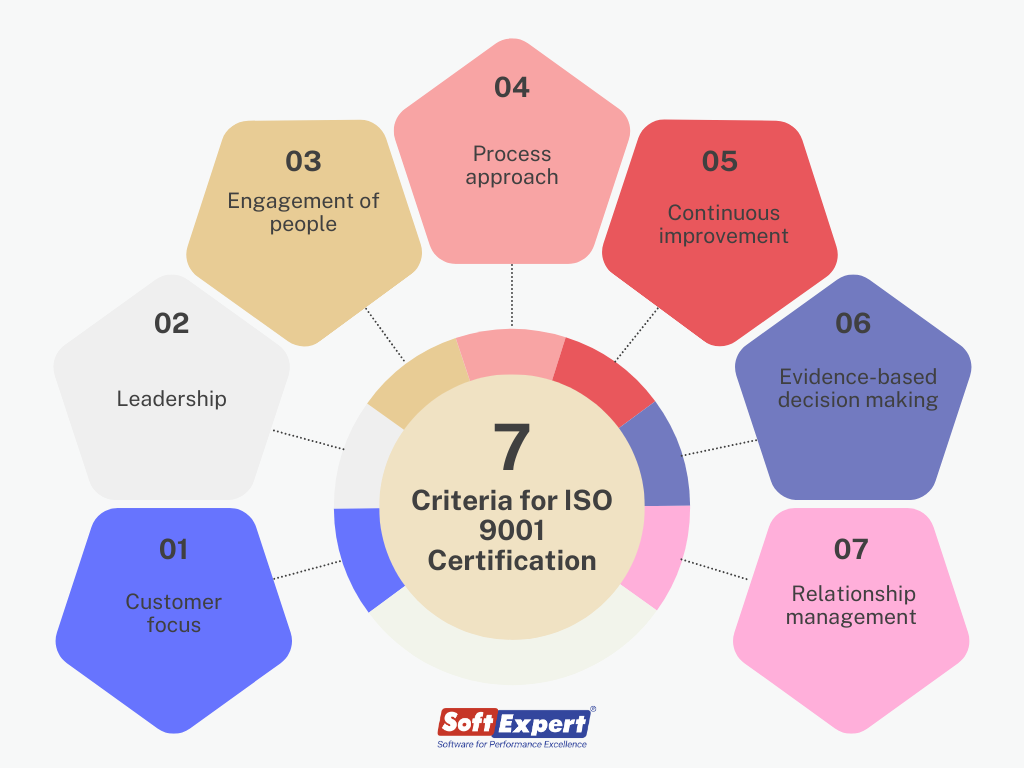
When selected and implemented carefully, software can provide a practical foundation for managing a QMS. The lasting results still depend on committed leadership, engaged employees and a genuine focus on delivering consistent quality to customers.
Top 7 FAQs About ISO 9001 Compliance and Software Solutions
- What is the best compliance software?
- How much does ISO 9001 cost?
- What is ISO 9001 compliance?
- What is the best QMS software?
- What is ISO 9001 software?
- What is the best software for ISO certification?
- How do you ensure compliance to ISO 9001?
What is the best compliance software?
There is no single “best” compliance software for every organisation. The right choice depends on your size, industry, existing processes and the standards you need to manage. For ISO 9001, look for a system that makes document control, audits, corrective actions, training records and reporting straightforward, with suitable access controls and a clear audit trail. Consider ease of use, implementation support, integrations and total cost, and ask suppliers to demonstrate how the software handles your real-world workflows. Ultimately, the best option is one your team will use consistently and that supports an effective quality management system—not a guarantee of certification.
How much does ISO 9001 cost?
The cost of ISO 9001 varies depending on your organisation’s size, complexity, number of sites and current quality management processes. Expenses may include consultancy, staff training, implementing or improving your quality management system, software subscriptions and certification audits. ISO 9001 compliance software pricing also differs by provider and may be based on users, features or locations. Request itemised quotes and check for implementation, support and renewal fees so you can estimate the total cost for your organisation.
What is ISO 9001 compliance?
ISO 9001 compliance means operating a quality management system (QMS) that meets the requirements of the ISO 9001 standard. It involves establishing and maintaining processes to deliver products or services consistently, meet customer and applicable regulatory requirements, monitor performance and drive continual improvement. Compliance is not achieved simply by using particular software: the organisation must put its QMS into practice and keep appropriate evidence. ISO 9001 certification is a separate step, assessed by an independent certification body.
What is the best QMS software?
The best QMS software is the system that fits your organisation’s size, processes and quality objectives—not necessarily the one with the most features. Look for a platform that is easy for staff to use and supports the activities you need, such as document control, audits, corrective actions, training records and reporting. Check its security, integrations, implementation support and ability to grow with your organisation, and ask suppliers to demonstrate real-world tasks before you decide. QMS software can help manage an ISO 9001 system, but it cannot guarantee certification or replace effective processes and staff involvement.
What is ISO 9001 software?
ISO 9001 software is a digital tool that helps an organisation manage the processes and records involved in its quality management system (QMS). Depending on the platform, it may support document control, staff training records, internal audits, risk assessments, customer feedback and corrective actions. It can make QMS information easier to organise, review and track, but the software itself does not guarantee ISO 9001 compliance or certification; the organisation must put effective processes into practice and demonstrate that they meet the standard’s requirements.
What is the best software for ISO certification?
The best software for ISO certification is the platform that fits your organisation’s processes, size and budget, rather than simply offering the longest list of features. Look for tools that support document control, audits, nonconformities, corrective actions, risk management and staff training, with clear reporting and appropriate access controls. Before choosing, ask suppliers to demonstrate everyday tasks using your own examples and check that the system is straightforward for staff to use. ISO software can help you manage evidence and maintain your quality management system, but it cannot guarantee certification; that depends on how effectively the system is implemented and assessed by an independent certification body.
How do you ensure compliance to ISO 9001?
To ensure compliance with ISO 9001, establish and maintain a quality management system that meets the standard’s requirements and reflects how your organisation operates. Define responsibilities and processes, keep controlled records, train employees, monitor performance and customer feedback, and address risks and opportunities. Regular internal audits and management reviews help identify gaps, while corrective actions and follow-up checks support continual improvement. ISO 9001 compliance software can help organise documents, audits, actions and evidence, but it cannot guarantee compliance on its own; the system must be used effectively, and certification requires assessment by an independent certification body.