The Power of Oracle Access Management Suite

Oracle Access Management Suite is a comprehensive solution designed to address the complex security challenges faced by modern organisations. With its robust set of features and capabilities, this suite offers a powerful framework for managing access to critical resources and protecting sensitive data.

Key Features

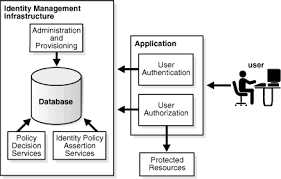
One of the standout features of Oracle Access Management Suite is its centralised access control mechanism. By providing a unified platform for managing user authentication and authorisation across multiple applications and services, organisations can ensure consistent security policies and reduce the risk of unauthorised access.

Another key feature is the suite’s support for multi-factor authentication, enabling organisations to implement additional layers of security beyond traditional password-based systems. This helps strengthen overall security posture and mitigate the risk of identity theft and credential-based attacks.

Benefits

Organisations that leverage Oracle Access Management Suite can enjoy a range of benefits, including enhanced data protection, improved regulatory compliance, and streamlined access management processes. By implementing fine-grained access controls and real-time monitoring capabilities, businesses can better safeguard their sensitive information and respond swiftly to security incidents.

Furthermore, the suite’s integration capabilities allow seamless connectivity with existing IT infrastructure, ensuring minimal disruption to operations during deployment. This interoperability enables organisations to leverage their current investments in technology while enhancing overall security posture.

Use Cases

Oracle Access Management Suite caters to a diverse range of industries and use cases. From financial institutions seeking to secure customer transactions to healthcare providers safeguarding patient records, this suite offers tailored solutions to meet specific security requirements.

In addition, government agencies looking to protect sensitive data from cyber threats can benefit from the suite’s advanced access control features and audit trails. By maintaining visibility into user activities and enforcing strict security policies, these organisations can uphold data integrity and confidentiality.

Conclusion

In today’s digital landscape where cyber threats are ever-evolving, Oracle Access Management Suite stands out as a reliable ally in securing critical assets and maintaining regulatory compliance. By leveraging its advanced features and robust architecture, organisations can fortify their defences against malicious actors while enabling seamless access for authorised users.

For businesses looking to enhance their security posture and streamline access management processes, Oracle Access Management Suite offers a comprehensive solution that delivers peace of mind in an increasingly interconnected world.


Understanding Oracle Access Management Suite: Key FAQs on IAM, Platform Features, and Installation

  1. What is IAM Oracle?
  2. What is Oracle Access Management Suite?
  3. What is Access Management platform?
  4. How to install Oracle Access Manager?

What is IAM Oracle?

IAM Oracle, also known as Oracle Identity and Access Management (IAM), is a comprehensive solution that provides organisations with a robust framework for managing user identities and controlling access to critical resources. IAM Oracle offers a suite of tools and capabilities designed to streamline authentication processes, enforce security policies, and ensure compliance with regulatory requirements. By centralising identity management functions and implementing advanced access controls, IAM Oracle helps businesses strengthen their security posture, mitigate risks associated with unauthorised access, and enhance overall operational efficiency.

What is Oracle Access Management Suite?

Oracle Access Management Suite is a comprehensive security solution developed by Oracle to address the complex access control challenges faced by organisations. It serves as a centralised platform for managing user authentication and authorisation across various applications and services, ensuring consistent security policies and reducing the risk of unauthorised access. With its support for multi-factor authentication and fine-grained access controls, Oracle Access Management Suite enables businesses to enhance data protection, streamline access management processes, and strengthen overall security posture. This suite is a vital tool for safeguarding sensitive information, maintaining regulatory compliance, and mitigating the risk of identity theft in today’s dynamic cybersecurity landscape.

What is Access Management platform?

An Access Management platform, such as Oracle Access Management Suite, serves as a centralised system that enables organisations to control and monitor user access to their digital resources securely. It provides a comprehensive framework for managing authentication, authorisation, and permissions across multiple applications and services. By implementing an Access Management platform, businesses can enforce security policies, prevent unauthorised access, and ensure data confidentiality. This platform plays a crucial role in safeguarding sensitive information, enhancing regulatory compliance, and streamlining access management processes within an organisation’s IT infrastructure.

How to install Oracle Access Manager?

Installing Oracle Access Manager (OAM) involves a series of steps to ensure a successful deployment. To begin, it is crucial to review the official Oracle documentation for the most up-to-date installation instructions and system requirements. The process typically involves setting up the necessary infrastructure components, such as databases and web servers, configuring the OAM software, and performing post-installation tasks like user authentication setup and policy configurations. It is recommended to follow a systematic approach, including thorough testing and validation procedures, to guarantee a smooth installation process and optimal performance of Oracle Access Manager for secure access management within your organisation.

Article: PKI Identity and Access Management

The Importance of PKI in Identity and Access Management

Public Key Infrastructure (PKI) plays a crucial role in modern Identity and Access Management (IAM) systems, providing a secure framework for managing digital identities, authentication, and access control. In an increasingly interconnected digital world, where data breaches and cyber threats are prevalent, implementing robust PKI solutions is essential to safeguard sensitive information and ensure secure access to resources.

Understanding PKI

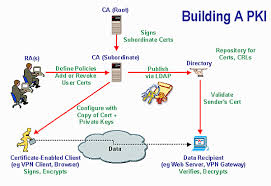
PKI is a comprehensive system that enables the creation, distribution, revocation, and management of digital certificates used for secure communication over networks. These certificates contain public keys that are paired with private keys held by authorised users or devices. By leveraging asymmetric encryption techniques, PKI establishes trust between entities in a networked environment.

The Role of PKI in IAM

Within an IAM framework, PKI serves as the foundation for authenticating users, devices, and services while ensuring data confidentiality and integrity. By issuing digital certificates to individuals or entities, organisations can verify their identities and control access to resources based on predefined policies. PKI also facilitates secure communication channels through encryption protocols like SSL/TLS.

Benefits of Integrating PKI into IAM

  • Enhanced Security: PKI enhances security by enabling strong authentication mechanisms and encrypting data transmissions.
  • Regulatory Compliance: Implementing PKI helps organisations comply with data protection regulations by securing sensitive information.
  • User Convenience: Users can securely access resources without the need for complex passwords through PKI-based authentication methods.
  • Risk Mitigation: By implementing robust identity verification processes using PKI, organisations can mitigate the risk of unauthorised access and data breaches.

Conclusion

In conclusion, integrating PKI into Identity and Access Management systems is essential for establishing a strong security posture in today’s digital landscape. By leveraging the capabilities of PKI to authenticate identities, control access privileges, and secure communication channels, organisations can effectively protect their assets from cyber threats while ensuring regulatory compliance. As technology continues to advance, the role of PKI in IAM will remain critical in safeguarding sensitive information and maintaining trust in online interactions.


Understanding PKI in Identity and Access Management: Key Components, Roles, and Examples

  1. What is PKI in IAM?
  2. What are the four main components of PKI?
  3. What does a PKI engineer do?
  4. What is PKI and how does it work?
  5. What are the 4 pillars of PKI?
  6. What is an example of a PKI?
  7. What is PKI in identity management?

What is PKI in IAM?

Public Key Infrastructure (PKI) in Identity and Access Management (IAM) is a fundamental framework that enables secure authentication, authorisation, and encryption within digital environments. PKI serves as the backbone of IAM systems by providing a robust mechanism for managing digital identities and ensuring secure access to resources. In essence, PKI in IAM utilises digital certificates, public and private key pairs, and encryption protocols to establish trust between entities, authenticate users, control access privileges, and facilitate secure communication channels. By integrating PKI into IAM strategies, organisations can enhance their security posture, mitigate risks of unauthorised access, and comply with regulatory requirements while maintaining a seamless user experience.

What are the four main components of PKI?

In the realm of PKI (Public Key Infrastructure) for identity and access management, understanding its fundamental components is crucial. The four main components of PKI include a Certificate Authority (CA), Registration Authority (RA), Certificate Store, and Key Management System. The Certificate Authority is responsible for issuing digital certificates that validate the identities of users or devices. The Registration Authority verifies the identity of entities before certificates are issued. The Certificate Store securely stores issued certificates for reference and validation purposes. Finally, the Key Management System oversees the generation, distribution, and protection of cryptographic keys used in encryption and authentication processes within the PKI framework. These components work together to establish a secure environment for managing digital identities and controlling access to resources effectively.

What does a PKI engineer do?

A PKI engineer is responsible for designing, implementing, and managing Public Key Infrastructure (PKI) systems within an organisation. Their role involves creating and maintaining the framework for issuing digital certificates, managing cryptographic keys, and ensuring secure authentication and data encryption processes. PKI engineers work to establish trust relationships between users, devices, and services by configuring certificate authorities, revocation mechanisms, and encryption protocols. They play a crucial role in safeguarding sensitive information, controlling access to resources based on identity verification, and ensuring compliance with security standards and regulations in the realm of Identity and Access Management.

What is PKI and how does it work?

Public Key Infrastructure (PKI) is a fundamental component of Identity and Access Management (IAM) systems, providing a secure framework for managing digital identities, authentication, and access control. PKI operates using asymmetric encryption techniques, where each entity in a network possesses a pair of cryptographic keys: a public key and a private key. The public key is distributed widely and used for encryption or verifying digital signatures, while the private key is kept confidential and used for decryption or signing messages. Through the issuance of digital certificates by Certificate Authorities (CAs), PKI establishes trust between entities by verifying their identities and enabling secure communication channels. This robust system ensures data confidentiality, integrity, and authenticity within an organisation’s network infrastructure.

What are the 4 pillars of PKI?

In the realm of PKI (Public Key Infrastructure) identity and access management, the concept of the “4 pillars of PKI” serves as a fundamental framework for understanding the core components that underpin a robust PKI system. These pillars encompass key elements such as Certificate Authority (CA), Registration Authority (RA), Certificate Revocation List (CRL), and Public Key Cryptography Standards (PKCS). The CA acts as a trusted entity responsible for issuing digital certificates, while the RA verifies user identities before certificate issuance. The CRL maintains a list of revoked certificates to ensure security, and PKCS defines standards for cryptographic operations within the PKI ecosystem. Understanding and implementing these pillars are essential for establishing a secure and efficient PKI infrastructure that effectively manages digital identities and access control.

What is an example of a PKI?

An example of a Public Key Infrastructure (PKI) is the use of digital certificates to secure online transactions in e-commerce platforms. In this scenario, a trusted Certificate Authority issues digital certificates to both the online merchant and the customer. The merchant’s digital certificate contains their public key, which is used to encrypt sensitive payment information before sending it over the internet. The customer’s browser can then verify the authenticity of the merchant’s certificate using the Certificate Authority’s public key, establishing a secure and encrypted communication channel for conducting safe online transactions. This application of PKI demonstrates how digital certificates play a vital role in verifying identities and ensuring secure access in online environments.

What is PKI in identity management?

Public Key Infrastructure (PKI) in identity management is a system that enables the secure management of digital identities, authentication processes, and access control within an organisation. PKI utilises digital certificates to verify the identities of users, devices, and services in a networked environment. These certificates contain public keys that are paired with private keys, allowing for secure communication and data exchange. By integrating PKI into identity management practices, organisations can establish trust, enhance security measures, and ensure compliance with regulatory requirements by effectively managing access to resources based on predefined policies.

The Importance of Privileged Identity Management in Office 365

Office 365 has become a cornerstone of many organisations’ productivity and collaboration efforts. With its array of tools and services, Office 365 streamlines work processes and enhances communication across teams. However, with great power comes great responsibility, especially when it comes to managing privileged identities within the platform.

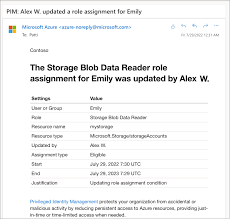
Privileged identity management (PIM) in Office 365 is crucial for maintaining security and controlling access to sensitive data. Privileged accounts have elevated permissions that can potentially expose an organisation to security risks if not managed properly. PIM helps mitigate these risks by implementing strict controls over who has access to privileged accounts and what actions they can perform.

The Key Benefits of Privileged Identity Management in Office 365:

  • Enhanced Security: By enforcing just-in-time access and approval workflows, PIM reduces the risk of unauthorised access to critical resources within Office 365.
  • Reduced Exposure: Limiting the time window during which privileged access is granted minimises the exposure of sensitive data and reduces the likelihood of insider threats.
  • Auditing and Monitoring: PIM provides detailed logs and reports on privileged account usage, allowing administrators to track activities and identify potential security incidents.
  • Compliance Requirements: Many regulatory frameworks require strict control over privileged identities. PIM helps organisations meet compliance standards by implementing robust access controls.

Best Practices for Implementing Privileged Identity Management in Office 365:

  1. Role-Based Access Control: Define clear roles and responsibilities within your organisation and assign appropriate permissions based on job functions.
  2. Just-In-Time Access: Implement time-limited access for privileged accounts, ensuring that users only have elevated permissions when necessary.
  3. Multifactor Authentication: Enforce strong authentication methods for accessing privileged accounts to add an extra layer of security.
  4. Ongoing Monitoring: Regularly review privileged account usage and conduct audits to detect any unusual activities or policy violations.

In conclusion, privileged identity management plays a vital role in maintaining a secure Office 365 environment. By implementing robust controls, monitoring access closely, and adhering to best practices, organisations can effectively manage their privileged identities within Office 365 and safeguard their valuable data from potential threats.


Six Essential Tips for Managing Privileged Identity in Office 365

  1. Enable multi-factor authentication for all privileged accounts.
  2. Regularly review and update role assignments to ensure least privilege access.
  3. Implement session monitoring and recording for privileged users.
  4. Enable just-in-time access to reduce the exposure of privileged accounts.
  5. Regularly audit and analyse privileged access logs for suspicious activities.
  6. Provide regular training and awareness sessions on best practices for privileged identity management.

Enable multi-factor authentication for all privileged accounts.

Enabling multi-factor authentication for all privileged accounts is a crucial step in enhancing the security of your Office 365 environment. By requiring an additional verification method beyond just a password, such as a code sent to a mobile device or biometric authentication, multi-factor authentication significantly reduces the risk of unauthorised access to sensitive data. This extra layer of security adds a vital barrier against potential cyber threats and ensures that only authorised users with verified identities can access privileged accounts, bolstering overall security posture and safeguarding critical information within Office 365.

Regularly review and update role assignments to ensure least privilege access.

Regularly reviewing and updating role assignments in Office 365 is a critical tip for maintaining effective privileged identity management. By ensuring that users are granted the minimum level of access required to perform their job functions, organisations can significantly reduce the risk of unauthorised activities and data breaches. Regular reviews help identify any unnecessary permissions that may have been granted over time, allowing administrators to adjust role assignments and enforce the principle of least privilege access. This proactive approach enhances security posture and aligns with best practices for managing privileged identities within Office 365.

Implement session monitoring and recording for privileged users.

Implementing session monitoring and recording for privileged users is a critical aspect of maintaining security in Office 365. By tracking and documenting the activities of privileged users during their sessions, organisations can enhance transparency, accountability, and threat detection. Session monitoring allows administrators to identify any suspicious behaviour or unauthorised actions taken by privileged accounts, helping to prevent potential security breaches and data leaks. Additionally, recording sessions provides a valuable audit trail for compliance purposes, enabling organisations to demonstrate adherence to security protocols and regulatory requirements. Overall, session monitoring and recording are essential tools in bolstering the security posture of Office 365 environments and safeguarding sensitive information from malicious actors.

Enable just-in-time access to reduce the exposure of privileged accounts.

Enabling just-in-time access in Office 365 is a critical tip for enhancing privileged identity management. By implementing this practice, organisations can significantly reduce the exposure of privileged accounts to potential security risks. Just-in-time access ensures that users are granted elevated permissions only when necessary and for a limited time window, thereby minimising the chances of unauthorised access and mitigating the impact of insider threats. This proactive approach not only strengthens security measures within Office 365 but also aligns with best practices for managing privileged identities effectively.

Regularly audit and analyse privileged access logs for suspicious activities.

Regularly auditing and analysing privileged access logs for suspicious activities is a critical aspect of maintaining robust security in Office 365. By monitoring these logs proactively, organisations can identify any unusual behaviour or unauthorised access attempts by privileged users. Analysing these logs allows administrators to detect potential security threats early on, investigate any anomalies, and take prompt action to mitigate risks. This practice not only helps in maintaining the integrity of the Office 365 environment but also strengthens overall privileged identity management protocols, ensuring that sensitive data remains protected from potential breaches.

Provide regular training and awareness sessions on best practices for privileged identity management.

To enhance the effectiveness of privileged identity management in Office 365, it is essential to conduct regular training and awareness sessions on best practices. By educating users on the importance of secure access controls, just-in-time permissions, and proper authentication methods, organisations can empower their employees to make informed decisions when handling privileged identities. These training sessions not only reinforce security protocols but also foster a culture of accountability and responsibility towards safeguarding sensitive data within Office 365. Through continuous education and awareness initiatives, organisations can significantly reduce the risks associated with privileged access and strengthen their overall security posture.

The Power of Federated Access Control in Modern IT Environments

In today’s interconnected digital landscape, the need for secure and efficient access control mechanisms is more critical than ever. Organisations are constantly seeking ways to streamline user authentication processes while maintaining robust security measures. This is where federated access control comes into play, offering a powerful solution to manage access across multiple systems and applications seamlessly.

What is Federated Access Control?

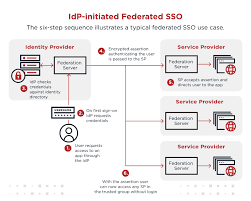
Federated access control is a decentralised approach to managing user authentication and authorisation across different domains or systems. Instead of relying on a single centralised system to authenticate users, federated access control allows organisations to establish trust relationships between multiple identity providers and service providers.

Through standards-based protocols such as Security Assertion Markup Language (SAML) and OAuth, federated access control enables users to access various resources without the need to create separate accounts for each system. This not only simplifies the user experience but also enhances security by reducing the risk of password fatigue and credential sprawl.

The Benefits of Federated Access Control

Implementing federated access control offers several key advantages for organisations:

  • Enhanced User Experience: Users can seamlessly access multiple applications and services without the hassle of managing multiple sets of credentials.
  • Improved Security: By centralising authentication processes and implementing strong identity verification mechanisms, federated access control helps mitigate the risk of unauthorised access and data breaches.
  • Scalability: Federated access control can easily scale to accommodate growing numbers of users and applications, making it ideal for dynamic IT environments.
  • Interoperability: Organisations can integrate disparate systems and platforms through standardised protocols, enabling seamless communication between different services.

Challenges and Considerations

While federated access control offers numerous benefits, organisations must also be aware of potential challenges and considerations when implementing this approach:

  • Trust Establishment: Establishing trust relationships between identity providers and service providers requires careful planning and coordination to ensure secure data exchange.
  • Compliance Requirements: Organisations must adhere to regulatory requirements such as GDPR when sharing user data across different systems through federated access control.
  • User Identity Management: Proper management of user identities, including provisioning, deprovisioning, and attribute mapping, is essential to maintain security and compliance.

The Future of Access Control

As organisations continue to embrace cloud-based services, mobile applications, and remote work environments, the demand for flexible yet secure access control solutions will only grow. Federated access control stands at the forefront of this evolution, offering a robust framework for managing identities across diverse IT ecosystems.

In conclusion, federated access control represents a paradigm shift in how organisations approach user authentication and authorisation. By leveraging standardised protocols and establishing trust relationships between entities, organisations can enhance security, streamline user experiences, and foster interoperability in today’s interconnected digital world.


Understanding Federated Access Control: Common Questions and Answers

  1. What is an example of a federated SSO?
  2. What is federated access control?
  3. What does federated mean in cyber security?
  4. What is the difference between SSO and federated access?
  5. What does federation access mean?
  6. What is meant by federated authentication?

What is an example of a federated SSO?

An example of a federated Single Sign-On (SSO) system is the integration between a company’s internal Active Directory and a cloud-based service provider such as Microsoft Azure or Google Workspace. In this scenario, users can log in to their corporate network using their existing Active Directory credentials and seamlessly access cloud applications without the need to enter their credentials again. Through federated SSO, the authentication process is streamlined, providing users with a unified and secure access experience across both on-premises and cloud environments.

What is federated access control?

Federated access control is a decentralised approach to managing user authentication and authorisation across multiple systems or domains. In essence, it allows organisations to establish trust relationships between different identity providers and service providers, enabling users to access various resources without the need for separate login credentials for each system. By leveraging standards-based protocols like SAML and OAuth, federated access control simplifies the user experience, enhances security by centralising authentication processes, and promotes interoperability between diverse IT environments. This method of access control streamlines user authentication while maintaining robust security measures in today’s interconnected digital landscape.

What does federated mean in cyber security?

In the realm of cybersecurity, the term “federated” refers to a decentralised approach to managing user authentication and authorisation across multiple systems or domains. Federated access control allows organisations to establish trust relationships between different identity providers and service providers, enabling users to access various resources without the need for separate credentials for each system. By implementing federated access control protocols such as SAML and OAuth, organisations can enhance security, streamline user experiences, and promote interoperability in a complex digital landscape where seamless access to diverse applications is paramount for efficient operations.

What is the difference between SSO and federated access?

One frequently asked question in the realm of federated access control is the distinction between Single Sign-On (SSO) and federated access. While both concepts aim to simplify user authentication processes, they operate in slightly different contexts. Single Sign-On (SSO) allows users to log in once and gain access to multiple applications within a single domain or organisation. On the other hand, federated access extends this capability by enabling users to access resources across different domains or systems without the need for separate login credentials. In essence, SSO focuses on streamlining access within a specific environment, while federated access broadens this scope to facilitate seamless authentication across disparate platforms and services. Understanding this difference is crucial for organisations looking to implement effective access control mechanisms that cater to their specific needs and operational requirements.

What does federation access mean?

“Federated access control, often referred to as federation access, is a decentralised approach to managing user authentication and authorisation across multiple systems or domains. In simple terms, federation access allows users to securely access various applications and services without the need to create separate accounts for each system. By establishing trust relationships between identity providers and service providers through standardised protocols like SAML and OAuth, federation access simplifies user authentication processes while enhancing security by reducing the reliance on multiple sets of credentials. This approach streamlines user experiences, improves security measures, and promotes interoperability in modern IT environments.”

What is meant by federated authentication?

Federated authentication refers to a decentralised approach to user authentication, where multiple identity providers collaborate to verify a user’s identity across different systems or domains. In a federated authentication scenario, a user can access various applications and services without needing separate credentials for each system. Instead, the user’s identity is verified by their trusted identity provider, which issues tokens or assertions that are accepted by service providers within the federation. This seamless and secure process not only simplifies user access but also enhances security by reducing the reliance on multiple passwords and minimising the risk of credential exposure.

Top Identity Management Solutions

The Top Identity Management Solutions for Secure and Efficient Access Control

In today’s digital age, managing user identities and access rights is crucial for organisations to ensure data security and compliance. Identity management solutions play a vital role in controlling who has access to what information within an organisation’s network. Here are some of the top identity management solutions that are leading the way in providing secure and efficient access control:

Microsoft Azure Active Directory

Microsoft Azure Active Directory is a cloud-based identity and access management service that helps organisations secure their resources. It offers single sign-on capabilities, multi-factor authentication, and seamless integration with Microsoft 365 applications.

Okta

Okta is a popular identity management platform that provides secure access to applications and data across cloud, mobile, and on-premises environments. It offers features such as adaptive multi-factor authentication, lifecycle management, and API access management.

IBM Security Identity Governance and Intelligence

IBM Security Identity Governance and Intelligence is a comprehensive solution that helps organisations manage user access rights across the enterprise. It provides automated provisioning, role-based access control, and risk assessment capabilities to enhance security.

OneLogin

OneLogin is a cloud-based identity and access management solution that simplifies user authentication and authorisation processes. It offers features such as single sign-on, directory integration, and user provisioning to streamline access control.

Ping Identity

Ping Identity is a leading provider of identity security solutions that enable secure access to applications and APIs. It offers capabilities such as intelligent authentication, fine-grained authorisation controls, and identity federation for seamless user experiences.

These top identity management solutions are designed to help organisations strengthen their security posture, improve operational efficiency, and ensure regulatory compliance. By implementing robust identity management practices, businesses can effectively manage user identities and permissions while mitigating the risk of unauthorised access.


Top Identity Management Solutions: Five Key Advantages for Enhanced Security and Efficiency

  1. Enhanced Security
  2. Improved Compliance
  3. User Convenience
  4. Efficient Provisioning
  5. Scalability


Challenges of Leading Identity Management Solutions: Complexity, Costs, and More

  1. Complexity of Implementation
  2. Costly Licensing Fees
  3. Integration Challenges
  4. User Adoption Issues
  5. Maintenance Overhead

Enhanced Security

Top identity management solutions provide enhanced security measures to safeguard sensitive data within organisations. With features like multi-factor authentication and stringent access controls, these solutions ensure that only authorised users can access critical information. By implementing such robust security measures, businesses can significantly reduce the risk of data breaches and unauthorised access attempts. This proactive approach to security not only protects valuable data but also enhances overall cybersecurity posture, instilling trust and confidence in stakeholders and customers alike.

Improved Compliance

Improved Compliance is a significant advantage of top identity management solutions. These advanced tools assist organisations in adhering to regulatory requirements by offering detailed audit trails and enforcing strict access policies. By maintaining a clear record of user activities and ensuring that access rights are granted based on predefined rules, these solutions help businesses demonstrate compliance with industry regulations and standards. This proactive approach to managing identities not only enhances security but also simplifies the process of meeting compliance obligations, ultimately reducing the risk of non-compliance penalties and reputational damage.

User Convenience

User Convenience is a significant advantage offered by top identity management solutions, such as single sign-on capabilities. With the ability to access multiple applications seamlessly using a single set of credentials, users can enjoy a streamlined experience that enhances productivity and user satisfaction. By eliminating the need to remember and enter multiple passwords, these solutions not only save time but also reduce the likelihood of password-related issues. This user-friendly approach to access control not only simplifies the user experience but also boosts overall efficiency within an organisation.

Efficient Provisioning

Efficient Provisioning is a key advantage of top identity management solutions. Automated user provisioning and deprovisioning processes help streamline administrative tasks by automatically granting or revoking access rights based on predefined rules and policies. This not only saves valuable time for IT administrators but also reduces the likelihood of human errors in managing user permissions. By automating these processes, organisations can ensure that users have the appropriate access to resources when needed and promptly remove access when no longer required, enhancing security and operational efficiency.

Scalability

Top identity management solutions offer scalability as a key advantage, allowing organisations to expand their user bases and adapt to changing business requirements without sacrificing security. These solutions are designed to grow alongside the organisation, ensuring that access control measures remain robust and effective even as the user population increases. By providing scalable identity management capabilities, businesses can maintain a secure environment while achieving flexibility and agility in managing identities and access rights.

Complexity of Implementation

The complexity of implementation is a notable drawback when it comes to top identity management solutions. These sophisticated systems often require extensive time and resources for deployment, which can pose challenges for organisations looking to streamline their access control processes. The intricacies involved in setting up and configuring these solutions may demand specialised expertise and careful planning to ensure a smooth integration with existing IT infrastructure. Despite the benefits they offer in terms of security and efficiency, the complexity of implementation can be a barrier for some organisations seeking to adopt these advanced identity management solutions.

Costly Licensing Fees

One significant drawback of some top identity management solutions is the issue of costly licensing fees. For many organisations, especially smaller ones or those operating with limited budgets, the high cost associated with acquiring and maintaining these solutions can be prohibitive. The expense of licensing fees can pose a barrier to accessing advanced identity management features, potentially limiting the ability of organisations to implement comprehensive security measures to protect their data and resources.

Integration Challenges

Integration Challenges: Integrating identity management solutions with existing IT infrastructure and applications can pose compatibility issues and require additional customisation. Organisations often face the conundrum of ensuring seamless integration of new identity management tools with their current systems, which may involve complex configurations and adjustments to ensure smooth operation. This process can be time-consuming and resource-intensive, potentially causing disruptions to daily operations while IT teams work to iron out compatibility issues. Additionally, the need for customisation to align the identity management solution with specific organisational requirements adds another layer of complexity to the integration process. Addressing these integration challenges effectively is crucial to maximising the benefits of identity management solutions while minimising potential disruptions to business processes.

User Adoption Issues

User Adoption Issues can be a significant drawback of implementing top identity management solutions. When users are required to adapt to new authentication methods or access controls, they may encounter difficulties in the transition process. This can result in resistance from users who are accustomed to familiar procedures, ultimately leading to potential productivity disruptions within the organisation. Addressing user adoption issues through effective training and communication strategies is essential to ensure a smooth integration of identity management solutions and minimise any negative impact on daily operations.

Maintenance Overhead

One significant drawback of top identity management solutions is the maintenance overhead they entail. The continuous need for system updates, troubleshooting, and general upkeep can place a significant demand on IT staff in terms of time and expertise. Ongoing maintenance tasks can be time-consuming and complex, requiring dedicated resources to ensure that the identity management system functions optimally and remains secure. This maintenance overhead can sometimes lead to disruptions in day-to-day operations and may require additional training or external support to manage effectively.

The Importance of Digital Identity Management Solutions in Today’s Cybersecurity Landscape

In the digital age, where online activities have become an integral part of our daily lives, the need for robust digital identity management solutions has never been more critical. With cyber threats on the rise and data breaches becoming increasingly common, businesses and individuals alike must prioritise the protection of their digital identities.

Digital identity management solutions encompass a range of tools and practices designed to safeguard and manage the identities of users across various online platforms and services. These solutions play a vital role in ensuring that only authorised individuals have access to sensitive information and resources, while also maintaining user privacy and compliance with regulations.

The Key Benefits of Digital Identity Management Solutions

Enhanced Security: By implementing digital identity management solutions, organisations can strengthen their security posture by enforcing strict authentication protocols, such as multi-factor authentication and biometric verification. This helps prevent unauthorised access to systems and data, reducing the risk of data breaches.

Improved User Experience: Effective digital identity management solutions streamline the user authentication process, making it easier for individuals to access the resources they need quickly and securely. This not only enhances user experience but also boosts productivity within organisations.

Regulatory Compliance: With data protection regulations becoming increasingly stringent, businesses must ensure that they comply with legal requirements regarding the management of user identities and personal information. Digital identity management solutions help organisations meet compliance standards by implementing robust data protection measures.

The Future of Digital Identity Management

As technology continues to advance at a rapid pace, the landscape of digital identity management is also evolving. Emerging trends such as decentralised identities, blockchain-based authentication, and artificial intelligence-driven security measures are shaping the future of identity management solutions.

Organisations must stay ahead of these trends by investing in innovative digital identity management solutions that can adapt to changing cybersecurity threats and regulatory requirements. By proactively managing digital identities, businesses can mitigate risks, protect sensitive information, and build trust with their customers.

In Conclusion

In conclusion, digital identity management solutions are essential components of a comprehensive cybersecurity strategy in today’s interconnected world. By prioritising the protection of digital identities through advanced technologies and best practices, organisations can safeguard their assets, maintain regulatory compliance, and foster a secure online environment for all users.


Understanding Digital Identity Management: Key Questions and Insights for Businesses

  1. What is digital identity management?
  2. Why is digital identity management important for businesses?
  3. How do digital identity management solutions enhance cybersecurity?
  4. What are the key features of effective digital identity management solutions?
  5. How can organisations ensure compliance with data protection regulations through digital identity management?
  6. What are the common challenges faced when implementing digital identity management solutions?
  7. What emerging trends are shaping the future of digital identity management?

What is digital identity management?

Digital identity management refers to the process of securely and efficiently managing the digital identities of individuals or entities across various online platforms and systems. It involves verifying the identity of users, granting access to resources based on predefined permissions, and ensuring that sensitive information is protected from unauthorised access. Digital identity management solutions play a crucial role in safeguarding personal data, preventing identity theft, and maintaining compliance with data protection regulations. By implementing robust authentication mechanisms and access controls, organisations can enhance security, streamline user access, and build trust with their stakeholders in the digital realm.

Why is digital identity management important for businesses?

Digital identity management is crucial for businesses due to the increasing reliance on digital platforms and the growing threat of cyber attacks. Effective digital identity management solutions help businesses protect sensitive data, prevent unauthorised access to critical systems, and ensure compliance with regulations. By implementing robust authentication measures and access controls, businesses can enhance security, build trust with customers, and safeguard their reputation. Additionally, digital identity management solutions streamline user access processes, improving operational efficiency and reducing the risk of data breaches. Overall, prioritising digital identity management is essential for businesses to mitigate risks, maintain data integrity, and uphold a strong cybersecurity posture in today’s dynamic business environment.

How do digital identity management solutions enhance cybersecurity?

Digital identity management solutions play a crucial role in enhancing cybersecurity by implementing robust authentication mechanisms and access controls. By verifying the identities of users through multi-factor authentication, biometric recognition, and other advanced techniques, these solutions significantly reduce the risk of unauthorised access to sensitive data and systems. Additionally, digital identity management solutions enable organisations to enforce strict security policies, monitor user activities in real-time, and detect suspicious behaviour promptly. This proactive approach to cybersecurity not only strengthens defences against cyber threats but also ensures compliance with regulatory requirements, ultimately safeguarding valuable assets and maintaining the integrity of digital environments.

What are the key features of effective digital identity management solutions?

Effective digital identity management solutions encompass a range of key features that are essential for ensuring robust security and seamless user experience. Some of the key features include advanced authentication methods such as multi-factor authentication and biometric verification, which enhance security by adding layers of protection. Centralised identity management capabilities allow for streamlined user access control and permissions management across various systems and applications. Comprehensive audit trails and reporting functionalities enable organisations to track user activities and monitor compliance with security policies. Integration with existing IT infrastructure and seamless scalability are also crucial features that ensure the flexibility and efficiency of digital identity management solutions. Overall, a combination of these features forms the foundation of effective digital identity management solutions in today’s cybersecurity landscape.

How can organisations ensure compliance with data protection regulations through digital identity management?

Organisations can ensure compliance with data protection regulations through digital identity management by implementing robust authentication and access control mechanisms. By enforcing strict verification processes, such as multi-factor authentication and biometric recognition, organisations can verify the identities of users accessing sensitive data and resources. Additionally, implementing encryption protocols to protect data in transit and at rest ensures that personal information is safeguarded according to regulatory requirements. Regular audits and monitoring of user activities help organisations track and manage access rights, detect potential security breaches, and demonstrate compliance with data protection regulations. By integrating these practices into their digital identity management solutions, organisations can effectively protect user data and meet the stringent requirements of modern privacy laws.

What are the common challenges faced when implementing digital identity management solutions?

When implementing digital identity management solutions, organisations often encounter common challenges that can impact the effectiveness of their cybersecurity measures. One prevalent issue is the complexity of integrating identity management systems across diverse IT environments, leading to compatibility issues and potential security vulnerabilities. Additionally, ensuring seamless user experience while maintaining robust security measures poses a challenge, as balancing convenience with stringent authentication requirements is crucial. Another common obstacle is the need for ongoing maintenance and updates to keep pace with evolving cyber threats and regulatory changes, requiring dedicated resources and expertise. Overcoming these challenges demands careful planning, collaboration between IT teams and stakeholders, and a proactive approach to address potential risks in digital identity management implementations.

The future of digital identity management is being influenced by several emerging trends that are reshaping the way organisations approach security and authentication. Decentralised identities, where users have more control over their personal data and how it is shared, are gaining traction as a more privacy-centric approach. Blockchain technology is also revolutionising identity verification processes by providing a secure and tamper-proof way to verify identities without relying on a central authority. Additionally, artificial intelligence is playing a significant role in enhancing the security of digital identities through advanced threat detection and adaptive authentication methods. These trends are paving the way for more secure, user-centric, and technologically advanced digital identity management solutions in the years to come.

Best Active Directory Auditing Tools

The Best Active Directory Auditing Tools

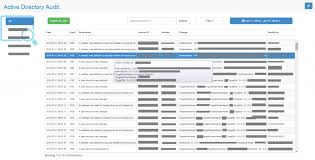
Active Directory auditing is a critical aspect of maintaining the security and integrity of your IT infrastructure. By monitoring and tracking changes within your Active Directory environment, you can detect suspicious activities, ensure compliance with regulations, and prevent potential security breaches. To help you effectively audit your Active Directory, here are some of the best tools available:

SolarWinds Security Event Manager

SolarWinds Security Event Manager offers comprehensive auditing capabilities for Active Directory. It provides real-time monitoring, alerting, and reporting features to help you track user activities, group changes, and policy modifications effectively.

ManageEngine ADAudit Plus

ManageEngine ADAudit Plus is a robust solution that offers detailed reports on all changes made in your Active Directory environment. It allows you to monitor user logon activities, file access events, and group policy modifications to enhance security and compliance.

Netwrix Auditor for Active Directory

Netwrix Auditor for Active Directory is a powerful tool that provides visibility into all changes happening in your Active Directory infrastructure. It offers pre-defined reports, alerts on critical events, and forensic analysis capabilities to help you maintain a secure and compliant environment.

LepideAuditor for Active Directory

LepideAuditor for Active Directory is a user-friendly auditing tool that enables you to track changes in real-time and generate customised reports for compliance audits. It helps you identify insider threats, monitor privileged user activities, and streamline IT operations efficiently.

Quest Change Auditor for Active Directory

Quest Change Auditor for Active Directory delivers comprehensive auditing capabilities to help you monitor all changes in your Active Directory environment effectively. It offers detailed reports on user activity, permission changes, and security events to enhance visibility and control over your IT infrastructure.

Choosing the right active directory auditing tool is essential for maintaining the security and compliance of your organisation’s IT environment. Consider the features offered by each tool mentioned above to select the one that best fits your requirements and helps you achieve a robust auditing strategy.


Top 9 Benefits of Leading Active Directory Auditing Tools: Enhancing Security and Compliance

  1. Real-time monitoring of user activities
  2. Comprehensive reporting on changes within Active Directory
  3. Alerting features to notify of suspicious events
  4. Enhanced security through tracking policy modifications
  5. Facilitates compliance with regulatory requirements
  6. Forensic analysis capabilities for investigating incidents
  7. User-friendly interfaces for easy configuration and management
  8. Customisable reports tailored to specific auditing needs
  9. Integration with other security tools for a holistic approach


Challenges of Top Active Directory Auditing Tools: Costs, Complexity, and Scalability Issues

  1. Steep learning curve for beginners due to the complexity of features.
  2. Some tools may be costly, especially for small businesses with budget constraints.
  3. Integration with existing IT infrastructure may require additional configuration and resources.
  4. Certain tools may lack customisation options for specific auditing needs.
  5. Maintenance and updates can be time-consuming, affecting operational efficiency.
  6. Limited scalability in terms of handling a large volume of audit data and user activities.

Real-time monitoring of user activities

Real-time monitoring of user activities is a crucial advantage offered by the best Active Directory auditing tools. This feature allows organisations to track and analyse user interactions within the Active Directory environment as they occur, providing immediate visibility into any suspicious or unauthorised behaviour. By monitoring user activities in real-time, IT administrators can swiftly detect potential security threats, identify anomalous patterns, and take proactive measures to mitigate risks effectively. This capability enhances overall security posture, enables rapid incident response, and helps maintain the integrity of the IT infrastructure in a dynamic and evolving threat landscape.

Comprehensive reporting on changes within Active Directory

Comprehensive reporting on changes within Active Directory is a crucial advantage offered by the best active directory auditing tools. These tools provide detailed insights into all modifications, user activities, group policy changes, and security events occurring within the Active Directory environment. By generating comprehensive reports, organisations can easily track and analyse every change made, helping them to identify potential security threats, ensure compliance with regulations, and maintain the integrity of their IT infrastructure. This level of visibility and transparency is essential for effective auditing and proactive security management in today’s dynamic digital landscape.

Alerting features to notify of suspicious events

Effective active directory auditing tools offer alerting features that play a crucial role in notifying administrators of suspicious events within the Active Directory environment. These alerting capabilities enable real-time monitoring and immediate detection of potentially harmful activities, such as unauthorised access attempts, unusual user behaviour, or policy violations. By promptly alerting administrators to such events, these tools empower them to take swift action to investigate and mitigate security threats, ensuring the integrity and confidentiality of the organisation’s IT infrastructure.

Enhanced security through tracking policy modifications

Enhanced security through tracking policy modifications is a crucial benefit offered by the best Active Directory auditing tools. By monitoring and recording changes made to group policies, access controls, and other security settings within the Active Directory environment, organisations can effectively identify any unauthorised alterations that could pose a security risk. This proactive approach not only helps in detecting potential threats promptly but also ensures that compliance with security policies and regulations is maintained. Through detailed tracking of policy modifications, these auditing tools play a vital role in strengthening the overall security posture of an organisation’s IT infrastructure.

Facilitates compliance with regulatory requirements

Implementing the best Active Directory auditing tools can significantly facilitate compliance with regulatory requirements. These tools offer comprehensive monitoring and reporting capabilities that help organisations track user activities, detect unauthorised changes, and ensure data integrity within their IT infrastructure. By maintaining detailed audit logs and generating compliance reports, these tools assist in demonstrating adherence to regulatory standards such as GDPR, HIPAA, or PCI DSS. This proactive approach not only helps in meeting legal obligations but also enhances overall data security and governance practices within the organisation.

Forensic analysis capabilities for investigating incidents

Forensic analysis capabilities offered by the best Active Directory auditing tools play a crucial role in investigating security incidents and breaches effectively. These capabilities allow organisations to delve deep into the details of any suspicious activity, track the root cause of security incidents, and gather evidence for further analysis. By providing a comprehensive view of user actions, system changes, and access permissions, Active Directory auditing tools with forensic analysis features empower IT teams to identify and respond to security threats promptly, ultimately enhancing the overall resilience of the IT infrastructure.

User-friendly interfaces for easy configuration and management

User-friendly interfaces offered by the best Active Directory auditing tools facilitate seamless configuration and management processes. These intuitive interfaces empower IT administrators to set up auditing parameters efficiently and navigate through monitoring functionalities with ease. By providing a straightforward user experience, these tools enable quick access to critical features, simplifying the task of monitoring user activities, tracking changes, and generating reports. The user-friendly nature of these interfaces enhances productivity and ensures that organisations can effectively manage their Active Directory auditing tasks without unnecessary complexity.

Customisable reports tailored to specific auditing needs

Customisable reports tailored to specific auditing needs are a key advantage of the best Active Directory auditing tools. By allowing users to create reports that align with their unique requirements, these tools enable organisations to focus on the most critical aspects of their Active Directory environment. Whether it’s tracking user activities, monitoring policy changes, or ensuring compliance with industry regulations, customisable reports provide valuable insights and actionable data that help enhance security, streamline operations, and demonstrate adherence to best practices. This flexibility empowers IT teams to efficiently address potential risks and make informed decisions based on the specific audit requirements of their organisation.

Integration with other security tools for a holistic approach

Effective Active Directory auditing tools offer a significant advantage through their integration with other security tools, enabling a holistic approach to IT security. By seamlessly integrating with complementary solutions such as SIEM platforms, threat intelligence feeds, and security information sources, these tools provide a comprehensive view of the entire security landscape. This integration allows for correlation of data across different systems, enhancing threat detection capabilities and facilitating a proactive response to potential security incidents. By adopting a holistic approach to security, organisations can strengthen their defences and better protect their Active Directory environment from evolving cyber threats.

Steep learning curve for beginners due to the complexity of features.

Navigating the realm of Active Directory auditing tools can present a significant challenge for beginners, primarily due to the steep learning curve resulting from the intricate nature of their features. The complexity of functionalities offered by these tools often requires a certain level of expertise and familiarity with IT auditing processes, making it daunting for newcomers to grasp and utilise them effectively. As a result, individuals embarking on their journey with Active Directory auditing may face hurdles in understanding and maximising the potential of these tools, necessitating dedicated time and effort to overcome the initial complexities and harness their full capabilities.

Some tools may be costly, especially for small businesses with budget constraints.

One significant drawback of utilising the best Active Directory auditing tools is the potential cost implications, which can be a challenge for small businesses operating under budget constraints. While these tools offer advanced features and robust security capabilities, their price tags may prove prohibitive for organisations with limited financial resources. Small businesses may find it difficult to justify the expense of investing in high-end auditing solutions, leading them to seek more affordable alternatives or compromise on the depth of auditing and monitoring they can achieve within their Active Directory environment.

Integration with existing IT infrastructure may require additional configuration and resources.

When considering the use of the best Active Directory auditing tools, a notable drawback is the potential need for additional configuration and resources to integrate them seamlessly with existing IT infrastructure. This con can lead to increased complexity in setup and maintenance processes, requiring careful planning and allocation of resources to ensure smooth integration. Organisations may need to invest time and effort in configuring the tools to work optimally with their specific network architecture, which could result in added costs and delays in implementation. It is crucial for businesses to evaluate this aspect carefully and be prepared for the necessary adjustments to effectively leverage the benefits of these auditing tools while minimising disruptions to their IT environment.

Certain tools may lack customisation options for specific auditing needs.

Certain active directory auditing tools may present a limitation in terms of customisation options for specific auditing needs. While many tools offer a wide range of features and functionalities, some organisations may find that their unique requirements cannot be fully addressed due to the lack of customisation capabilities in certain tools. This can result in difficulties in tailoring the auditing process to align with specific compliance regulations or internal security policies. Organisations seeking highly customised auditing solutions may need to carefully evaluate the available options to ensure that the chosen tool can adequately meet their individual auditing needs.

Maintenance and updates can be time-consuming, affecting operational efficiency.

Maintenance and updates of the best Active Directory auditing tools can present a significant challenge as they often require dedicated time and resources, impacting operational efficiency. Keeping the tools up-to-date with the latest security patches, feature enhancements, and compatibility updates can be a time-consuming task that diverts attention from core business activities. Moreover, the complexity of managing multiple tools and ensuring seamless integration with existing systems can further add to the maintenance burden. This con highlights the importance of careful planning and resource allocation to mitigate disruptions and maximise the effectiveness of Active Directory auditing processes.

Limited scalability in terms of handling a large volume of audit data and user activities.

One significant drawback of some of the best Active Directory auditing tools is their limited scalability when it comes to handling a large volume of audit data and user activities. As organisations grow in size and complexity, the sheer amount of data generated by user interactions within the Active Directory can overwhelm certain auditing tools, leading to performance issues and potential gaps in monitoring. This limitation can hinder the ability to effectively track and analyse all activities within the Active Directory environment, potentially compromising security and compliance efforts. Organizations looking to implement auditing tools should carefully consider scalability requirements to ensure they can accommodate future growth and maintain comprehensive visibility into their IT infrastructure.

The Importance of Compliance Software Tools

The Importance of Compliance Software Tools

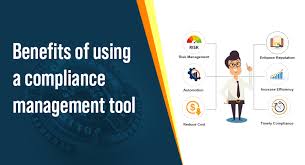
Compliance software tools play a crucial role in helping organisations adhere to industry regulations and standards. In today’s complex business environment, where data privacy and security are paramount, compliance software tools provide the necessary framework for companies to manage and monitor their regulatory obligations effectively.

Ensuring Regulatory Compliance

One of the primary functions of compliance software tools is to ensure that businesses comply with relevant laws, regulations, and standards. These tools help organisations track and document their adherence to specific requirements, such as GDPR, HIPAA, PCI DSS, or ISO standards. By automating compliance processes and providing real-time monitoring capabilities, these tools reduce the risk of non-compliance penalties and reputational damage.

Risk Management

Compliance software tools also assist in identifying and mitigating risks associated with regulatory non-compliance. By conducting regular audits, risk assessments, and control evaluations, these tools help organisations proactively address potential compliance issues before they escalate. This proactive approach not only minimises financial risks but also enhances overall operational efficiency.

Streamlining Processes

Another key benefit of compliance software tools is their ability to streamline compliance-related processes. These tools centralise data collection, automate reporting tasks, and provide a unified platform for managing compliance activities across the organisation. By eliminating manual processes and reducing administrative burden, compliance software tools enable businesses to focus on strategic initiatives while ensuring continuous compliance.

Enhancing Security Measures

Compliance software tools often include security features that help strengthen an organisation’s overall security posture. From access controls and encryption mechanisms to vulnerability assessments and incident response capabilities, these tools contribute to a comprehensive security strategy that aligns with regulatory requirements. By integrating security measures into compliance practices, businesses can better protect sensitive data and mitigate cybersecurity risks.

Conclusion

In conclusion, compliance software tools are indispensable for modern businesses seeking to navigate the complex landscape of regulatory compliance effectively. By leveraging these tools’ capabilities to ensure regulatory adherence, manage risks, streamline processes, and enhance security measures, organisations can establish a culture of compliance that promotes trust among stakeholders and sustains long-term success.


Enhancing Efficiency and Security: The Benefits of Compliance Software Tools

  1. Automate compliance processes, saving time and reducing manual errors.
  2. Provide real-time monitoring of regulatory activities for proactive risk management.
  3. Centralise data collection and reporting, ensuring consistency and accuracy.
  4. Help organisations adhere to industry regulations and standards effortlessly.
  5. Enhance security measures by integrating security features into compliance practices.
  6. Streamline compliance-related processes, improving operational efficiency.
  7. Facilitate audits, risk assessments, and control evaluations for better decision-making.
  8. Reduce the risk of non-compliance penalties and reputational damage.
  9. Enable businesses to focus on strategic initiatives while ensuring continuous compliance.


Exploring the Challenges of Compliance Software: Complexity, Cost, and Common Pitfalls

  1. Complexity
  2. Cost
  3. Integration Challenges
  4. Maintenance Overhead
  5. Training Requirements
  6. False Positives

Automate compliance processes, saving time and reducing manual errors.

Automating compliance processes through the use of software tools is a significant advantage that can greatly benefit organisations. By automating tasks such as data collection, reporting, and monitoring, compliance software tools help save valuable time and resources that would otherwise be spent on manual efforts. This automation not only increases efficiency but also minimises the risk of human errors, ensuring that regulatory requirements are consistently met with accuracy and precision. Overall, the ability to automate compliance processes not only saves time but also reduces the likelihood of costly mistakes, enhancing overall compliance effectiveness.

Provide real-time monitoring of regulatory activities for proactive risk management.

Compliance software tools offer a significant advantage by providing real-time monitoring of regulatory activities, enabling organisations to proactively manage risks. By continuously tracking compliance with industry regulations and standards in real-time, these tools empower businesses to identify potential issues as they arise and take immediate corrective action. This proactive approach not only helps mitigate compliance risks but also enhances overall risk management strategies, ensuring that organisations can maintain a high level of regulatory adherence and operational efficiency.

Centralise data collection and reporting, ensuring consistency and accuracy.

Centralising data collection and reporting through compliance software tools is a significant advantage for organisations. By consolidating data from various sources into a unified platform, these tools ensure consistency and accuracy in compliance-related information. This centralisation not only streamlines the reporting process but also minimises the risk of errors or discrepancies that may arise from manual data handling. Organisations can rely on the robust data management capabilities of compliance software tools to maintain a single source of truth, enabling them to make informed decisions based on reliable and up-to-date information.

Help organisations adhere to industry regulations and standards effortlessly.

Compliance software tools offer a significant advantage by assisting organisations in effortlessly adhering to industry regulations and standards. By automating compliance processes, providing real-time monitoring capabilities, and offering streamlined solutions for managing regulatory obligations, these tools simplify the complex task of ensuring adherence to various laws and standards. This not only reduces the burden on organisations in terms of time and resources but also minimises the risk of non-compliance penalties and reputational damage, ultimately fostering a culture of regulatory compliance within the organisation.

Enhance security measures by integrating security features into compliance practices.

By integrating security features into compliance practices, compliance software tools play a crucial role in enhancing overall security measures within organisations. This proactive approach not only ensures regulatory adherence but also strengthens the organisation’s security posture by implementing access controls, encryption mechanisms, vulnerability assessments, and incident response capabilities. By aligning security measures with compliance requirements, these tools help mitigate cybersecurity risks, protect sensitive data, and bolster the organisation’s resilience against potential threats, ultimately fostering a more secure and robust operational environment.

Compliance software tools offer the significant advantage of streamlining compliance-related processes, thereby enhancing operational efficiency within organisations. By centralising data collection, automating reporting tasks, and providing a unified platform for managing compliance activities, these tools eliminate manual processes and reduce administrative burden. This streamlined approach not only saves time and resources but also allows businesses to focus on strategic initiatives and core operations while ensuring continuous compliance with regulatory requirements.

Facilitate audits, risk assessments, and control evaluations for better decision-making.

Compliance software tools offer a significant advantage by facilitating audits, risk assessments, and control evaluations, ultimately leading to better decision-making within organisations. By automating these critical processes, these tools provide real-time insights into compliance status and potential risks, enabling businesses to make informed decisions based on accurate data. This proactive approach not only enhances regulatory compliance but also improves overall operational efficiency and strategic planning. With the ability to streamline audit procedures and assess controls effectively, compliance software tools empower organisations to identify areas for improvement, mitigate risks, and drive continuous enhancement of their compliance practices.

Reduce the risk of non-compliance penalties and reputational damage.

Compliance software tools play a pivotal role in reducing the risk of non-compliance penalties and reputational damage for organisations. By automating compliance processes, providing real-time monitoring capabilities, and ensuring adherence to industry regulations and standards, these tools help businesses avoid costly fines and preserve their reputation in the market. Proactively addressing compliance issues through the use of such tools not only safeguards against financial liabilities but also enhances trust and credibility with customers, partners, and regulatory authorities.

Enable businesses to focus on strategic initiatives while ensuring continuous compliance.

Compliance software tools empower businesses to concentrate on strategic initiatives by automating and streamlining compliance processes. By handling regulatory obligations efficiently, these tools free up valuable time and resources that can be redirected towards driving innovation, expanding market reach, or enhancing customer experience. With the assurance of continuous compliance provided by these tools, organisations can pursue their long-term goals with confidence, knowing that their regulatory responsibilities are being met effectively in the background.

Complexity

One significant drawback of compliance software tools is their inherent complexity, which often demands a level of specialised knowledge to configure and utilise effectively. Navigating the intricate features and settings of these tools can pose challenges for users without a deep understanding of regulatory requirements and technical nuances. The complexity of compliance software tools may lead to implementation delays, user errors, and the need for additional training, potentially hindering organisations from maximising the tools’ full potential in maintaining regulatory compliance.

Cost

One notable drawback of compliance software tools is the financial aspect, particularly the substantial upfront costs associated with implementation. Customised solutions, tailored to meet specific regulatory requirements or organisational needs, often come with a higher price tag. This initial investment can pose a challenge for businesses, especially smaller enterprises with limited budgets, as it may require allocating significant resources towards acquiring and customising the software. The cost factor can be a barrier for some organisations looking to enhance their compliance efforts through software tools, highlighting the importance of carefully assessing the return on investment and long-term benefits before committing to such solutions.

Integration Challenges

Integration challenges can present a significant drawback when implementing compliance software tools. The need to integrate these tools with existing systems and processes can often lead to disruptions in workflow. Compatibility issues, data migration complexities, and the learning curve associated with new technologies can all contribute to delays and inefficiencies in the integration process. These challenges may hinder the seamless adoption of compliance software tools within an organisation, impacting productivity and potentially prolonging the time required to realise the full benefits of such solutions.

Maintenance Overhead

One significant drawback of compliance software tools is the maintenance overhead they entail. Regular updates, patches, and maintenance tasks are essential to ensure that these tools remain current and operate at their optimal performance levels. This ongoing need for maintenance can consume valuable time and resources within an organisation, diverting attention away from other critical tasks and potentially causing disruptions in workflow efficiency. Additionally, the complexity of managing updates across various systems and ensuring compatibility with existing infrastructure can pose challenges for IT teams, leading to increased workload and potential delays in addressing compliance requirements effectively.

Training Requirements

Training staff on how to use compliance software tools effectively can present a significant challenge for organisations. The time and resources required to educate employees on the intricacies of these tools can be substantial, impacting productivity and operational efficiency. Moreover, ensuring that staff members are proficient in utilising the software to its full potential may require ongoing training sessions and support, adding to the overall training burden. As a result, the training requirements associated with compliance software tools can strain resources and prolong the implementation process, potentially delaying the realisation of benefits from these tools.

False Positives

One significant drawback of compliance software tools is the occurrence of false positives. These tools have the potential to produce misleading alerts or inaccuracies, which can result in organisations conducting unnecessary investigations and potentially overlooking genuine compliance issues. The presence of false positives not only consumes valuable time and resources but also introduces the risk of overlooking critical compliance errors due to the noise generated by these inaccurate alerts. Organizations must be vigilant in distinguishing genuine threats from false positives to maintain the effectiveness and reliability of their compliance processes.