Privileged Identity Management in Azure

The Importance of Privileged Identity Management in Azure

Azure, Microsoft’s cloud computing platform, offers a wide range of services and features to help organisations manage their digital operations efficiently. One critical aspect of securing your Azure environment is implementing Privileged Identity Management (PIM). PIM is a crucial security feature that helps organisations manage, control, and monitor access to sensitive resources within Azure.

What is Privileged Identity Management?

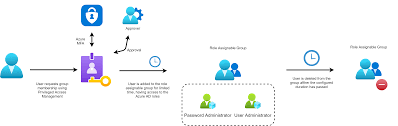
Privileged Identity Management in Azure is a comprehensive solution that allows organisations to manage and monitor access rights for privileged roles. These roles typically have extensive permissions that can significantly impact the security and integrity of an organisation’s data and resources. By implementing PIM, organisations can enforce strict controls over who has access to privileged roles, when they have access, and what they can do with that access.

The Benefits of Implementing PIM in Azure

Implementing Privileged Identity Management in Azure offers several key benefits:

  • Reduced Security Risks: By limiting access to privileged roles only when necessary, organisations can reduce the risk of unauthorised access or misuse of sensitive data.
  • Enhanced Monitoring and Auditing: PIM provides detailed logs and reports on privileged role activations and usage, enabling organisations to track and audit all activities effectively.
  • Improved Compliance: Many regulatory standards require strict controls over privileged access. Implementing PIM helps organisations meet compliance requirements more effectively.
  • Elevated Security Posture: With PIM, organisations can proactively manage potential security threats by monitoring and controlling privileged access in real-time.

Best Practices for Implementing PIM

To maximise the effectiveness of Privileged Identity Management in Azure, consider the following best practices:

  1. Regular Access Reviews: Conduct regular reviews of who has access to privileged roles to ensure that only authorised individuals have the necessary permissions.
  2. Mandatory Multi-Factor Authentication (MFA): Enforce MFA for all users with privileged access to add an extra layer of security.
  3. Time-bound Access: Implement time-bound activation for privileged roles so that access is granted only when needed for a specific period.
  4. Audit Logging: Enable detailed logging and monitoring features within PIM to track all activities related to privileged role assignments and activations.

In conclusion, Privileged Identity Management plays a crucial role in enhancing the security posture of organisations using Azure. By implementing robust controls over privileged access, organisations can mitigate security risks, improve compliance efforts, and proactively manage potential threats effectively.


Understanding Privileged Identity Management (PIM) in Azure: Key FAQs

  1. Where is PIM in Azure?
  2. What is Azure privileged identity management?
  3. What is privilege identity management?
  4. What does PIM stand for in Azure?

Where is PIM in Azure?

In Azure, Privileged Identity Management (PIM) can be accessed through the Azure portal. To locate PIM within Azure, users can navigate to the Azure Active Directory section of the portal and select the ‘Privileged Identity Management’ option. This feature allows users to manage and monitor access to privileged roles effectively, providing granular control over who has access to sensitive resources within the Azure environment. By utilising PIM in Azure, organisations can enhance their security posture and ensure that only authorised individuals have access to critical roles, helping to mitigate security risks and maintain compliance with regulatory standards.

What is Azure privileged identity management?

Azure Privileged Identity Management (PIM) is a critical security feature offered by Microsoft Azure that allows organisations to manage and monitor access to privileged roles within their Azure environment. With Azure PIM, organisations can enforce strict controls over who has access to sensitive resources, when they have access, and what actions they can perform. By implementing PIM, organisations can reduce security risks associated with privileged roles, enhance monitoring and auditing capabilities, improve compliance efforts, and elevate their overall security posture in the cloud.

What is privilege identity management?

Privileged Identity Management (PIM) in Azure refers to a comprehensive security solution that focuses on managing and monitoring access rights for privileged roles within an organisation’s Azure environment. Privileged roles typically have elevated permissions that can pose significant security risks if not properly controlled. By implementing PIM, organisations can enforce strict controls over who has access to privileged roles, when that access is granted, and what actions can be performed with those privileges. This proactive approach helps organisations enhance their security posture, reduce the risk of unauthorised access or misuse of sensitive data, and ensure compliance with regulatory standards by effectively managing and auditing privileged identities.

What does PIM stand for in Azure?

In the context of Azure, PIM stands for Privileged Identity Management. Privileged Identity Management is a critical security feature that helps organisations manage and monitor access to sensitive resources within the Azure environment. By implementing PIM, organisations can enforce strict controls over who has access to privileged roles, when they have access, and what actions they can perform with that access. This proactive approach to managing privileged identities enhances security, reduces risks of unauthorised access, and strengthens compliance efforts within Azure.

ManageEngine Active Directory Audit

The Importance of ManageEngine Active Directory Audit

ManageEngine Active Directory Audit is a powerful tool that offers comprehensive auditing capabilities for your Active Directory environment. In today’s digital landscape, where data security is paramount, having visibility into user activities and changes within your Active Directory is crucial for maintaining a secure and compliant IT infrastructure.

Key Features of ManageEngine Active Directory Audit:

  • Real-time Monitoring: Monitor all changes and activities happening in your Active Directory in real-time to identify suspicious behaviour promptly.
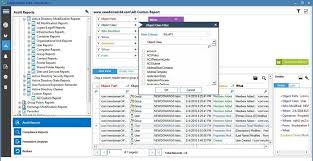
  • Detailed Reporting: Generate detailed reports on user logins, modifications to group policies, password changes, and more to track all changes effectively.
  • Audit Trails: Maintain audit trails of all actions performed in your Active Directory for compliance purposes and forensic analysis.
  • Alerts and Notifications: Set up custom alerts to receive notifications about critical events or policy violations instantly.
  • Compliance Management: Simplify compliance with regulatory requirements by ensuring that your Active Directory environment meets industry standards.

Benefits of Using ManageEngine Active Directory Audit:

By implementing ManageEngine Active Directory Audit, organisations can enhance their security posture, mitigate risks, and improve overall operational efficiency. Some key benefits include:

  • Better control over user access rights and permissions
  • Proactive identification of security threats and vulnerabilities
  • Evidence collection for investigations and audits
  • In-depth visibility into user activities for improved incident response
  • Auditing support for compliance with data protection regulations

In conclusion, ManageEngine Active Directory Audit is a valuable tool for organisations looking to strengthen their IT security practices and ensure the integrity of their Active Directory environment. By leveraging its robust features and functionalities, businesses can proactively monitor, audit, and secure their critical infrastructure against potential threats.


Top 5 Tips for Effective ManageEngine Active Directory Auditing

  1. Enable auditing for important Active Directory events to track changes effectively.
  2. Regularly review audit logs to identify any suspicious activities or unauthorized changes.
  3. Set up alerts and notifications to stay informed about critical events in real-time.
  4. Implement least privilege access controls to restrict unnecessary permissions within Active Directory.
  5. Regularly update ManageEngine Active Directory Audit software to ensure you have the latest security features and patches.

Enable auditing for important Active Directory events to track changes effectively.

Enabling auditing for critical Active Directory events is a fundamental tip when utilising ManageEngine Active Directory Audit. By activating auditing for key events, such as user logins, group policy modifications, and password changes, organisations can effectively track and monitor changes within their Active Directory environment. This proactive approach not only enhances security by detecting suspicious activities promptly but also facilitates compliance with regulatory requirements by maintaining detailed audit trails of crucial events. By following this tip, businesses can bolster their cybersecurity posture and ensure the integrity of their Active Directory infrastructure.

Regularly review audit logs to identify any suspicious activities or unauthorized changes.

Regularly reviewing audit logs is a crucial tip when utilising ManageEngine Active Directory Audit. By consistently monitoring these logs, organisations can swiftly identify any suspicious activities or unauthorised changes within their Active Directory environment. This proactive approach allows for timely detection of potential security breaches, enabling swift remediation actions to be taken to safeguard the integrity and confidentiality of critical data. By staying vigilant and responsive to anomalies in the audit logs, businesses can enhance their overall security posture and maintain compliance with regulatory requirements.

Set up alerts and notifications to stay informed about critical events in real-time.

Setting up alerts and notifications in ManageEngine Active Directory Audit is a proactive approach to staying informed about critical events in real-time. By configuring custom alerts, administrators can receive immediate notifications about important activities within the Active Directory environment, such as unauthorized access attempts, policy changes, or unusual user behaviour. This feature enables swift responses to potential security threats and helps maintain the integrity of the network by ensuring that any suspicious activities are promptly identified and addressed.

Implement least privilege access controls to restrict unnecessary permissions within Active Directory.

Implementing least privilege access controls is a crucial tip when utilising ManageEngine Active Directory Audit. By restricting unnecessary permissions within Active Directory, organisations can enhance their security posture and reduce the risk of unauthorised access or misuse of resources. This practice ensures that users only have the minimum level of access required to perform their job functions, limiting the potential impact of security incidents and maintaining a more secure IT environment overall.

Regularly update ManageEngine Active Directory Audit software to ensure you have the latest security features and patches.

It is essential to regularly update ManageEngine Active Directory Audit software to guarantee that you are equipped with the most up-to-date security features and patches. By staying current with software updates, you can enhance the overall security of your Active Directory environment and effectively protect against emerging threats. Keeping the software updated ensures that you have access to the latest advancements in security technology, enabling you to maintain a robust defence mechanism against potential vulnerabilities.

The Best Identity and Access Management (IAM) Solutions

The Best Identity and Access Management (IAM) Solutions

Identity and Access Management (IAM) solutions play a crucial role in today’s digital landscape, where data security and privacy are paramount. Organisations need robust IAM tools to manage user identities, control access to resources, and ensure compliance with regulations. Here, we explore some of the best IAM solutions available:

Microsoft Azure Active Directory

As a cloud-based IAM solution, Microsoft Azure Active Directory offers a comprehensive set of features for identity management and access control. It integrates seamlessly with Microsoft services and applications, making it an ideal choice for organisations using the Microsoft ecosystem.

Okta

Okta is a popular IAM platform known for its user-friendly interface and strong security capabilities. It provides single sign-on (SSO), multi-factor authentication (MFA), and adaptive access policies to protect against threats while enhancing user experience.

IBM Security Identity Governance and Intelligence

IBM’s IAM solution combines identity governance with intelligence to help organisations manage user access effectively. It offers automated provisioning, role-based access control, and risk assessment tools to streamline identity management processes.

Ping Identity

Ping Identity is a versatile IAM solution that caters to various industries and use cases. It provides secure access to applications and APIs, supports hybrid IT environments, and offers advanced threat detection capabilities to safeguard against cyber threats.

OneLogin

OneLogin is a cloud-based IAM platform designed for simplicity and scalability. It offers features such as SSO, MFA, directory integration, and user provisioning to help organisations centralise identity management tasks efficiently.

In conclusion, choosing the right IAM solution is crucial for maintaining a secure and compliant IT environment. These top IAM solutions provide the necessary tools and features to help organisations protect their data assets while enabling seamless access for authorised users.


Top FAQs on Choosing the Best IAM Solutions: CyberArk, Best Practices, and Selection Tips

  1. Is CyberArk an IAM tool?
  2. Which IAM solution is best?
  3. What is the best practice for IAM?
  4. How do I choose the right IAM solution?

Is CyberArk an IAM tool?

CyberArk is a leading provider of Privileged Access Management (PAM) solutions rather than a traditional Identity and Access Management (IAM) tool. While IAM solutions focus on managing user identities, access controls, and authentication processes across an organisation’s IT infrastructure, CyberArk specialises in securing privileged accounts and credentials to prevent cyber threats targeting critical systems and sensitive data. Organisations often complement their IAM strategies with CyberArk’s PAM solutions to enhance overall security posture by effectively managing and monitoring privileged access within their networks.

Which IAM solution is best?

When it comes to determining the best IAM solution for your organisation, there is no one-size-fits-all answer. The ideal IAM solution depends on various factors, including the size of your organisation, industry-specific requirements, budget constraints, and existing IT infrastructure. It is essential to conduct a thorough assessment of your needs and priorities before selecting an IAM solution. Consider factors such as scalability, integration capabilities, security features, user experience, and vendor reputation when evaluating different options. Ultimately, the best IAM solution is one that aligns closely with your organisation’s goals and can effectively address your identity and access management challenges.

What is the best practice for IAM?

When it comes to Identity and Access Management (IAM), following best practices is essential to ensure a secure and efficient system. One key best practice for IAM is implementing a robust authentication process, such as multi-factor authentication (MFA), to verify users’ identities. Additionally, organisations should regularly review and update access controls to align with employees’ roles and responsibilities, reducing the risk of unauthorised access. It is also recommended to conduct regular audits and monitoring of IAM processes to detect any anomalies or potential security threats promptly. By adhering to these best practices, organisations can strengthen their IAM framework and enhance overall cybersecurity posture.

How do I choose the right IAM solution?

When considering the best IAM solution for your organisation, it is essential to assess your specific needs and requirements. Start by conducting a thorough evaluation of your current IT infrastructure, user base, and security policies. Identify the key features that are crucial for your IAM implementation, such as single sign-on (SSO), multi-factor authentication (MFA), user provisioning, and access control mechanisms. Consider the scalability and flexibility of the IAM solution to ensure it can adapt to your organisation’s growth and evolving security needs. Additionally, evaluate the vendor’s reputation, support services, and compliance with industry regulations to make an informed decision that aligns with your business objectives and security goals.

The Importance of Access Management Services in Ensuring Data Security

In today’s digital age, where data breaches and cyber threats are becoming increasingly common, the need for robust access management services has never been more critical. Access management is the process of controlling who can access what information within an organisation’s IT infrastructure. It involves managing user identities, enforcing security policies, and monitoring user activities to protect sensitive data from unauthorised access.

One of the key benefits of access management services is enhanced data security. By implementing strong authentication methods such as multi-factor authentication and role-based access control, organisations can ensure that only authorised users have access to specific resources. This helps prevent insider threats, external attacks, and accidental data leaks that could compromise the confidentiality and integrity of sensitive information.

Access management services also play a crucial role in regulatory compliance. Many industries are subject to strict data protection regulations that require organisations to implement adequate measures to safeguard sensitive data. By using access management solutions to enforce access policies, track user activities, and generate audit reports, businesses can demonstrate compliance with regulations such as GDPR, HIPAA, and PCI DSS.

Moreover, effective access management services improve operational efficiency within an organisation. By automating user provisioning and deprovisioning processes, IT departments can streamline user account management tasks and reduce the risk of human errors. This not only saves time and resources but also ensures that former employees or contractors no longer have access to company systems after they leave.

Another advantage of access management services is improved user experience. By implementing single sign-on solutions and self-service password reset capabilities, organisations can provide users with seamless access to multiple applications without compromising security. This not only enhances productivity but also reduces the burden on IT support teams by empowering users to manage their own accounts.

In conclusion, access management services are essential for protecting sensitive data, ensuring regulatory compliance, enhancing operational efficiency, and improving user experience within an organisation. By investing in robust access management solutions, businesses can mitigate security risks, prevent data breaches, and build a strong foundation for a secure digital environment.


Top 9 Benefits of Access Management Services: Strengthening Security and Efficiency

  1. Enhances data security by controlling access to sensitive information.
  2. Mitigates the risk of insider threats and external cyber attacks.
  3. Facilitates regulatory compliance by enforcing access policies.
  4. Improves operational efficiency through automated user provisioning processes.
  5. Reduces the likelihood of human errors in user account management.
  6. Enhances user experience with single sign-on and self-service capabilities.
  7. Increases productivity by providing seamless access to multiple applications.
  8. Empowers users to manage their own accounts, reducing IT support workload.
  9. Builds a secure foundation for a digital environment in today’s cyber landscape.


Challenges and Concerns in Implementing Access Management Services

  1. Complex implementation process that may require significant time and resources.
  2. Potential for user resistance to new access control measures, impacting adoption rates.
  3. Risk of system downtime or disruptions during the deployment of access management solutions.
  4. Difficulty in managing access privileges for a large number of users across multiple systems and applications.
  5. Challenges in integrating access management services with existing IT infrastructure and legacy systems.
  6. Concerns about data privacy and security breaches if access management tools are not properly configured or maintained.

Enhances data security by controlling access to sensitive information.

Access management services play a crucial role in enhancing data security by controlling access to sensitive information. By implementing strict access controls and authentication mechanisms, organisations can ensure that only authorised users have the necessary permissions to view or modify sensitive data. This proactive approach helps prevent unauthorised access, insider threats, and data breaches, safeguarding confidential information from falling into the wrong hands. Effective access management not only strengthens the overall security posture of an organisation but also instils trust among stakeholders that their data is being protected with the highest level of diligence and care.

Mitigates the risk of insider threats and external cyber attacks.

Access management services play a crucial role in mitigating the risk of insider threats and external cyber attacks by implementing robust authentication mechanisms and access controls. By enforcing strict user authentication processes, such as multi-factor authentication and role-based access control, organisations can ensure that only authorised individuals have access to sensitive data and resources. This helps prevent malicious insiders from abusing their privileges and external attackers from infiltrating the network through compromised accounts. Additionally, continuous monitoring of user activities and prompt detection of suspicious behaviour enable proactive responses to potential security breaches, safeguarding the organisation’s digital assets from internal and external threats.

Facilitates regulatory compliance by enforcing access policies.

Access management services play a crucial role in facilitating regulatory compliance by enforcing access policies. By implementing strict access controls and permissions based on roles and responsibilities, organisations can ensure that only authorised individuals have access to sensitive data and systems. This proactive approach not only helps in preventing data breaches and insider threats but also assists in demonstrating compliance with industry regulations such as GDPR, HIPAA, and PCI DSS. By enforcing access policies through access management services, businesses can effectively manage user permissions, track user activities, and generate audit reports to meet regulatory requirements and protect sensitive information from unauthorised access.

Improves operational efficiency through automated user provisioning processes.

Automated user provisioning processes provided by access management services significantly enhance operational efficiency within organisations. By automating the creation, modification, and deletion of user accounts based on predefined rules and policies, IT departments can streamline the onboarding and offboarding processes for employees, contractors, and partners. This automation not only reduces the manual workload on IT staff but also minimises the risk of errors and delays in granting or revoking access to critical systems and resources. As a result, organisations can efficiently manage user access permissions, ensure compliance with security policies, and maintain a secure and agile IT environment that aligns with business needs.

Reduces the likelihood of human errors in user account management.

One significant advantage of access management services is their ability to reduce the likelihood of human errors in user account management. By automating processes such as user provisioning and deprovisioning, organisations can minimise the risk of mistakes that could lead to security vulnerabilities or compliance issues. Automated workflows ensure that user accounts are created, modified, or removed accurately and in a timely manner, eliminating the need for manual intervention and reducing the potential for errors. This not only enhances data security but also improves operational efficiency by streamlining account management tasks and maintaining an accurate record of user access rights.

Enhances user experience with single sign-on and self-service capabilities.

By implementing access management services that offer features such as single sign-on and self-service capabilities, organisations can greatly enhance the user experience. With single sign-on, users can conveniently access multiple applications with just one set of credentials, eliminating the need to remember and enter different passwords for each system. Additionally, self-service capabilities empower users to reset their passwords or manage account settings independently, reducing reliance on IT support and providing a seamless and efficient user experience. These features not only improve productivity but also contribute to a more positive interaction between users and IT systems within the organisation.

Increases productivity by providing seamless access to multiple applications.

One significant advantage of access management services is their ability to boost productivity by offering seamless access to multiple applications. By implementing single sign-on solutions and centralised user authentication mechanisms, organisations can streamline the login process for employees, eliminating the need to remember and enter multiple sets of credentials. This not only saves time but also enhances user experience, allowing individuals to access the necessary tools and resources swiftly and efficiently. As a result, employees can focus on their tasks without being hindered by cumbersome login procedures, ultimately increasing overall productivity within the workplace.

Empowers users to manage their own accounts, reducing IT support workload.

Empowering users to manage their own accounts through access management services is a significant benefit that can greatly reduce the workload on IT support teams. By providing self-service capabilities such as password resets and account updates, organisations enable users to address common account-related issues independently, without the need for IT intervention. This not only enhances user satisfaction by offering a more seamless experience but also frees up IT resources to focus on more strategic initiatives and critical security tasks, ultimately improving operational efficiency across the board.

Builds a secure foundation for a digital environment in today’s cyber landscape.

In today’s ever-evolving cyber landscape, access management services play a crucial role in building a secure foundation for digital environments. By implementing strong authentication methods, enforcing access policies, and monitoring user activities, organisations can establish a robust security framework that protects sensitive data from cyber threats. This proactive approach not only helps prevent unauthorised access and data breaches but also instils trust among stakeholders that their information is safeguarded within the digital ecosystem. In essence, access management services serve as the cornerstone of cybersecurity efforts in an increasingly interconnected world, ensuring that businesses can operate safely and securely in the face of evolving cyber risks.

Complex implementation process that may require significant time and resources.

One significant drawback of access management services is the complex implementation process that often demands a substantial investment of time and resources. Setting up access management solutions involves configuring user roles, permissions, authentication methods, and integration with existing IT systems, which can be a challenging and time-consuming task. Organisations may need to allocate dedicated personnel, undergo extensive training, and potentially enlist external expertise to ensure the successful deployment of access management services. This complexity in implementation can lead to delays in achieving desired security measures and may pose a barrier for organisations with limited IT capabilities or budget constraints.

Potential for user resistance to new access control measures, impacting adoption rates.

One significant con of access management services is the potential for user resistance to new access control measures, which can impact adoption rates within an organisation. Introducing stringent authentication requirements or restricting access to certain resources may be met with pushback from employees who are accustomed to more lenient access privileges. User resistance can lead to frustration, decreased productivity, and even circumvention of security measures, ultimately undermining the effectiveness of the access management system. Overcoming user resistance requires effective communication, training, and a balance between security needs and user convenience to ensure successful implementation and acceptance of new access control measures.

Risk of system downtime or disruptions during the deployment of access management solutions.

During the deployment of access management solutions, one significant con that organisations may face is the risk of system downtime or disruptions. Implementing new access management tools or making changes to existing systems can sometimes lead to unexpected technical issues that may temporarily impact system availability. This downtime can disrupt normal business operations, causing inconvenience to users and potentially affecting productivity. It is crucial for organisations to carefully plan and test access management deployments to minimise the risk of system disruptions and ensure a smooth transition without compromising the integrity of critical IT services.

Difficulty in managing access privileges for a large number of users across multiple systems and applications.

One significant challenge posed by access management services is the complexity of managing access privileges for a large number of users across multiple systems and applications. As organisations grow and adopt various technologies, the task of ensuring that the right users have appropriate access levels becomes increasingly intricate. With disparate systems and applications requiring different sets of permissions, maintaining consistency and accuracy in user access control can be a daunting task. This complexity not only increases the risk of errors and oversights but also adds to the administrative burden on IT teams, making it challenging to efficiently manage and monitor user access across the entire IT landscape.

Challenges in integrating access management services with existing IT infrastructure and legacy systems.

One significant challenge of access management services is the complexity involved in integrating them with existing IT infrastructure and legacy systems. Many organisations rely on a mix of modern and outdated technologies, making it difficult to implement a seamless access management solution across all platforms. Legacy systems may lack compatibility with newer authentication methods or may not support the level of security required by modern access management services. This integration challenge can lead to increased implementation costs, longer deployment times, and potential disruptions to existing workflows, highlighting the need for careful planning and expertise in navigating the complexities of integrating access management services with diverse IT environments.

Concerns about data privacy and security breaches if access management tools are not properly configured or maintained.

One significant con of access management services is the potential risk of data privacy breaches and security incidents if the access management tools are not correctly configured or adequately maintained. Inadequate configuration could lead to vulnerabilities that malicious actors could exploit to gain unauthorised access to sensitive information. Without proper maintenance, outdated access controls or misconfigurations may go unnoticed, leaving critical data exposed to potential breaches. Organisations must prioritise regular monitoring, updates, and audits of their access management systems to mitigate these risks and uphold data privacy and security standards effectively.

Identity and Access Management Services

The Importance of Identity and Access Management Services

In today’s digital age, where data breaches and cyber threats are on the rise, organisations must prioritise the security of their information assets. One crucial aspect of ensuring data security is implementing robust Identity and Access Management (IAM) services.

What is Identity and Access Management?

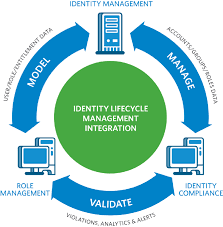
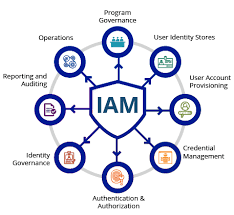
Identity and Access Management is a framework of policies, technologies, and processes that enables organisations to manage and control user identities and their access to resources within the IT infrastructure. IAM solutions help in securely managing user identities, enforcing access controls, and ensuring compliance with regulatory requirements.

The Benefits of IAM Services

Implementing IAM services offers several benefits to organisations:

  • Enhanced Security: IAM solutions help in preventing unauthorised access to sensitive data by enforcing strict access controls.
  • Improved Compliance: Organisations can meet regulatory requirements by implementing IAM solutions that provide audit trails and enforce policies.
  • Increased Productivity: By streamlining user access processes, IAM services enable users to quickly obtain the necessary permissions for their roles.
  • Centralised Management: IAM solutions provide a centralised platform for managing user identities, reducing administrative overhead.
  • Risk Mitigation: By implementing IAM services, organisations can reduce the risk of insider threats and data breaches.

Choosing the Right IAM Solution

When selecting an IAM solution for your organisation, consider factors such as scalability, ease of integration with existing systems, compliance capabilities, reporting functionalities, and user experience. It is essential to choose a solution that aligns with your organisation’s security requirements and future growth plans.

In Conclusion

Identity and Access Management services play a critical role in safeguarding organisational data assets from cyber threats. By implementing robust IAM solutions, organisations can enhance security, improve compliance posture, streamline access management processes, and mitigate risks effectively. Investing in IAM services is not only a proactive measure but also a strategic decision towards building a secure digital environment.


Essential Insights into Identity and Access Management: Key Questions and Answers

  1. What is Identity and Access Management (IAM) and why is it important?
  2. How does Identity and Access Management help in enhancing cybersecurity?
  3. What are the key components of an Identity and Access Management system?
  4. How can Identity and Access Management services benefit my organisation?
  5. What are the common challenges faced when implementing Identity and Access Management solutions?
  6. How do Identity and Access Management systems ensure compliance with data protection regulations?
  7. What factors should organisations consider when selecting an Identity and Access Management solution?

What is Identity and Access Management (IAM) and why is it important?

Identity and Access Management (IAM) is a comprehensive framework of policies, technologies, and processes that organisations utilise to manage user identities and control their access to resources within the IT infrastructure. IAM plays a crucial role in enhancing data security by ensuring that only authorised individuals have access to sensitive information, thereby reducing the risk of data breaches and insider threats. By enforcing strict access controls, IAM solutions help organisations comply with regulatory requirements and maintain a secure digital environment. In essence, IAM is vital for safeguarding organisational data assets, improving compliance posture, streamlining access management processes, and mitigating risks effectively in today’s evolving cybersecurity landscape.

How does Identity and Access Management help in enhancing cybersecurity?

Identity and Access Management (IAM) plays a pivotal role in enhancing cybersecurity by providing a comprehensive framework for managing user identities and controlling their access to critical resources within an organisation’s IT infrastructure. By implementing IAM solutions, businesses can enforce strict access controls, authenticate users effectively, and monitor user activities in real-time. This proactive approach helps in preventing unauthorised access to sensitive data, reducing the risk of insider threats and external cyber attacks. IAM also aids in ensuring compliance with regulatory requirements by maintaining audit trails and enforcing security policies. Overall, IAM acts as a robust security layer that strengthens an organisation’s cybersecurity posture by safeguarding against potential vulnerabilities and mitigating risks associated with identity-related breaches.

What are the key components of an Identity and Access Management system?

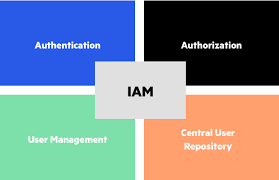
In an Identity and Access Management (IAM) system, several key components work together to ensure secure and efficient management of user identities and access rights. These components typically include authentication mechanisms, which verify the identity of users through methods like passwords, biometrics, or multi-factor authentication. Authorisation controls determine the level of access granted to users based on their roles and permissions. User provisioning and deprovisioning tools manage the creation, modification, and removal of user accounts across systems. Additionally, audit and reporting functionalities track user activities for compliance purposes and security monitoring. Centralised directories such as LDAP or Active Directory store user information, while Single Sign-On (SSO) capabilities streamline user access to multiple applications with a single set of credentials. Together, these components form a comprehensive IAM system that enhances security, compliance, and operational efficiency within an organisation’s IT infrastructure.

How can Identity and Access Management services benefit my organisation?

Identity and Access Management (IAM) services offer a multitude of benefits to organisations. By implementing IAM solutions, your organisation can significantly enhance its security posture by ensuring that only authorised individuals have access to sensitive data and resources. IAM services also help in improving compliance with regulatory requirements by providing audit trails and enforcing access policies. Furthermore, IAM solutions streamline user access processes, leading to increased productivity and reduced administrative overhead. Overall, investing in IAM services can empower your organisation to mitigate risks, enhance operational efficiency, and safeguard critical information assets effectively.

What are the common challenges faced when implementing Identity and Access Management solutions?

When organisations embark on implementing Identity and Access Management (IAM) solutions, they often encounter common challenges that can impact the success of the deployment. One prevalent issue is the complexity of integrating IAM systems with existing IT infrastructure, which can lead to compatibility issues and disruptions in user access. Another challenge is ensuring a balance between security and user convenience, as overly stringent access controls may hinder productivity. Additionally, managing the lifecycle of user identities, such as provisioning and deprovisioning access rights effectively, poses a significant challenge. Addressing these challenges requires careful planning, stakeholder engagement, and continuous monitoring to ensure a seamless implementation of IAM solutions that meet both security requirements and user needs.

How do Identity and Access Management systems ensure compliance with data protection regulations?

Identity and Access Management (IAM) systems play a vital role in ensuring compliance with data protection regulations by implementing robust security measures and access controls. These systems help organisations adhere to regulations such as the GDPR by managing user identities, enforcing authentication protocols, and controlling access to sensitive data based on predefined policies. IAM systems provide audit trails and reporting functionalities that enable organisations to monitor and track user activities, ensuring that data is accessed only by authorised individuals. By centralising identity management processes and enforcing strict access controls, IAM systems help organisations demonstrate compliance with data protection regulations and safeguard against potential breaches or non-compliance issues.

What factors should organisations consider when selecting an Identity and Access Management solution?

When organisations are evaluating Identity and Access Management solutions, several key factors should be taken into consideration to ensure the selection of the most suitable solution. Firstly, scalability is crucial, as the chosen IAM solution should be able to accommodate the organisation’s current needs and future growth. Integration capabilities with existing systems and applications are also important to ensure seamless operation across the IT infrastructure. Compliance features play a significant role in meeting regulatory requirements and maintaining data security standards. Additionally, robust reporting functionalities help in monitoring user activities and identifying potential security risks. User experience is another essential factor to consider, as a user-friendly IAM solution enhances productivity and adoption rates within the organisation. By carefully assessing these factors, organisations can make informed decisions when selecting an Identity and Access Management solution that aligns with their security objectives and operational requirements.

The Importance of Identity Access Management Services

The Importance of Identity Access Management Services

Identity Access Management (IAM) services play a crucial role in today’s digital landscape, where data security and privacy are paramount. IAM services encompass processes, technologies, and policies that manage digital identities and control access to resources within an organisation. Let’s delve into why IAM services are essential for businesses of all sizes.

Enhanced Security

One of the primary benefits of IAM services is enhanced security. By implementing robust authentication and authorisation mechanisms, IAM helps prevent unauthorised access to sensitive information. With features such as multi-factor authentication and role-based access control, businesses can ensure that only authorised individuals have access to specific resources.

Improved Compliance

Compliance with regulations such as GDPR, HIPAA, and PCI DSS is a significant concern for organisations across industries. IAM services aid in achieving compliance by maintaining detailed logs of user activities, enforcing access policies, and facilitating audits. This not only helps in meeting regulatory requirements but also enhances data governance practices.

Increased Productivity

Effective IAM services streamline the user provisioning and deprovisioning processes, making it easier for IT teams to manage user accounts efficiently. Automation features reduce manual intervention, saving time and resources. This results in increased productivity across the organisation as employees can access the resources they need promptly without unnecessary delays.

Cost Savings

By centralising identity management functions and automating routine tasks, IAM services help reduce operational costs associated with managing user identities. The elimination of manual processes lowers the risk of errors and enhances overall operational efficiency. Additionally, IAM solutions often offer scalability options that grow with the business without significant additional investments.

Conclusion

In conclusion, Identity Access Management services are indispensable for modern businesses looking to secure their digital assets effectively. From bolstering security measures to ensuring regulatory compliance and improving operational efficiency, IAM services offer a comprehensive solution to identity management challenges. By investing in robust IAM solutions, organisations can safeguard their data assets while enabling seamless access for authorised users.


Enhancing Security: Six Essential Tips for Effective Identity Access Management

  1. Implement strong password policies to enhance security.
  2. Use multi-factor authentication for an added layer of protection.
  3. Regularly review and update user access permissions to prevent unauthorized access.
  4. Monitor user activity and set up alerts for suspicious behaviour.
  5. Ensure employees receive proper training on identity access management best practices.
  6. Consider using a centralised identity management system for easier administration.

Implement strong password policies to enhance security.

Implementing strong password policies is a fundamental aspect of enhancing security within Identity Access Management services. By requiring users to create complex passwords that include a combination of letters, numbers, and special characters, organisations can significantly reduce the risk of unauthorised access to sensitive information. Strong passwords act as the first line of defence against cyber threats and malicious actors, ensuring that only authenticated users can access critical resources. Regularly updating passwords and enforcing password expiry policies further strengthens security measures and helps mitigate the risk of data breaches.

Use multi-factor authentication for an added layer of protection.

Implementing multi-factor authentication (MFA) is a highly recommended practice when it comes to identity access management services. By requiring users to provide multiple forms of verification before accessing sensitive resources, such as a password along with a unique code sent to their mobile device, MFA significantly enhances security. This additional layer of protection helps mitigate the risk of unauthorised access, even if login credentials are compromised. Utilising MFA ensures that only authorised individuals with the necessary permissions can securely access critical data and systems within an organisation.

Regularly review and update user access permissions to prevent unauthorized access.

Regularly reviewing and updating user access permissions is a fundamental tip in Identity Access Management services to mitigate the risk of unauthorised access. By conducting periodic audits of user permissions, organisations can ensure that individuals only have access to the resources necessary for their roles. This proactive approach not only enhances security but also helps in maintaining compliance with data protection regulations. By staying vigilant and promptly revoking unnecessary access rights, businesses can significantly reduce the likelihood of security breaches and protect their sensitive information effectively.

Monitor user activity and set up alerts for suspicious behaviour.

To enhance the security of your digital environment, it is crucial to monitor user activity and establish alerts for any suspicious behaviour when utilising Identity Access Management services. By actively tracking user actions and setting up alerts for anomalies or potential threats, organisations can proactively detect and respond to security incidents. Monitoring user activity allows for the identification of unusual patterns or unauthorised access attempts, enabling swift action to mitigate risks and protect sensitive data. This proactive approach helps bolster overall cybersecurity defences and ensures that any potential breaches are promptly addressed.

Ensure employees receive proper training on identity access management best practices.

To maximise the effectiveness of identity access management services, it is crucial to ensure that employees receive proper training on best practices. By educating staff on the importance of maintaining secure passwords, recognising phishing attempts, and following access control policies, organisations can significantly reduce the risk of data breaches and unauthorised access. Training empowers employees to play an active role in safeguarding sensitive information and reinforces a culture of security awareness throughout the organisation.

Consider using a centralised identity management system for easier administration.

When implementing Identity Access Management services, it is advisable to consider utilising a centralised identity management system for simplified administration. By centralising user identities and access controls in one system, businesses can streamline user provisioning, authentication, and authorisation processes. This approach not only enhances security by providing a single point of control but also facilitates easier management of user accounts across various applications and systems. With a centralised identity management system in place, organisations can efficiently manage access rights, track user activities, and ensure compliance with regulatory requirements.

The Importance of Active Directory Audits

The Importance of Active Directory Audits

In the realm of IT security, one crucial aspect that often gets overlooked is the regular auditing of Active Directory. Active Directory serves as the central nervous system of an organisation’s network, managing user accounts, permissions, and access to resources. Conducting thorough and regular audits of your Active Directory is essential for maintaining a secure and compliant IT environment.

Enhancing Security

Active Directory audits help in identifying potential security vulnerabilities within your network. By reviewing user permissions, group memberships, and access controls, you can detect any anomalies or unauthorised activities that may pose a threat to your organisation’s data security. Regular audits enable you to proactively address security issues before they escalate into major breaches.

Ensuring Compliance

Many industries have strict regulatory requirements regarding data protection and privacy. Conducting Active Directory audits helps ensure that your organisation remains compliant with relevant regulations such as GDPR, HIPAA, or PCI DSS. By documenting and reviewing access controls and user activities, you can demonstrate due diligence in safeguarding sensitive information.

Improving Operational Efficiency

Active Directory audits not only focus on security and compliance but also contribute to enhancing operational efficiency. By monitoring user account usage, tracking changes to group policies, and identifying inactive accounts, you can streamline IT operations and optimise resource allocation. This leads to a more agile and responsive IT infrastructure.

Choosing the Right Audit Solution

When it comes to conducting Active Directory audits, selecting the right audit solution is paramount. Look for tools that offer comprehensive reporting capabilities, real-time monitoring features, and customisable alerts. Consider solutions that integrate seamlessly with your existing IT environment and provide actionable insights to improve your overall security posture.

Conclusion

In conclusion, active directory audits play a vital role in safeguarding your organisation’s digital assets, ensuring regulatory compliance, and enhancing operational efficiency. By investing in regular audits and leveraging advanced audit solutions, you can mitigate risks effectively and maintain a robust IT infrastructure capable of withstanding evolving cyber threats.


8 Essential Tips for Conducting Effective Active Directory Audits

  1. Regularly review user accounts to ensure only authorised individuals have access.
  2. Monitor login activity and investigate any suspicious or unusual patterns.
  3. Implement strong password policies and enforce regular password changes.
  4. Audit group memberships to prevent unnecessary access rights.
  5. Keep track of changes made to group policies for security compliance.
  6. Enable auditing features in Active Directory to log events for analysis.
  7. Periodically review permissions assigned to sensitive data or resources.
  8. Train IT staff on best practices for maintaining a secure Active Directory environment.

Regularly review user accounts to ensure only authorised individuals have access.

It is crucial to regularly review user accounts within Active Directory to verify that only authorised individuals have access to the network resources. By conducting routine audits of user permissions and account activities, organisations can identify and rectify any instances of unauthorised access or potential security breaches. This proactive approach helps strengthen the overall security posture of the IT environment and minimises the risk of data breaches or insider threats.

Monitor login activity and investigate any suspicious or unusual patterns.

Monitoring login activity is a crucial aspect of conducting effective Active Directory audits. By keeping a close eye on user logins and investigating any suspicious or unusual patterns, organisations can proactively identify potential security threats and prevent unauthorised access to critical systems and data. Monitoring login activity allows IT teams to detect anomalies such as multiple failed login attempts, logins from unfamiliar locations, or unusual login times, which could indicate malicious activities. By promptly investigating and addressing these irregularities, organisations can strengthen their security posture and mitigate the risk of security breaches.

Implement strong password policies and enforce regular password changes.

To enhance the security of your Active Directory environment, it is crucial to implement robust password policies and enforce regular password changes. By setting strong password requirements such as minimum length, complexity, and expiration periods, you can significantly reduce the risk of unauthorised access and credential-based attacks. Regularly prompting users to update their passwords not only strengthens authentication measures but also helps in mitigating potential security threats posed by compromised credentials. By prioritising password security through proactive policies and enforcement, organisations can bolster their overall defence against cyber threats targeting their Active Directory infrastructure.

Audit group memberships to prevent unnecessary access rights.

Audit group memberships is a crucial tip in Active Directory audits to prevent unnecessary access rights. By regularly reviewing and monitoring the groups that users belong to, organisations can ensure that individuals only have access to the resources and information necessary for their roles. Identifying and removing users from groups they no longer require membership in helps minimise the risk of unauthorised access and potential security breaches. This proactive approach enhances data security and compliance by maintaining strict control over access rights within the network.

Keep track of changes made to group policies for security compliance.

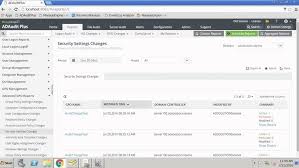
To maintain security compliance in your Active Directory environment, it is essential to keep track of changes made to group policies. Monitoring and documenting alterations to group policies allow you to ensure that only authorised modifications are implemented, reducing the risk of security breaches or compliance violations. By maintaining a detailed record of policy changes, organisations can demonstrate transparency and accountability in adhering to security standards and regulatory requirements, ultimately strengthening the overall security posture of their IT infrastructure.

Enable auditing features in Active Directory to log events for analysis.

Enabling auditing features in Active Directory is a crucial tip to enhance the security of your network. By activating these features, you can effectively log events and activities within your Active Directory environment, providing valuable data for analysis and monitoring. This proactive approach allows you to track user actions, detect suspicious behaviour, and investigate potential security incidents promptly. Leveraging the auditing capabilities of Active Directory empowers you to strengthen your overall cybersecurity posture and ensure the integrity of your IT infrastructure.

Periodically review permissions assigned to sensitive data or resources.

It is crucial to periodically review the permissions assigned to sensitive data or resources in your Active Directory environment. By regularly assessing and validating user access rights, you can ensure that only authorised individuals have the necessary permissions to sensitive information. This practice helps mitigate the risk of data breaches and unauthorised access, enhancing the overall security posture of your organisation. Regular reviews also enable you to identify and address any inconsistencies or potential vulnerabilities in access controls, maintaining a secure and compliant IT infrastructure.

Train IT staff on best practices for maintaining a secure Active Directory environment.

To enhance the security of your Active Directory environment, it is essential to provide comprehensive training to your IT staff on best practices. By educating them on proper user access management, secure password policies, regular monitoring procedures, and prompt response to security incidents, you empower your team to proactively safeguard the integrity of your network. Training IT staff on these crucial aspects not only strengthens the overall security posture of your organisation but also fosters a culture of vigilance and responsibility towards maintaining a secure Active Directory environment.

The Importance of Active Directory Auditing

The Importance of Active Directory Auditing

Active Directory (AD) is a crucial component of most organisations’ IT infrastructure, serving as a centralised database that stores and manages user accounts, computer information, and security policies. With the increasing number of cyber threats and regulatory requirements, ensuring the security and compliance of your AD environment is more important than ever.

AD auditing plays a vital role in maintaining the integrity and security of your network. By conducting regular audits, organisations can track user activities, monitor changes to configurations, detect potential security breaches, and ensure compliance with industry regulations such as GDPR, HIPAA, or PCI DSS.

Benefits of AD Auditing:

  • Enhanced Security: By monitoring user activities and tracking changes in AD settings, organisations can quickly identify suspicious behaviour or unauthorised access attempts.
  • Compliance: Auditing helps organisations demonstrate compliance with regulatory requirements by providing detailed reports on access controls, data modifications, and user permissions.
  • Improved Troubleshooting: Auditing logs can help IT teams troubleshoot issues more efficiently by providing insights into system errors or policy violations.
  • Audit Trail: Having a comprehensive audit trail allows organisations to investigate security incidents, track down the source of data breaches, and prevent future attacks.

In conclusion, active directory auditing is a critical practice for any organisation looking to secure their IT environment, protect sensitive data, and meet compliance standards. By implementing robust auditing processes and leveraging advanced audit tools, businesses can proactively safeguard their AD infrastructure against threats and ensure the smooth operation of their network.


Understanding and Conducting an Ad Audit: Key Questions and Methodologies

  1. How do I run an ad audit?
  2. What is an ad audit?
  3. What is the audit methodology of Active Directory?
  4. How do you audit ad changes?

How do I run an ad audit?

Running an Active Directory (AD) audit involves a series of steps to ensure the security and compliance of your IT environment. To initiate an AD audit, start by defining the scope of the audit, including the specific areas you want to assess such as user accounts, group policies, or access controls. Next, select a reliable AD auditing tool that aligns with your requirements and can provide detailed insights into AD activities. Configure the auditing tool to monitor and track changes within your AD environment, including user logins, account modifications, and permission changes. Once the audit is set up, regularly review and analyse the generated reports to identify any anomalies or potential security risks. By following these steps and maintaining a proactive approach to AD auditing, you can enhance the security posture of your organisation and ensure regulatory compliance.

What is an ad audit?

An AD audit, short for Active Directory audit, is a systematic examination and evaluation of an organisation’s Active Directory environment to ensure its security, compliance, and operational efficiency. During an AD audit, IT professionals review user activities, permissions settings, configuration changes, and access controls within the Active Directory system. By conducting regular AD audits, organisations can identify potential security vulnerabilities, detect unauthorised access attempts, track changes made to critical settings, and maintain compliance with industry regulations. Overall, an AD audit is a proactive measure that helps businesses strengthen their IT security posture and mitigate risks associated with managing user accounts and network resources within the Active Directory infrastructure.

What is the audit methodology of Active Directory?

The audit methodology of Active Directory involves a systematic process of evaluating and monitoring the security, configuration, and activity within an organisation’s Active Directory environment. This methodology typically includes identifying critical assets and resources within the AD, establishing audit policies and procedures, conducting regular audits to assess compliance with security standards and regulations, analysing audit logs for anomalies or suspicious activities, and implementing corrective measures to address any identified issues. By following a structured audit methodology, organisations can enhance their overall security posture, mitigate risks, and ensure the integrity of their Active Directory infrastructure.

How do you audit ad changes?

Auditing Active Directory (AD) changes involves monitoring and tracking modifications made to user accounts, group policies, permissions, and other configurations within the AD environment. Organisations can implement various methods to audit AD changes effectively, such as enabling auditing policies in AD to log events, using third-party auditing tools for more comprehensive monitoring, and regularly reviewing audit logs to detect any suspicious activities or unauthorised modifications. By establishing robust auditing processes and leveraging advanced technologies, organisations can proactively identify and respond to changes in their AD environment, enhancing security, compliance, and overall IT governance.

Article: Identity & Access Management System

The Importance of Identity & Access Management System in Modern Businesses

In today’s digital age, where cyber threats are constantly evolving, ensuring the security of sensitive data and resources is a top priority for businesses of all sizes. One crucial component of a robust cybersecurity strategy is the implementation of an Identity and Access Management (IAM) system.

What is Identity & Access Management?

Identity and Access Management is a framework of policies and technologies that enables organisations to manage and control user identities and their access to various systems and applications within the IT infrastructure. It encompasses processes such as user authentication, authorisation, provisioning, deprovisioning, and access governance.

The Benefits of IAM System

Implementing an IAM system offers numerous benefits to businesses:

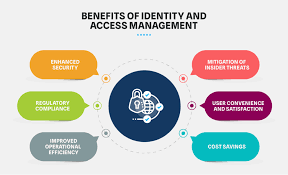
  • Enhanced Security: IAM helps prevent unauthorised access to critical systems and data by ensuring that only authenticated users have the appropriate level of access.
  • Improved Compliance: IAM systems assist in meeting regulatory requirements by providing detailed audit trails and enforcing security policies.
  • Increased Productivity: By streamlining user onboarding processes and automating access requests, IAM reduces administrative burden and enhances operational efficiency.
  • Cost Savings: Centralising identity management can lead to cost savings through reduced IT support overheads and mitigating the risk of security breaches.
  • User Convenience: IAM systems offer users a seamless experience across multiple applications with single sign-on capabilities, enhancing user convenience without compromising security.

The Future of IAM

As businesses continue to digitalise their operations and adopt cloud-based services, the role of IAM becomes even more critical. The future of IAM lies in integrating advanced technologies such as biometrics, artificial intelligence, and machine learning to enhance authentication methods and adapt to evolving security threats.

In conclusion, implementing an Identity & Access Management system is essential for safeguarding sensitive data, ensuring regulatory compliance, enhancing operational efficiency, and protecting against cyber threats. By investing in a robust IAM framework, businesses can strengthen their overall cybersecurity posture in an increasingly interconnected world.


Understanding Identity & Access Management Systems: Key Concepts and Examples

  1. What is the purpose of the IAM system?
  2. What is CMS identity and access management system?
  3. What is an example of IAM?
  4. What is identity access management system?

What is the purpose of the IAM system?

The primary purpose of an Identity and Access Management (IAM) system is to securely manage and control the identities of users within an organisation and regulate their access to various systems, applications, and data resources. By implementing an IAM system, businesses can ensure that only authorised individuals have the appropriate level of access to sensitive information, thereby reducing the risk of data breaches and insider threats. IAM systems play a crucial role in enhancing security, streamlining user authentication processes, enforcing compliance with regulations, and improving overall operational efficiency within an IT environment.

What is CMS identity and access management system?

The CMS Identity and Access Management System, often abbreviated as CMS IAM, is a specialised solution designed to manage user identities and control access within the context of Content Management Systems (CMS). This system allows organisations to regulate user permissions, authenticate users securely, and monitor user activities within their CMS environment. By implementing CMS IAM, businesses can ensure that only authorised individuals have access to sensitive content, streamline user management processes, and enhance overall security measures within their content management infrastructure.

What is an example of IAM?

An example of an Identity and Access Management (IAM) system is Microsoft Azure Active Directory (AAD). AAD is a cloud-based identity management service that allows organisations to manage user identities and control access to various applications and resources within the Azure ecosystem. With AAD, administrators can set up user accounts, assign permissions, enforce security policies, and enable single sign-on for seamless access across multiple services. This example showcases how IAM systems like AAD play a crucial role in ensuring secure and efficient identity management in modern IT environments.

What is identity access management system?

An Identity and Access Management (IAM) system is a comprehensive framework that organisations use to manage and control user identities and their access to various systems and applications within the IT infrastructure. It involves a set of policies, processes, and technologies that govern user authentication, authorisation, provisioning, deprovisioning, and access governance. In essence, an IAM system serves as the gatekeeper that ensures only authenticated users have the appropriate level of access to critical resources while maintaining security, compliance, and operational efficiency across the organisation.