Article: Identity & Access Management System

The Importance of Identity & Access Management System in Modern Businesses

In today’s digital age, where cyber threats are constantly evolving, ensuring the security of sensitive data and resources is a top priority for businesses of all sizes. One crucial component of a robust cybersecurity strategy is the implementation of an Identity and Access Management (IAM) system.

What is Identity & Access Management?

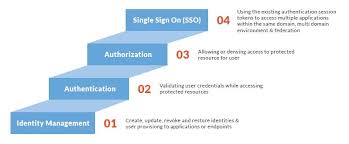
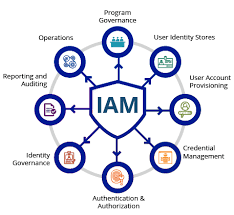
Identity and Access Management is a framework of policies and technologies that enables organisations to manage and control user identities and their access to various systems and applications within the IT infrastructure. It encompasses processes such as user authentication, authorisation, provisioning, deprovisioning, and access governance.

The Benefits of IAM System

Implementing an IAM system offers numerous benefits to businesses:

  • Enhanced Security: IAM helps prevent unauthorised access to critical systems and data by ensuring that only authenticated users have the appropriate level of access.
  • Improved Compliance: IAM systems assist in meeting regulatory requirements by providing detailed audit trails and enforcing security policies.
  • Increased Productivity: By streamlining user onboarding processes and automating access requests, IAM reduces administrative burden and enhances operational efficiency.
  • Cost Savings: Centralising identity management can lead to cost savings through reduced IT support overheads and mitigating the risk of security breaches.
  • User Convenience: IAM systems offer users a seamless experience across multiple applications with single sign-on capabilities, enhancing user convenience without compromising security.

The Future of IAM

As businesses continue to digitalise their operations and adopt cloud-based services, the role of IAM becomes even more critical. The future of IAM lies in integrating advanced technologies such as biometrics, artificial intelligence, and machine learning to enhance authentication methods and adapt to evolving security threats.

In conclusion, implementing an Identity & Access Management system is essential for safeguarding sensitive data, ensuring regulatory compliance, enhancing operational efficiency, and protecting against cyber threats. By investing in a robust IAM framework, businesses can strengthen their overall cybersecurity posture in an increasingly interconnected world.


Understanding Identity & Access Management Systems: Key Concepts and Examples

  1. What is the purpose of the IAM system?
  2. What is CMS identity and access management system?
  3. What is an example of IAM?
  4. What is identity access management system?

What is the purpose of the IAM system?

The primary purpose of an Identity and Access Management (IAM) system is to securely manage and control the identities of users within an organisation and regulate their access to various systems, applications, and data resources. By implementing an IAM system, businesses can ensure that only authorised individuals have the appropriate level of access to sensitive information, thereby reducing the risk of data breaches and insider threats. IAM systems play a crucial role in enhancing security, streamlining user authentication processes, enforcing compliance with regulations, and improving overall operational efficiency within an IT environment.

What is CMS identity and access management system?

The CMS Identity and Access Management System, often abbreviated as CMS IAM, is a specialised solution designed to manage user identities and control access within the context of Content Management Systems (CMS). This system allows organisations to regulate user permissions, authenticate users securely, and monitor user activities within their CMS environment. By implementing CMS IAM, businesses can ensure that only authorised individuals have access to sensitive content, streamline user management processes, and enhance overall security measures within their content management infrastructure.

What is an example of IAM?

An example of an Identity and Access Management (IAM) system is Microsoft Azure Active Directory (AAD). AAD is a cloud-based identity management service that allows organisations to manage user identities and control access to various applications and resources within the Azure ecosystem. With AAD, administrators can set up user accounts, assign permissions, enforce security policies, and enable single sign-on for seamless access across multiple services. This example showcases how IAM systems like AAD play a crucial role in ensuring secure and efficient identity management in modern IT environments.

What is identity access management system?

An Identity and Access Management (IAM) system is a comprehensive framework that organisations use to manage and control user identities and their access to various systems and applications within the IT infrastructure. It involves a set of policies, processes, and technologies that govern user authentication, authorisation, provisioning, deprovisioning, and access governance. In essence, an IAM system serves as the gatekeeper that ensures only authenticated users have the appropriate level of access to critical resources while maintaining security, compliance, and operational efficiency across the organisation.
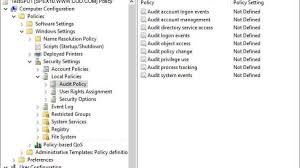
Audit Active Directory Tools

The Importance of Using Audit Active Directory Tools

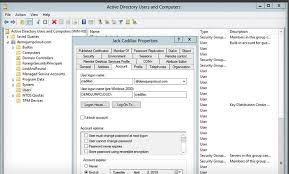
Active Directory is a critical component of many organisations’ IT infrastructure, serving as a centralised database that stores and manages information about network resources. As the backbone of user authentication and access control in Windows environments, it is essential to ensure the security and integrity of Active Directory.

One way to enhance the security of Active Directory is through the use of audit tools specifically designed for monitoring and managing its activities. These tools provide administrators with valuable insights into user actions, system changes, and potential security threats within the directory.

Benefits of Audit Active Directory Tools:

  1. Enhanced Security: By monitoring user activity and system changes, audit tools help identify suspicious behaviour that may indicate a security breach. They allow administrators to detect unauthorised access attempts and take proactive measures to mitigate risks.
  2. Compliance: Many industries have regulatory requirements regarding data security and privacy. Audit tools help organisations demonstrate compliance with standards such as GDPR, HIPAA, or PCI DSS by providing detailed logs and reports on Active Directory activities.
  3. Insightful Reporting: Audit tools generate comprehensive reports that offer insights into user permissions, group memberships, password policies, and more. Administrators can use these reports to assess the overall health of Active Directory and make informed decisions about security configurations.
  4. Auditing Changes: Tracking changes made to Active Directory objects is crucial for maintaining data integrity. Audit tools record modifications to user accounts, group policies, schema changes, and other critical components, enabling administrators to revert unwanted changes or investigate suspicious activities.
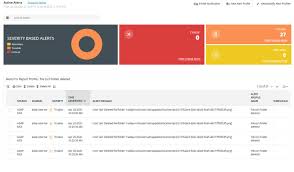
  5. Real-time Monitoring: Some audit tools provide real-time alerts for specific events or policy violations within Active Directory. This proactive approach allows administrators to respond promptly to security incidents and prevent potential threats from escalating.

In conclusion, utilising audit Active Directory tools is essential for maintaining a secure and compliant IT environment. By leveraging the capabilities of these tools, organisations can strengthen their defences against cyber threats, streamline compliance efforts, and ensure the smooth operation of their Active Directory infrastructure.


Top 5 Tips for Effectively Auditing Active Directory Tools

  1. Regularly review and monitor user access rights in Active Directory to ensure compliance with security policies.
  2. Utilize audit trail features of Active Directory tools to track changes made to user accounts, groups, and permissions.
  3. Set up alerts for suspicious activities or unauthorized access attempts within Active Directory.
  4. Perform periodic audits of privileged accounts and administrative roles to detect any anomalies or potential security risks.
  5. Document audit findings and remediation actions taken to maintain a record of security measures implemented in Active Directory.

Regularly review and monitor user access rights in Active Directory to ensure compliance with security policies.

Regularly reviewing and monitoring user access rights in Active Directory is a crucial step in maintaining a secure IT environment and ensuring compliance with security policies. By regularly assessing and updating user permissions, organisations can prevent unauthorised access to sensitive data, reduce the risk of insider threats, and uphold regulatory requirements. Monitoring user access rights also helps identify any discrepancies or anomalies that may indicate potential security breaches, allowing administrators to take prompt action to mitigate risks and safeguard the integrity of their Active Directory infrastructure.

Utilize audit trail features of Active Directory tools to track changes made to user accounts, groups, and permissions.

By utilising the audit trail features of Active Directory tools, administrators can effectively track and monitor changes made to user accounts, groups, and permissions within the network. This capability enables a detailed record of all modifications, allowing for greater visibility into who made the changes, when they occurred, and what specific actions were taken. By maintaining a comprehensive audit trail, organisations can enhance security measures, detect unauthorised alterations promptly, and ensure the integrity of their Active Directory environment.

Set up alerts for suspicious activities or unauthorized access attempts within Active Directory.

Setting up alerts for suspicious activities or unauthorised access attempts within Active Directory is a crucial step in enhancing the security of your IT infrastructure. By configuring proactive alerts through audit tools, administrators can receive immediate notifications of any unusual behaviour or potential security threats within the directory. This allows for swift responses to mitigate risks, investigate incidents, and prevent unauthorised access before it escalates. Implementing alert mechanisms not only strengthens the overall security posture of Active Directory but also empowers organisations to stay ahead of potential cyber threats and maintain a vigilant approach to protecting their critical assets.

Perform periodic audits of privileged accounts and administrative roles to detect any anomalies or potential security risks.

Performing periodic audits of privileged accounts and administrative roles is a crucial practice in maintaining the security of Active Directory. By regularly reviewing and scrutinising these accounts, organisations can identify any irregularities or potential security risks that may compromise the integrity of their IT infrastructure. Detecting anomalies in user permissions and access levels can help prevent unauthorised actions and data breaches, ensuring that only authorised personnel have the necessary privileges within the Active Directory environment. This proactive approach to auditing not only enhances security but also strengthens overall compliance with regulatory requirements and best practices in cybersecurity.

Document audit findings and remediation actions taken to maintain a record of security measures implemented in Active Directory.

It is crucial to document audit findings and the remediation actions taken when utilising audit Active Directory tools. By maintaining a record of security measures implemented in Active Directory, organisations can track and demonstrate their commitment to enhancing system security. Documenting audit findings not only helps in identifying vulnerabilities and potential threats but also ensures that appropriate steps are taken to address them effectively. This proactive approach enables administrators to have a clear overview of the security posture of their Active Directory environment and facilitates continuous improvement in safeguarding critical IT assets.

The Importance of Identity Management Solutions

The Importance of Identity Management Solutions

In today’s digital age, where data breaches and cyber threats are on the rise, the need for robust identity management solutions has never been more critical. Identity management plays a crucial role in ensuring the security and integrity of an organisation’s IT infrastructure by controlling and monitoring user access to sensitive information.

Identity management solutions encompass a range of tools and technologies that enable businesses to manage user identities, roles, and privileges effectively. By implementing these solutions, organisations can streamline user access processes, strengthen security measures, and ensure compliance with regulatory requirements.

Key Benefits of Identity Management Solutions:

  • Enhanced Security: Identity management solutions help prevent unauthorised access to sensitive data by enforcing strict authentication and authorisation protocols.
  • Improved Efficiency: By automating user provisioning and deprovisioning processes, identity management solutions reduce administrative overhead and ensure timely access to resources.
  • Compliance Adherence: Organisations can meet regulatory requirements such as GDPR, HIPAA, or PCI DSS more easily with identity management solutions that provide audit trails and reporting capabilities.
  • User Experience: Simplified login processes and single sign-on capabilities enhance the user experience while maintaining security standards.
  • Risk Mitigation: Identity management solutions help identify and mitigate potential security risks through continuous monitoring of user activities and access privileges.

Choosing the Right Identity Management Solution

When selecting an identity management solution for your organisation, it is essential to consider factors such as scalability, integration capabilities, ease of use, and compliance features. Whether you opt for on-premises or cloud-based solutions, ensure that the chosen platform aligns with your business objectives and security requirements.

In conclusion, investing in robust identity management solutions is paramount for safeguarding your organisation’s sensitive data assets in today’s interconnected world. By implementing effective identity management practices, businesses can enhance security posture, improve operational efficiency, and build trust with customers and stakeholders.


Seven Essential Tips for Effective Identity Management Solutions

  1. Implement multi-factor authentication for added security.
  2. Regularly review and update user access permissions to prevent unauthorized access.
  3. Utilize a centralized identity management system to streamline administration tasks.
  4. Ensure strong password policies are in place to enhance security.
  5. Monitor user activity and set up alerts for suspicious behaviour.
  6. Provide training on best practices for managing identities and access rights.
  7. Regularly audit and assess the effectiveness of your identity management solution.

Implement multi-factor authentication for added security.

Implementing multi-factor authentication (MFA) is a crucial tip in identity management solutions to enhance security measures. By requiring users to provide multiple forms of verification, such as a password and a unique code sent to their mobile device, MFA significantly reduces the risk of unauthorised access to sensitive information. This additional layer of security not only strengthens authentication processes but also mitigates the impact of potential data breaches or cyber attacks, making it an essential practice in safeguarding valuable assets within an organisation’s IT infrastructure.

Regularly review and update user access permissions to prevent unauthorized access.

Regularly reviewing and updating user access permissions is a fundamental practice in identity management solutions to prevent unauthorised access to sensitive data and resources. By conducting periodic audits of user permissions, organisations can ensure that only authorised individuals have the necessary access rights, reducing the risk of data breaches and insider threats. This proactive approach not only enhances security but also helps maintain compliance with regulatory requirements by keeping access controls up to date with changes in personnel roles and responsibilities.

Utilize a centralized identity management system to streamline administration tasks.

By utilising a centralised identity management system, organisations can streamline administrative tasks related to user access and permissions. A centralised system simplifies the process of managing user identities, roles, and privileges across various applications and systems, reducing the complexity of administration. This approach not only enhances operational efficiency but also strengthens security measures by ensuring consistent access controls and monitoring capabilities. Centralising identity management empowers businesses to efficiently allocate resources, enforce security policies, and maintain compliance with regulatory requirements.

Ensure strong password policies are in place to enhance security.

To enhance security in identity management solutions, it is crucial to ensure that strong password policies are implemented. Strong password policies typically include requirements such as minimum length, complexity, and regular expiration intervals. By enforcing these policies, organisations can significantly reduce the risk of unauthorised access and data breaches. Additionally, educating users on the importance of creating unique and secure passwords can further strengthen the overall security posture of the system.

Monitor user activity and set up alerts for suspicious behaviour.

To enhance the security of your identity management system, it is crucial to monitor user activity closely and establish alerts for any suspicious behaviour. By tracking user actions within the system, such as login attempts, access requests, and changes to permissions, organisations can quickly detect anomalies or potential security threats. Setting up alerts for unusual patterns or activities can help proactively identify and respond to malicious behaviour, safeguarding sensitive data and preventing potential breaches. Monitoring user activity and implementing alert mechanisms are essential practices in maintaining a robust and secure identity management solution.

Provide training on best practices for managing identities and access rights.

To enhance the effectiveness of identity management solutions, it is crucial to provide training on best practices for managing identities and access rights. By educating employees on the importance of secure access protocols, password management, and data protection guidelines, organisations can empower their staff to make informed decisions that strengthen overall cybersecurity measures. Training sessions that focus on identity management best practices help create a culture of security awareness within the workforce, ultimately reducing the risk of data breaches and ensuring compliance with industry regulations.

Regularly audit and assess the effectiveness of your identity management solution.

It is crucial to regularly audit and assess the effectiveness of your identity management solution to ensure its continued reliability and security. By conducting routine audits, you can identify any vulnerabilities or gaps in your system, allowing you to take proactive measures to address them promptly. Regular assessments also help in verifying that your identity management solution aligns with your organisation’s evolving needs and compliance requirements. By staying vigilant and proactive in auditing your system, you can maintain a robust security posture and uphold the integrity of user identities within your IT infrastructure.

Article: Identity Management Products

The Importance of Identity Management Products in Today’s Digital Landscape

In the increasingly complex world of cybersecurity, the need for robust identity management products has never been more critical. Identity management plays a pivotal role in safeguarding sensitive information, securing digital assets, and ensuring compliance with regulations.

Identity management products encompass a range of tools and solutions designed to manage user identities, control access to resources, and protect against unauthorised activities. These products are essential for organisations looking to mitigate security risks and streamline their operations.

Key Features of Identity Management Products:

  • Single Sign-On (SSO): SSO functionality allows users to access multiple applications with a single set of credentials, enhancing user experience while maintaining security.
  • Multi-Factor Authentication (MFA): MFA adds an extra layer of security by requiring users to provide multiple forms of verification before accessing sensitive data or systems.
  • User Provisioning and De-provisioning: These features automate the process of granting or revoking access rights based on predefined rules, reducing the risk of human error.
  • Role-Based Access Control (RBAC): RBAC assigns permissions based on job roles or responsibilities, ensuring that users have appropriate access levels according to their roles within the organisation.
  • Audit Trails and Reporting: Identity management products offer detailed audit logs and reporting capabilities to track user activities, detect anomalies, and facilitate compliance audits.

The Benefits of Implementing Identity Management Products:

By investing in identity management products, organisations can enjoy a multitude of benefits:

  • Enhanced Security: Protect sensitive data from unauthorised access and reduce the risk of data breaches.
  • Improved Compliance: Meet regulatory requirements by enforcing access controls and maintaining audit trails.
  • Increase Productivity: Streamline user authentication processes and reduce password-related issues through SSO and automation.
  • Cost Savings: Reduce IT support costs associated with managing user accounts manually and mitigating security incidents.
  • User Experience: Provide seamless access to resources while maintaining a high level of security for users across various platforms.

In conclusion, identity management products are indispensable tools for modern organisations seeking to protect their digital assets, enhance operational efficiency, and ensure regulatory compliance. By implementing these solutions effectively, businesses can establish a strong foundation for secure and streamlined identity management practices in today’s dynamic digital landscape.


7 Essential Tips for Choosing and Implementing an Effective Identity Management Product

  1. Ensure the identity management product supports multi-factor authentication for enhanced security.
  2. Choose a product that offers role-based access control to manage user permissions effectively.
  3. Look for solutions that provide single sign-on capabilities to improve user experience and productivity.
  4. Consider scalability and flexibility of the product to accommodate future growth and changing needs.
  5. Implement regular audits and reviews of user access rights to maintain data security and compliance.
  6. Integrate the identity management product with existing systems for seamless operation and data synchronisation.
  7. Provide comprehensive training for users on how to use the identity management product effectively.

Ensure the identity management product supports multi-factor authentication for enhanced security.

To bolster security measures effectively, it is crucial to ensure that the chosen identity management product incorporates multi-factor authentication. By requiring users to provide multiple forms of verification before accessing sensitive information or systems, multi-factor authentication significantly enhances security levels. This additional layer of protection helps safeguard against unauthorised access attempts and strengthens overall data protection protocols within the organisation’s digital infrastructure.

Choose a product that offers role-based access control to manage user permissions effectively.

When selecting an identity management product, it is advisable to opt for a solution that provides role-based access control functionality. Role-based access control enables organisations to assign permissions based on job roles or responsibilities, ensuring that users have appropriate access levels aligned with their specific functions within the company. By implementing role-based access control, businesses can effectively manage user permissions, enhance security measures, and streamline access management processes, ultimately contributing to a more secure and efficient operational environment.

Look for solutions that provide single sign-on capabilities to improve user experience and productivity.

When exploring identity management products, it is advisable to seek out solutions that offer single sign-on capabilities. By implementing single sign-on functionality, users can access multiple applications and systems using a single set of credentials, thereby simplifying the authentication process. This not only enhances user experience by reducing the need to remember multiple passwords but also boosts productivity by streamlining access to resources across various platforms. Embracing solutions with single sign-on capabilities can significantly improve operational efficiency and user satisfaction within an organisation’s digital ecosystem.

Consider scalability and flexibility of the product to accommodate future growth and changing needs.

When evaluating identity management products, it is crucial to consider the scalability and flexibility of the solution to accommodate future growth and evolving requirements. A product that can scale seamlessly with the organisation’s expanding user base and adapt to changing business needs ensures long-term viability and cost-effectiveness. By choosing a solution that offers scalability and flexibility, businesses can future-proof their identity management infrastructure, enabling them to meet the challenges of tomorrow while maintaining optimal security and efficiency.

Implement regular audits and reviews of user access rights to maintain data security and compliance.

Implementing regular audits and reviews of user access rights is a crucial tip in ensuring data security and compliance within an organisation. By conducting systematic evaluations of user access permissions, businesses can proactively identify and rectify any potential security vulnerabilities or instances of unauthorised access. These audits help to maintain the integrity of data, protect sensitive information, and ensure that users have appropriate levels of access based on their roles. Moreover, regular reviews contribute to compliance with regulatory requirements by demonstrating a commitment to upholding data protection standards and mitigating risks associated with improper access privileges.

Integrate the identity management product with existing systems for seamless operation and data synchronisation.

To maximise the effectiveness of identity management products, it is crucial to integrate them with existing systems to ensure seamless operation and data synchronisation. By integrating the identity management product with other IT systems within an organisation, such as HR databases or cloud applications, businesses can achieve a unified and consistent approach to managing user identities and access controls. This integration not only enhances operational efficiency but also allows for real-time data synchronisation, ensuring that user information remains up-to-date across all platforms.

Provide comprehensive training for users on how to use the identity management product effectively.

To maximise the benefits of identity management products, it is crucial to provide comprehensive training for users on how to utilise the system effectively. By offering thorough guidance and education, organisations can empower their employees to navigate the identity management product with confidence and proficiency. Proper training ensures that users understand the features, functionalities, and best practices of the system, leading to enhanced security measures, improved productivity, and a smoother transition towards streamlined identity management processes within the organisation.

The Importance of Access Management Solutions in Today’s Digital World

In the rapidly evolving landscape of cybersecurity, organisations are facing increasing challenges in protecting their sensitive data and digital assets. One of the key aspects of securing an IT environment is managing access to resources effectively. Access management solutions play a crucial role in safeguarding information and ensuring that only authorised individuals can access specific data or systems.

What Are Access Management Solutions?

Access management solutions encompass a range of technologies and practices that help organisations control user access to applications, systems, networks, and data. These solutions enable administrators to define user permissions, authenticate identities, and monitor user activities to prevent unauthorised access or misuse of resources.

The Benefits of Implementing Access Management Solutions

Implementing robust access management solutions offers several benefits to organisations:

  • Enhanced Security: By enforcing strict access controls and authentication mechanisms, organisations can reduce the risk of data breaches and insider threats.
  • Compliance: Access management solutions help organisations comply with regulatory requirements by ensuring that only authorised personnel have access to sensitive data.
  • Improved User Experience: These solutions streamline the login process for users while maintaining security standards, enhancing overall user experience.
  • Audit Trails: Access management solutions provide detailed audit trails that track user activities, helping organisations investigate security incidents and demonstrate compliance during audits.
  • Efficient Resource Management: By managing access permissions effectively, organisations can optimise resource allocation and prevent unauthorised use of critical assets.

Types of Access Management Solutions

There are various types of access management solutions available in the market, including:

  • Single Sign-On (SSO): SSO solutions allow users to log in once with a single set of credentials to access multiple applications or services securely.
  • Multi-Factor Authentication (MFA): MFA adds an extra layer of security by requiring users to provide multiple forms of verification before granting access.
  • Role-Based Access Control (RBAC): RBAC assigns permissions based on job roles or responsibilities, ensuring that users have appropriate levels of access based on their roles within the organisation.
  • Federated Identity Management: Federated identity management enables seamless authentication and authorisation across multiple domains or systems without the need for duplicating user identities.

The Future of Access Management

As cyber threats continue to evolve, the role of access management solutions will become even more critical in protecting organisational assets. Future advancements may include biometric authentication, adaptive authentication based on user behaviour analysis, and integration with artificial intelligence for proactive threat detection.

In conclusion, implementing effective access management solutions is essential for safeguarding sensitive data, ensuring compliance with regulations, and maintaining a secure digital environment. Organisations that prioritise access control will be better equipped to mitigate security risks and protect their valuable assets in today’s digital age.


Top 7 Frequently Asked Questions About Access Management Solutions for Organisations

  1. What is access management?
  2. Why is access management important for organisations?
  3. How do access management solutions enhance cybersecurity?
  4. What are the common features of access management solutions?
  5. What role does user authentication play in access management?
  6. How can organisations ensure compliance with regulations through access management solutions?
  7. What are the best practices for implementing effective access management strategies?

What is access management?

Access management, also known as identity and access management (IAM), refers to the processes and technologies used by organisations to control and monitor user access to resources within their IT environment. It involves defining and managing user permissions, authenticating user identities, and enforcing security policies to ensure that only authorised individuals can access specific data, applications, or systems. Access management plays a crucial role in protecting sensitive information, preventing data breaches, and maintaining compliance with regulatory requirements. By implementing robust access management solutions, organisations can effectively manage user access rights, reduce security risks, and enhance overall cybersecurity posture.

Why is access management important for organisations?

Access management is crucial for organisations as it plays a pivotal role in safeguarding sensitive data, protecting against security breaches, and ensuring regulatory compliance. By implementing robust access management solutions, organisations can control user permissions, authenticate identities, and monitor user activities effectively. This helps prevent unauthorised access to critical resources, minimises the risk of insider threats, and enhances overall cybersecurity posture. Access management also streamlines the user experience by providing secure and seamless access to applications and systems while maintaining strict security protocols. Ultimately, access management is essential for organisations to maintain data integrity, mitigate security risks, and uphold the trust of stakeholders in an increasingly digital world.

How do access management solutions enhance cybersecurity?

Access management solutions play a crucial role in enhancing cybersecurity by providing organisations with robust tools to control user access effectively. By implementing access management solutions, organisations can enforce strict authentication processes, such as multi-factor authentication and biometric verification, to ensure that only authorised individuals can access sensitive data and systems. These solutions also enable administrators to set granular access permissions based on user roles, reducing the risk of insider threats and unauthorised access. Furthermore, access management solutions offer detailed audit trails and monitoring capabilities, allowing organisations to track user activities in real-time and detect any suspicious behaviour promptly. Overall, access management solutions strengthen cybersecurity by fortifying the perimeter of digital assets and mitigating the risks associated with unauthorised access or data breaches.

What are the common features of access management solutions?

Access management solutions typically offer a range of common features designed to enhance security and streamline access control processes. These features often include robust authentication mechanisms such as multi-factor authentication (MFA) to verify user identities securely. Role-based access control (RBAC) is another key feature that assigns permissions based on predefined roles, ensuring that users only have access to resources necessary for their job functions. Audit trails and reporting capabilities are essential components that track user activities and provide detailed logs for compliance purposes and security incident investigations. Additionally, many access management solutions offer single sign-on (SSO) functionality, allowing users to access multiple applications with a single set of credentials, improving user experience and reducing the risk of password fatigue.

What role does user authentication play in access management?

User authentication plays a crucial role in access management by verifying the identity of users seeking access to resources within an IT environment. Through user authentication, organisations can ensure that only authorised individuals are granted access to sensitive data, applications, and systems. By requiring users to prove their identity through credentials such as passwords, biometrics, or security tokens, access management solutions establish a secure barrier against unauthorised access and potential security breaches. Effective user authentication not only enhances the overall security posture of an organisation but also forms the foundation for implementing granular access controls and enforcing compliance with regulatory requirements.

How can organisations ensure compliance with regulations through access management solutions?

Organisations can ensure compliance with regulations through access management solutions by implementing robust controls and mechanisms that align with regulatory requirements. Access management solutions enable organisations to define user permissions, restrict access to sensitive data, and monitor user activities to ensure compliance with data protection laws and industry regulations. By enforcing policies such as role-based access control, multi-factor authentication, and regular access reviews, organisations can demonstrate adherence to regulatory standards and protect against data breaches. Additionally, access management solutions provide audit trails and reporting capabilities that allow organisations to track user access, detect anomalies, and generate compliance reports for regulatory audits. By leveraging these features effectively, organisations can establish a secure and compliant environment that meets the stringent demands of today’s regulatory landscape.

What are the best practices for implementing effective access management strategies?

When it comes to implementing effective access management strategies, several best practices can help organisations enhance their security posture and protect sensitive data. Firstly, conducting regular access reviews to ensure that user permissions are up-to-date and aligned with job roles is crucial. Implementing strong authentication mechanisms, such as multi-factor authentication, adds an extra layer of security. Utilising role-based access control (RBAC) to assign permissions based on job responsibilities helps prevent unauthorised access. Additionally, providing continuous user training on security awareness and best practices for accessing company resources can further strengthen the overall access management strategy. By following these best practices, organisations can establish a robust and proactive approach to managing access effectively in their IT environments.

Article: Active Directory Security

The Importance of Active Directory Security

Active Directory is a crucial component of many organisations’ IT infrastructure, serving as the centralised database that manages user identities and permissions within a network. Given its significance, ensuring the security of Active Directory is paramount to safeguard sensitive data, prevent unauthorised access, and maintain overall system integrity.

Common Threats to Active Directory Security

There are various threats that can compromise the security of Active Directory if not adequately addressed:

  • Brute Force Attacks: Hackers may attempt to gain access by repeatedly trying different password combinations until they succeed.
  • Insider Threats: Employees or contractors with malicious intent can abuse their access rights to compromise Active Directory.
  • Phishing: Social engineering techniques can trick users into revealing their credentials, which can then be used to access Active Directory.
  • Misconfigured Permissions: Inappropriate access rights can lead to data exposure or unauthorised changes within Active Directory.

Best Practices for Securing Active Directory

To enhance the security of your organisation’s Active Directory, consider implementing the following best practices:

  1. Regular Auditing: Conduct routine audits to monitor user activities, identify anomalies, and detect potential security breaches.
  2. Strong Password Policies: Enforce complex password requirements and implement multi-factor authentication to mitigate the risk of unauthorised access.
  3. Access Control: Limit user privileges based on job roles and responsibilities to minimise the impact of insider threats.
  4. Patch Management: Keep software up-to-date with the latest security patches to address known vulnerabilities in Active Directory components.
  5. Data Encryption: Encrypt sensitive data stored in Active Directory to protect it from unauthorised disclosure in case of a breach.

The Future of Active Directory Security

In an increasingly digital landscape where cyber threats continue to evolve, organisations must adapt their security measures to defend against sophisticated attacks targeting Active Directory. By staying vigilant, investing in advanced security solutions, and educating users on cybersecurity best practices, businesses can strengthen the defences around their critical IT infrastructure and protect valuable assets from potential harm.


Frequently Asked Questions About Enhancing Active Directory Security

  1. How do I make Active Directory secure?
  2. What is the function of the Active Directory security?
  3. Is Active Directory important for cyber security?
  4. What is security in Active Directory?

How do I make Active Directory secure?

Ensuring the security of Active Directory is a critical task for any organisation looking to protect its sensitive data and maintain system integrity. To make Active Directory secure, implementing a multi-layered approach is essential. Start by establishing strong password policies and enforcing regular password changes to reduce the risk of unauthorised access. Utilise role-based access control to restrict user permissions based on job roles, limiting potential vulnerabilities. Regularly audit Active Directory to monitor user activities, detect suspicious behaviour, and address any security gaps promptly. Implementing encryption for sensitive data stored in Active Directory adds an extra layer of protection against data breaches. By combining these measures with ongoing security training for users and staying abreast of emerging threats, organisations can enhance the overall security posture of their Active Directory environment.

What is the function of the Active Directory security?

The primary function of Active Directory security is to protect the integrity, confidentiality, and availability of an organisation’s network resources managed within the Active Directory environment. By implementing robust security measures, such as access controls, authentication mechanisms, and encryption protocols, Active Directory security ensures that only authorised users can access specific resources while preventing unauthorised access or malicious activities. Additionally, Active Directory security plays a crucial role in maintaining compliance with regulatory requirements and safeguarding sensitive data from potential threats, thereby fostering a secure and resilient IT infrastructure for the organisation.

Is Active Directory important for cyber security?

Active Directory plays a pivotal role in cybersecurity by serving as the centralised repository for user identities, permissions, and access controls within an organisation’s network. Its significance lies in its ability to authenticate users, manage their privileges, and enforce security policies across various IT resources. Active Directory enables administrators to streamline security measures, monitor user activities, and respond promptly to potential threats or breaches. Therefore, maintaining a secure Active Directory environment is crucial for ensuring robust cybersecurity defences and safeguarding sensitive data from malicious actors.

What is security in Active Directory?

Security in Active Directory refers to the measures and protocols put in place to protect the integrity, confidentiality, and availability of data stored within the directory service. It encompasses a range of practices aimed at preventing unauthorised access, detecting and responding to security incidents, and ensuring compliance with industry regulations. Security in Active Directory involves implementing strong authentication mechanisms, enforcing access controls based on user roles, monitoring user activities for suspicious behaviour, encrypting sensitive data, and regularly auditing the system for vulnerabilities. By prioritising security in Active Directory, organisations can safeguard their networks against cyber threats and maintain a robust defence posture to mitigate risks effectively.

The Power of SailPoint Identity Management (IDM)

In today’s digital age, managing user identities and access rights has become a critical aspect of cybersecurity for organisations across industries. SailPoint Identity Management (IDM) stands out as a leading solution that offers comprehensive identity governance capabilities to help businesses secure their sensitive data and resources.

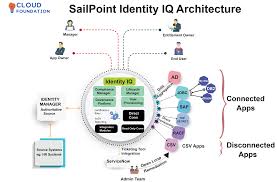
At its core, SailPoint IDM provides a centralised platform for managing user identities, access privileges, and compliance policies. By leveraging advanced automation and AI-driven insights, organisations can streamline their identity management processes while enhancing security and compliance.

Key Features of SailPoint IDM:

  • Identity Governance: SailPoint IDM enables organisations to define and enforce access policies based on roles, responsibilities, and business needs. This helps in reducing the risk of unauthorised access and ensuring compliance with regulatory requirements.
  • User Provisioning: With automated user provisioning capabilities, SailPoint IDM simplifies the process of granting or revoking access to applications, systems, and data based on predefined rules. This enhances operational efficiency and reduces the risk of human errors.
  • Access Certification: Organisations can conduct regular access reviews and certifications using SailPoint IDM to ensure that users have the appropriate level of access privileges. This proactive approach helps in identifying and mitigating security risks in a timely manner.
  • Role-Based Access Control: By implementing role-based access control mechanisms, SailPoint IDM allows organisations to assign permissions based on job roles or functions. This granular control helps in reducing the complexity of managing access rights across the enterprise.

The Benefits of SailPoint IDM:

SailPoint IDM offers numerous benefits for organisations looking to enhance their identity management practices:

  • Improved Security: By implementing robust identity governance controls, organisations can strengthen their security posture and mitigate the risk of data breaches caused by insider threats or unauthorised access.
  • Enhanced Compliance: With automated compliance reporting and audit trails, SailPoint IDM helps organisations demonstrate adherence to regulatory requirements such as GDPR, HIPAA, or SOX.
  • Operational Efficiency: The automation capabilities of SailPoint IDM reduce manual intervention in identity management tasks, freeing up IT resources to focus on strategic initiatives rather than routine administrative tasks.
  • User Experience: By providing self-service options for users to manage their own identities and access requests, SailPoint IDM improves user satisfaction while maintaining security standards.

In conclusion, SailPoint Identity Management (IDM) is a powerful solution that empowers organisations to effectively manage identities, enforce access controls, and ensure regulatory compliance. By adopting SailPoint IDM, businesses can proactively address security challenges while driving operational efficiency and maintaining a seamless user experience.


Top 8 Tips for Optimising SailPoint IDM Security and Efficiency

  1. Ensure proper configuration of user access and permissions
  2. Regularly review and update user roles and entitlements
  3. Implement strong password policies and multi-factor authentication
  4. Monitor user activity for any unusual behaviour or security risks
  5. Integrate SailPoint IDM with other security systems for comprehensive protection
  6. Provide adequate training to users on how to use SailPoint IDM effectively
  7. Establish clear processes for onboarding and offboarding users in the system
  8. Regularly audit and report on access controls to ensure compliance

Ensure proper configuration of user access and permissions

To maximise the effectiveness of SailPoint Identity Management (IDM), it is crucial to ensure the proper configuration of user access and permissions. By meticulously defining user roles, access levels, and permissions within the SailPoint IDM platform, organisations can establish a robust security framework that aligns with their business requirements. This meticulous configuration not only enhances data protection but also streamlines access management processes, minimises the risk of unauthorised activities, and facilitates compliance with regulatory standards. Ultimately, a well-configured user access and permission structure in SailPoint IDM lays a solid foundation for a secure and efficient identity governance framework.

Regularly review and update user roles and entitlements

Regularly reviewing and updating user roles and entitlements is a crucial practice when utilising SailPoint Identity Management (IDM). By conducting frequent assessments of user permissions and access rights, organisations can ensure that users have the appropriate level of access based on their roles and responsibilities. This proactive approach not only enhances security by reducing the risk of unauthorised access but also helps in maintaining compliance with regulatory requirements. Regular reviews enable organisations to adapt to changes in user roles, business processes, and system configurations, ensuring that access privileges remain aligned with the evolving needs of the organisation.

Implement strong password policies and multi-factor authentication

To enhance the security of your SailPoint Identity Management (IDM) implementation, it is crucial to implement strong password policies and multi-factor authentication. By enforcing complex password requirements, such as minimum length, special characters, and regular expiration intervals, you can significantly reduce the risk of unauthorised access to sensitive data. Additionally, enabling multi-factor authentication adds an extra layer of protection by requiring users to verify their identity using a combination of something they know (password) and something they have (e.g., a mobile device or security token). This proactive approach helps safeguard user accounts and strengthens overall cybersecurity within your IDM environment.

Monitor user activity for any unusual behaviour or security risks

Monitoring user activity for any unusual behaviour or security risks is a crucial aspect of maintaining a robust cybersecurity posture with SailPoint Identity Management (IDM). By keeping a close eye on user actions and access patterns, organisations can swiftly identify potential threats such as unauthorised access attempts, suspicious login activities, or data breaches. Proactive monitoring allows security teams to respond promptly to any anomalies, mitigate risks, and safeguard sensitive information within the IT environment. With SailPoint IDM’s capabilities for real-time monitoring and alerting, organisations can stay ahead of potential security incidents and ensure the integrity of their identity management processes.

Integrate SailPoint IDM with other security systems for comprehensive protection

To maximise the security capabilities of SailPoint Identity Management (IDM), organisations are advised to integrate it with other security systems for comprehensive protection. By seamlessly connecting SailPoint IDM with complementary security solutions such as SIEM platforms, threat intelligence tools, and endpoint protection systems, businesses can create a robust defence mechanism that spans across various layers of their IT infrastructure. This integration enables real-time threat detection, rapid incident response, and enhanced visibility into user activities, ultimately strengthening the overall security posture of the organisation.

Provide adequate training to users on how to use SailPoint IDM effectively

To maximise the benefits of SailPoint IDM, it is crucial to provide users with comprehensive training on how to utilise the platform effectively. By offering adequate training sessions, organisations can ensure that users understand the functionalities of SailPoint IDM, including how to request access, review certifications, and adhere to security protocols. Proper training not only enhances user proficiency but also promotes a culture of security awareness within the organisation, ultimately strengthening overall cybersecurity measures.

Establish clear processes for onboarding and offboarding users in the system

Establishing clear processes for onboarding and offboarding users in the SailPoint Identity Management (IDM) system is crucial for maintaining a secure and efficient identity governance framework. By defining structured procedures for adding new users to the system and removing access for departing employees, organisations can ensure that access privileges are granted and revoked in a timely manner, reducing the risk of unauthorised access. Clear onboarding processes help new users get up and running quickly with the right level of access, while well-defined offboarding procedures protect sensitive data by promptly revoking access upon employee departure. This proactive approach not only enhances security but also streamlines administrative tasks, contributing to overall operational effectiveness within the organisation.

Regularly audit and report on access controls to ensure compliance

Regularly auditing and reporting on access controls is a crucial practice when utilising SailPoint Identity Management (IDM) to maintain compliance with regulatory standards and internal security policies. By conducting routine audits, organisations can identify any discrepancies or anomalies in access privileges, promptly address security risks, and demonstrate adherence to industry regulations. Generating comprehensive reports on access controls not only helps in tracking user permissions but also provides valuable insights for continuous improvement of identity governance practices. In essence, this proactive approach ensures that the right users have the right level of access to resources, mitigating the potential for unauthorised activities and enhancing overall security posture.

Exploring Specops Password Auditor: A Comprehensive Review

Exploring Specops Password Auditor: A Comprehensive Review

Specops Password Auditor is a powerful tool designed to enhance password security within organisations. In today’s digital landscape, where cyber threats are ever-evolving, ensuring robust password practices is crucial for safeguarding sensitive data. Let’s delve into the features and benefits of Specops Password Auditor:

Key Features:

  • Password Policy Assessment: Specops Password Auditor evaluates existing password policies to identify weaknesses and areas for improvement.
  • Password Strength Analysis: It analyses the strength of user passwords based on complexity, length, and patterns, providing insights into potential vulnerabilities.
  • Breach Detection: The tool checks user passwords against known breached passwords to prevent the use of compromised credentials.
  • Compliance Reporting: Specops Password Auditor generates detailed reports to help organisations meet compliance requirements such as GDPR and PCI DSS.
  • User-Friendly Interface: With an intuitive interface, users can easily navigate through reports and recommendations for effective password management.

Benefits of Specops Password Auditor:

By utilising Specops Password Auditor, organisations can proactively strengthen their security posture in the following ways:

  1. Risk Mitigation: Identifying weak passwords and enforcing stronger password policies reduces the risk of unauthorised access and data breaches.
  2. Compliance Adherence: Meeting regulatory requirements is simplified through compliance reports that highlight areas needing attention.
  3. User Education: Educating users on password best practices becomes more effective with actionable insights provided by the tool.
  4. Cyber Resilience: By addressing password vulnerabilities, organisations enhance their resilience against cyber threats and attacks.

In Conclusion

In conclusion, Specops Password Auditor offers a comprehensive solution for assessing and improving password security within organisations. By leveraging its advanced features and benefits, businesses can fortify their defences against cyber threats while promoting a culture of strong password hygiene. Embrace the power of Specops Password Auditor to bolster your security posture in an increasingly digital world.


Frequently Asked Questions About Specops Password Auditor: Sentinel Password, Password Check, Policy Auditor, and Pricing

  1. What is the Sentinel password in Specops?
  2. What is the Specops password check?
  3. What is the Specops password policy auditor?
  4. How much does Specops password auditor cost?

What is the Sentinel password in Specops?

The frequently asked question regarding Specops Password Auditor is: “What is the Sentinel password in Specops?” The Sentinel password in Specops refers to a unique feature that acts as a master password for accessing sensitive information within the Specops environment. This password serves as a critical security measure to protect confidential data and ensure that only authorised users can access and modify essential settings and configurations. By setting up and safeguarding the Sentinel password, organisations can enhance their overall security posture and prevent unauthorised access to critical resources within the Specops platform.

What is the Specops password check?

The Specops password check is a feature within Specops Password Auditor that allows users to assess the strength and security of their passwords. By utilising this tool, individuals and organisations can evaluate the complexity, length, and patterns of their passwords to determine if they meet recommended security standards. The Specops password check helps users identify weak or compromised passwords, enabling them to take proactive measures to enhance their overall password security and reduce the risk of potential cyber threats and data breaches.

What is the Specops password policy auditor?

The Specops Password Policy Auditor is a specialised tool designed to assess and enhance password security measures within organisations. This innovative solution evaluates existing password policies to identify any weaknesses or areas that require improvement. By analysing the strength of user passwords based on factors such as complexity, length, and patterns, the Specops Password Policy Auditor provides valuable insights into potential vulnerabilities that could compromise data security. Additionally, this tool helps in breach detection by cross-referencing user passwords against known breached credentials to prevent the use of compromised passwords. Overall, the Specops Password Policy Auditor plays a critical role in promoting robust password practices and bolstering overall cybersecurity resilience.

How much does Specops password auditor cost?

When considering Specops Password Auditor, one common query that arises is regarding its cost. The pricing of Specops Password Auditor may vary based on factors such as the size of the organisation, the specific features required, and any additional services or support packages chosen. To obtain accurate pricing information tailored to your unique needs, it is recommended to reach out directly to Specops or their authorised resellers. By engaging with their sales team, organisations can receive detailed quotes and explore licensing options that align with their budget and security requirements.

The Importance of Compliance Tools in Today’s Business Environment

The Importance of Compliance Tools in Today’s Business Environment

In today’s rapidly evolving business landscape, regulatory compliance has become a critical aspect of operations across industries. With the increasing number of regulations and data protection laws, organisations are under immense pressure to ensure that they adhere to these requirements to avoid hefty fines and reputational damage.

Compliance tools play a vital role in helping businesses navigate the complex web of regulations by automating processes, monitoring activities, and generating reports to demonstrate adherence to compliance standards. These tools are designed to streamline compliance efforts, mitigate risks, and enhance overall governance within an organisation.

Key Benefits of Compliance Tools:

  • Efficiency: Compliance tools automate manual tasks such as data collection, analysis, and reporting, saving time and resources for organisations.
  • Accuracy: By leveraging technology, compliance tools ensure accurate and consistent monitoring of regulatory requirements, reducing the likelihood of errors.
  • Visibility: These tools provide real-time visibility into compliance status, enabling proactive identification of non-compliance issues for timely resolution.
  • Audit Trail: Compliance tools maintain detailed audit trails of activities, changes, and access controls, facilitating audits and investigations.
  • Risk Mitigation: By identifying potential risks and vulnerabilities proactively, compliance tools help organisations strengthen their security posture and reduce exposure to threats.

Organisations that invest in robust compliance tools demonstrate a commitment to upholding ethical standards, protecting sensitive data, and building trust with stakeholders. Moreover, these tools enable businesses to adapt quickly to regulatory changes and stay ahead of compliance requirements in an ever-changing regulatory landscape.

In conclusion, compliance tools are indispensable assets for modern businesses seeking to navigate the complexities of regulatory compliance effectively. By leveraging technology-driven solutions, organisations can enhance their governance practices, mitigate risks, and uphold the integrity of their operations in today’s demanding business environment.


Top 5 Tips for Maximising the Effectiveness of Your Compliance Tools

  1. Regularly update your compliance tools to ensure they are effective and up-to-date with regulations.
  2. Customize your compliance tools to fit the specific needs and requirements of your organisation.
  3. Train your employees on how to properly use the compliance tools to maximize their effectiveness.
  4. Implement regular audits and checks to monitor the performance of your compliance tools.
  5. Stay informed about changes in regulations and adjust your compliance tools accordingly.

Regularly update your compliance tools to ensure they are effective and up-to-date with regulations.

It is essential to regularly update your compliance tools to maintain their effectiveness and alignment with current regulations. By staying up-to-date with software upgrades and regulatory changes, you can ensure that your tools continue to provide accurate monitoring, reporting, and analysis capabilities. Regular updates also help in addressing new compliance requirements promptly, enhancing your organisation’s ability to adapt to evolving regulatory landscapes and maintain a strong compliance posture.

Customize your compliance tools to fit the specific needs and requirements of your organisation.

To maximise the effectiveness of compliance tools, it is crucial to customise them to align with the unique needs and requirements of your organisation. By tailoring these tools to address specific challenges and regulations relevant to your business, you can enhance their utility and accuracy. Customisation allows for a more targeted approach in monitoring, reporting, and managing compliance activities, ensuring that your organisation remains proactive and agile in meeting regulatory obligations. Embracing a bespoke approach to compliance tools empowers your business to adapt swiftly to changing compliance landscapes and maintain a robust framework for governance and risk management.

Train your employees on how to properly use the compliance tools to maximize their effectiveness.

To maximise the effectiveness of compliance tools, it is essential to invest in training for employees on how to utilise them correctly. By providing comprehensive training sessions, organisations can ensure that their staff understand the functionalities and best practices associated with these tools. Equipping employees with the necessary knowledge and skills not only enhances their efficiency in using compliance tools but also strengthens overall compliance efforts within the organisation. Training empowers employees to leverage the full potential of these tools, enabling them to proactively monitor, report, and address compliance issues, ultimately contributing to a culture of compliance and risk mitigation across the business.

Implement regular audits and checks to monitor the performance of your compliance tools.

It is essential to implement regular audits and checks to monitor the performance of your compliance tools effectively. By conducting routine assessments, organisations can ensure that their compliance tools are operating optimally and meeting the required standards. Regular audits help identify any potential issues or gaps in compliance processes, allowing for timely corrective actions to be taken. Monitoring the performance of compliance tools through regular checks not only enhances overall efficiency but also strengthens the organisation’s ability to maintain regulatory compliance and mitigate risks effectively.

Stay informed about changes in regulations and adjust your compliance tools accordingly.

To ensure effective compliance management, it is essential to stay informed about changes in regulations and adjust your compliance tools accordingly. By keeping abreast of evolving regulatory requirements, organisations can proactively update their compliance tools to align with the latest standards and guidelines. This proactive approach not only helps mitigate compliance risks but also demonstrates a commitment to upholding regulatory obligations and safeguarding the integrity of business operations. Adapting compliance tools to reflect regulatory changes enables businesses to maintain a robust compliance framework that is responsive to the dynamic regulatory landscape, thereby enhancing overall governance and risk management practices.