ISO 9001 Compliance Software: A Practical Guide

Maintaining an effective quality management system (QMS) takes more than writing procedures and preparing for an audit. Organisations need to manage documents, monitor processes, record issues and show that they are continually improving. ISO 9001 compliance software can bring these activities together, making it easier to manage a QMS and keep useful evidence in one place.

Software does not guarantee ISO 9001 certification. Certification depends on how an organisation’s QMS works in practice and on an assessment by an independent certification body. The right system can, however, help teams organise their work and maintain processes that support the requirements of the standard.

What is ISO 9001 compliance software?

ISO 9001 compliance software is a digital platform used to manage some or all of the processes involved in operating a QMS. Depending on the product, it may support document control, staff training records, audits, corrective actions, risk management, supplier reviews and performance reporting.

Some platforms are designed specifically for quality management. Others are broader governance, risk and compliance systems that can be configured to support ISO 9001 alongside other standards or regulatory requirements.

How software can support an ISO 9001 QMS

ISO 9001 sets out requirements for a QMS, including how an organisation controls its processes, meets customer requirements, evaluates performance and pursues improvement. Software can help make these activities more consistent and traceable.

Document and record control

Teams need to know which procedures, forms and work instructions are current. Document control features can manage approval workflows, revision histories, access permissions and review dates. This helps reduce the risk of staff using an outdated document and makes it easier to locate relevant records.

Audit planning and findings

Audit tools can help schedule internal audits, assign auditors, record evidence and track findings through to closure. A central audit history can also help managers identify recurring issues or areas that may need closer attention.

Nonconformities and corrective actions

When a process does not meet a requirement, the organisation needs to respond appropriately and consider why it happened. Software can record nonconformities, allocate actions, set due dates and document follow-up checks. This supports a more structured approach than relying on separate spreadsheets or email chains.

Risk and opportunity management

A QMS should reflect the organisation’s context and the risks and opportunities that could affect its intended results. Depending on the platform, users may be able to record assessments, assign owners, review controls and monitor changes over time. The assessment itself still requires informed judgement from people who understand the business.

Training and competence records

Organisations need to determine the competence required for relevant roles and retain appropriate evidence. Software can link training requirements to job roles, record completed learning and flag upcoming renewals or gaps. It may also help managers see whether people have acknowledged changes to procedures.

Supplier and customer feedback

Some systems help manage supplier evaluations, customer feedback, complaints and service issues. Bringing these records together can make it easier to spot patterns and consider whether action is needed.

Performance monitoring and reporting

Dashboards and reports can summarise information such as audit status, overdue actions, complaints or process performance. Useful reporting depends on accurate data and meaningful measures; a dashboard alone does not demonstrate that quality objectives are being achieved.

Benefits of using ISO 9001 software

  • Greater visibility: Teams can see the status of audits, actions, documents and reviews.
  • More consistent processes: Standard workflows can help staff follow agreed steps across departments or sites.
  • Improved traceability: Revision histories and action records can provide a clearer account of decisions and changes.
  • Less administrative effort: Notifications, templates and automated workflows may reduce repetitive manual tasks.
  • Better access to information: Staff can find relevant records more easily, subject to appropriate access controls.
  • Support for continual improvement: A joined-up view of issues, causes and actions can help teams learn from experience.

The benefits depend on the way the software is selected, configured and used. A system that is difficult to maintain or does not fit existing processes can add work rather than reduce it.

Choosing the right software

Before comparing products, map out how the organisation currently manages its QMS and identify the problems it wants to solve. Consider the following questions:

  • Which QMS activities need the most support?
  • Can the platform handle the organisation’s locations, teams and approval structures?
  • Is it straightforward for occasional users as well as quality professionals?
  • Can existing documents and records be migrated without losing important information?
  • Does the system provide clear permissions, audit trails and backup arrangements?
  • Can it integrate with tools already in use, such as identity management or document platforms?
  • What support, training and implementation assistance are included?
  • How are data security, hosting, retention and export handled?
  • Can the system support other standards or business needs if requirements change?

Ask suppliers to demonstrate realistic tasks using examples relevant to the organisation. A polished dashboard is less important than whether staff can complete everyday activities accurately and efficiently.

Implementation: technology and people

Successful implementation starts with clear ownership. Senior leaders should support the QMS, while process owners and staff should help shape workflows that reflect how work is actually done. Simply transferring poorly understood procedures into a new platform will not improve them.

A practical implementation may include reviewing existing documents, agreeing responsibilities, configuring approval routes, migrating records, training users and testing the system before wider use. It is also important to establish how the organisation will review software access, maintain records and manage changes to its QMS.

Keep the system proportionate. Not every process needs a complex workflow, and excessive forms or approvals can make the QMS harder to use. The aim is to provide enough control and evidence to support effective operations without creating unnecessary bureaucracy.

Software and ISO 9001 certification

ISO 9001 compliance software can help an organisation prepare for audits by making records easier to manage and retrieve. It cannot replace the work required to understand customer needs, control processes, develop competent staff, assess risks or act on performance information.

Certification is granted by an independent certification body following an assessment. Organisations should check which edition of ISO 9001 applies to their certification programme and confirm any transition arrangements with their certification body. Software vendors can explain how their products support a QMS, but their claims should be assessed against the organisation’s own requirements.

Common pitfalls to avoid

  • Buying before defining needs: A long feature list does not necessarily mean a product is a good fit.
  • Treating software as a substitute for a QMS: The platform supports the system; it does not create effective processes by itself.
  • Overcomplicating workflows: Too many steps can discourage use and delay action.
  • Ignoring user adoption: Staff need appropriate training and a clear understanding of why records matter.
  • Failing to review data: Records are valuable only when they are accurate, relevant and used to inform decisions.
  • Assuming certification is guaranteed: No software product can promise a successful certification outcome.

Conclusion

ISO 9001 compliance software can make quality management more organised, visible and traceable. It may be particularly useful for organisations managing multiple sites, large document sets, frequent audits or numerous corrective actions. The best choice is one that fits the organisation’s processes, is usable by its staff and supports continual improvement without adding unnecessary complexity.

When selected and implemented carefully, software can provide a practical foundation for managing a QMS. The lasting results still depend on committed leadership, engaged employees and a genuine focus on delivering consistent quality to customers.


Top 7 FAQs About ISO 9001 Compliance and Software Solutions

  1. What is the best compliance software?
  2. How much does ISO 9001 cost?
  3. What is ISO 9001 compliance?
  4. What is the best QMS software?
  5. What is ISO 9001 software?
  6. What is the best software for ISO certification?
  7. How do you ensure compliance to ISO 9001?

What is the best compliance software?

There is no single “best” compliance software for every organisation. The right choice depends on your size, industry, existing processes and the standards you need to manage. For ISO 9001, look for a system that makes document control, audits, corrective actions, training records and reporting straightforward, with suitable access controls and a clear audit trail. Consider ease of use, implementation support, integrations and total cost, and ask suppliers to demonstrate how the software handles your real-world workflows. Ultimately, the best option is one your team will use consistently and that supports an effective quality management system—not a guarantee of certification.

How much does ISO 9001 cost?

The cost of ISO 9001 varies depending on your organisation’s size, complexity, number of sites and current quality management processes. Expenses may include consultancy, staff training, implementing or improving your quality management system, software subscriptions and certification audits. ISO 9001 compliance software pricing also differs by provider and may be based on users, features or locations. Request itemised quotes and check for implementation, support and renewal fees so you can estimate the total cost for your organisation.

What is ISO 9001 compliance?

ISO 9001 compliance means operating a quality management system (QMS) that meets the requirements of the ISO 9001 standard. It involves establishing and maintaining processes to deliver products or services consistently, meet customer and applicable regulatory requirements, monitor performance and drive continual improvement. Compliance is not achieved simply by using particular software: the organisation must put its QMS into practice and keep appropriate evidence. ISO 9001 certification is a separate step, assessed by an independent certification body.

What is the best QMS software?

The best QMS software is the system that fits your organisation’s size, processes and quality objectives—not necessarily the one with the most features. Look for a platform that is easy for staff to use and supports the activities you need, such as document control, audits, corrective actions, training records and reporting. Check its security, integrations, implementation support and ability to grow with your organisation, and ask suppliers to demonstrate real-world tasks before you decide. QMS software can help manage an ISO 9001 system, but it cannot guarantee certification or replace effective processes and staff involvement.

What is ISO 9001 software?

ISO 9001 software is a digital tool that helps an organisation manage the processes and records involved in its quality management system (QMS). Depending on the platform, it may support document control, staff training records, internal audits, risk assessments, customer feedback and corrective actions. It can make QMS information easier to organise, review and track, but the software itself does not guarantee ISO 9001 compliance or certification; the organisation must put effective processes into practice and demonstrate that they meet the standard’s requirements.

What is the best software for ISO certification?

The best software for ISO certification is the platform that fits your organisation’s processes, size and budget, rather than simply offering the longest list of features. Look for tools that support document control, audits, nonconformities, corrective actions, risk management and staff training, with clear reporting and appropriate access controls. Before choosing, ask suppliers to demonstrate everyday tasks using your own examples and check that the system is straightforward for staff to use. ISO software can help you manage evidence and maintain your quality management system, but it cannot guarantee certification; that depends on how effectively the system is implemented and assessed by an independent certification body.

How do you ensure compliance to ISO 9001?

To ensure compliance with ISO 9001, establish and maintain a quality management system that meets the standard’s requirements and reflects how your organisation operates. Define responsibilities and processes, keep controlled records, train employees, monitor performance and customer feedback, and address risks and opportunities. Regular internal audits and management reviews help identify gaps, while corrective actions and follow-up checks support continual improvement. ISO 9001 compliance software can help organise documents, audits, actions and evidence, but it cannot guarantee compliance on its own; the system must be used effectively, and certification requires assessment by an independent certification body.
Network Security Solution Companies: What They Do and How to Choose One

Organisations rely on connected systems to communicate, store information and deliver services. That connectivity also creates opportunities for cyber criminals, making network security an essential part of business operations. Network security solution companies help organisations protect their networks, detect suspicious activity and respond to threats.

These providers range from specialist consultancies to managed security service providers and technology vendors. Understanding what they offer can help a business find the right support for its size, risks and technical requirements.

What do network security companies do?

Network security companies help protect the systems, devices and data that connect across an organisation. Depending on the provider, their work may include:

  • Security assessments: Reviewing network architecture, configurations and existing controls to identify weaknesses.
  • Firewalls and access controls: Helping manage which users, devices and applications can access particular resources.
  • Intrusion detection and prevention: Monitoring network traffic for patterns that may indicate an attack or policy breach.
  • Threat monitoring: Analysing security alerts and activity, often around the clock, to identify potential incidents.
  • Incident response: Supporting an organisation when a security incident occurs, including investigation, containment and recovery.
  • Cloud and remote-access security: Protecting cloud services and connections used by staff working away from the office.
  • Compliance support: Helping organisations assess security controls against relevant legal, regulatory or industry requirements.

Some companies provide advice and implementation services, while others supply security products or manage them on a customer’s behalf. A provider may offer one of these services or combine several.

Common types of provider

Security consultancies

Consultancies assess an organisation’s security and recommend improvements. They may carry out network reviews, penetration testing, risk assessments or security planning. This can suit organisations that need independent expertise or help defining a security strategy.

Managed security service providers

Managed security service providers (MSSPs) operate or monitor security tools for their customers. Services may include alert monitoring, firewall management and incident support. An MSSP can give an organisation access to specialist skills, although the precise service hours and response responsibilities should be checked carefully.

Security technology vendors

Vendors develop products such as firewalls, endpoint protection, network monitoring platforms and identity security tools. Buying technology is only one part of the process: organisations also need to configure it, keep it up to date and ensure that someone reviews the alerts it generates.

Systems integrators

Systems integrators connect security products and services with an organisation’s existing technology. They can help ensure that tools work together, but it is important to establish who will manage and support the systems after implementation.

How to choose a network security provider

The right provider will depend on an organisation’s existing systems, internal expertise, budget and exposure to risk. Before making a decision, consider the following factors:

  • Relevant experience: Look for experience with organisations of a similar size, sector and technical complexity.
  • Clearly defined services: Confirm exactly what is included, such as monitoring hours, reporting, maintenance and incident response.
  • Response arrangements: Ask how alerts are prioritised, who is contacted and how quickly the provider can act during an incident.
  • Visibility and reporting: The provider should explain what it monitors and provide reports that help the organisation understand its security position.
  • Compatibility: Check that proposed services work with existing networks, cloud platforms, identity systems and business applications.
  • Data handling: Understand what information the provider can access, where it is stored and how it is protected.
  • Service levels and accountability: Review contracts, service-level agreements, responsibilities and escalation processes.
  • Scalability: Consider whether the service can adapt as the organisation adds users, locations or cloud services.

Certifications and recognised security frameworks can provide useful evidence of a provider’s processes, but they should not replace due diligence. Ask for references, review the contract and make sure the provider can explain its approach in clear, practical terms.

Questions to ask before signing a contract

A structured conversation can reveal whether a provider’s offering matches the organisation’s needs. Useful questions include:

  • Which parts of our network and infrastructure will you monitor?
  • Is monitoring provided continuously, and what happens outside standard working hours?
  • Who investigates alerts and who is authorised to take action?
  • How will you work with our internal IT or security team?
  • What information will appear in reports, and how often will they be delivered?
  • How do you test your own processes and keep your staff’s skills current?
  • What are the arrangements for ending the service and transferring data or systems?

Building a stronger security approach

Working with a network security company can strengthen an organisation’s defences, but it does not remove the need for good internal practices. Businesses should maintain an accurate inventory of devices and systems, apply security updates, restrict access to what users need and prepare an incident response plan. Staff awareness and regular reviews of security controls also play an important role.

Ultimately, the best network security provider is one that understands the organisation’s risks, communicates clearly and delivers services that can be measured. Comparing providers on their expertise, responsibilities and response arrangements can help businesses make an informed choice and build a more resilient network.


Key Questions About Leading Network Security Solution Companies

  1. Who are the top network security providers?
  2. What are the network security solutions?
  3. What are the top 5 cyber security companies?
  4. What are the big 5 cybersecurity companies?
  5. Which is the best network security software?
  6. What are the top 10 companies in cybersecurity?
  7. Who are the top 5 security companies in the UK?
  8. Which network security is best?
  9. What are the 5 types of network security?

Who are the top network security providers?

The top network security providers vary according to an organisation’s size, industry, technology and security needs. Established companies such as Cisco, Fortinet, Palo Alto Networks, Check Point and Sophos offer a range of network security products and services, while managed security service providers can monitor and manage solutions on a business’s behalf. Rather than relying on a single ranking, compare providers on the features you need, compatibility with your existing systems, quality of support, incident response arrangements and total cost. Checking independent reviews and relevant industry certifications can also help you make an informed choice.

What are the network security solutions?

Network security solutions are the tools, services and processes used to protect an organisation’s network, connected devices and data from unauthorised access, cyber attacks and disruption. They can include firewalls, intrusion detection and prevention systems, secure remote access, network monitoring, access controls, encryption and threat response services. The right combination depends on an organisation’s systems, risks and security requirements.

What are the top 5 cyber security companies?

There is no definitive ranking of the top five cyber security companies, as the right choice depends on an organisation’s size, industry and requirements. Well-known providers include Palo Alto Networks, CrowdStrike, Fortinet, Cisco and Check Point, which offer products and services across areas such as network security, endpoint protection and threat monitoring. When comparing providers, consider independent assessments, relevant expertise, support arrangements, compatibility with existing systems and the specific risks your organisation needs to address.

What are the big 5 cybersecurity companies?

There is no official “Big 5” list, as rankings vary according to revenue, market share and the type of cybersecurity solutions considered. However, major companies commonly associated with network security include Cisco, Palo Alto Networks, Fortinet, Check Point Software and Broadcom, which owns Symantec’s enterprise security business. Each offers a different mix of products and services, so the most suitable provider depends on an organisation’s network, security needs and budget.

Which is the best network security software?

There is no single best network security software for every organisation. The right choice depends on your network, business size, security risks, budget and the expertise available to manage it. Options may include firewalls, intrusion detection and prevention systems, endpoint protection and network monitoring tools, often used together. Compare products for compatibility, ease of management, reporting, support and ability to detect and respond to threats. A network security specialist can help assess your requirements and recommend a suitable solution.

What are the top 10 companies in cybersecurity?

There is no single definitive ranking of the top 10 cybersecurity companies, as the best choice depends on an organisation’s needs, budget and existing technology. Well-known providers include Microsoft Security, Palo Alto Networks, CrowdStrike, Fortinet, Cisco, Check Point, IBM, Sophos, Trend Micro and Zscaler. Their services span areas such as network protection, cloud security, endpoint detection and threat monitoring, so organisations should compare each provider’s expertise, service levels and suitability for their requirements rather than relying on a league table alone.

Who are the top 5 security companies in the UK?

There is no official ranking of the UK’s top network security companies, as the best choice depends on an organisation’s needs, budget and existing systems. Well-known providers operating in the UK include NCC Group, which offers cybersecurity consultancy and managed services; Sophos, a UK-founded cybersecurity vendor; Darktrace, known for AI-based threat detection; BAE Systems Digital Intelligence, which provides cyber security and intelligence services; and BT Security, which offers network protection and managed security services. Treat this as a starting point rather than a definitive top-five list, and compare each provider’s expertise, service scope, response arrangements and suitability for your organisation.

Which network security is best?

There is no single network security solution that is best for every organisation. The right choice depends on factors such as the size of the business, its network, the data it handles and the threats it faces. Most organisations benefit from a layered approach combining measures such as firewalls, network monitoring, access controls, multi-factor authentication, regular updates and a tested incident response plan. A network security provider can assess your requirements and recommend solutions that fit your risks, existing systems and budget.

What are the 5 types of network security?

The five common types of network security are firewalls, which control incoming and outgoing traffic; access control, which limits network access to authorised users and devices; intrusion detection and prevention systems, which identify or block suspicious activity; antivirus and endpoint protection, which defend connected devices against malicious software; and virtual private networks (VPNs) and encryption, which help protect data as it travels across networks. These measures are often used together, as no single type can protect a network on its own.

ISO 27001 Risk Management Software: A Practical Guide

Managing information security risks is central to an effective Information Security Management System (ISMS). For many organisations, spreadsheets and email are enough to get started, but they can become difficult to maintain as risks, controls, owners and evidence multiply. ISO 27001 risk management software can bring this information together and help teams run a more consistent, visible and repeatable process.

Software does not make an organisation compliant or guarantee certification. It can, however, help people carry out and document the activities needed to manage information security risks in line with ISO/IEC 27001.

What is ISO 27001 risk management software?

ISO 27001 risk management software is a tool for recording, assessing, treating and reviewing information security risks. Depending on the product, it may also support wider ISMS activities, such as managing policies, controls, audits, corrective actions and compliance evidence.

A dedicated platform can provide a shared view of the risk management process. Teams can see which risks have been identified, how they have been assessed, who is responsible for them and what actions are still outstanding.

How risk management fits into ISO 27001

ISO/IEC 27001 requires organisations to establish and apply an information security risk assessment process. The method should be defined and consistent, so that assessments can produce comparable and repeatable results. Organisations also need criteria for accepting risks and for conducting assessments at planned intervals or when significant changes occur.

Risk treatment follows assessment. The organisation decides how to address each risk, selects appropriate controls and records its treatment decisions. The Statement of Applicability (SoA) documents the controls selected, their status and the justification for including or excluding them.

The standard does not prescribe one universal scoring model or require a particular software product. Each organisation must choose an approach suited to its context, obligations and risk appetite, then apply it consistently.

What features should you look for?

A configurable risk assessment method

Look for software that can reflect your organisation’s assessment criteria, such as likelihood and impact scales, risk levels and acceptance thresholds. The tool should support your chosen method rather than force you into a model that does not fit your business.

A central risk register

A well-structured risk register should let you record the risk, its source or scenario, affected assets or processes, existing safeguards, assessment results, owner and review date. It should also preserve a useful history of changes and decisions.

Risk treatment and action tracking

Once a risk has been assessed, the next steps need to be clear. Software can help assign treatment decisions, actions, owners and deadlines, then track progress through to completion. It should also make it easy to document why a risk is accepted, reduced, avoided or shared.

Links between risks, controls and the SoA

Connecting risks with controls and treatment plans makes it easier to understand why safeguards are in place and whether they are working as intended. Some platforms also help maintain the SoA and link it to supporting evidence. Check that the product supports the edition of the standard and control framework relevant to your ISMS.

Reviews, approvals and audit trails

Risk assessments should not be treated as one-off paperwork. Automated reminders can prompt owners to review risks, while approval workflows can help ensure that important decisions are reviewed by the right people. An audit trail can show when records were created or changed and who approved them.

Reporting and evidence management

Useful reports help management understand the organisation’s exposure, overdue actions and changes in risk over time. Evidence management can also make it easier to locate records during internal audits, management reviews and certification audits. Reports should be clear and relevant, not just detailed.

Benefits of using dedicated software

  • Improved visibility: A central view makes it easier to see priority risks, assigned owners and outstanding treatments.
  • More consistent assessments: Shared criteria and structured workflows can reduce variation between teams.
  • Clearer accountability: Named owners and due dates help turn risk decisions into practical actions.
  • Better traceability: Links between risks, controls, decisions and evidence make it easier to explain how the ISMS works.
  • Less manual administration: Reminders, workflows and reusable records can reduce repetitive work, particularly as the programme grows.

These benefits depend on good implementation. Poorly configured software can simply digitise an unclear process, so the risk methodology and responsibilities should be agreed before the tool is rolled out.

How to choose the right solution

Start by mapping your current process. Identify who assesses risks, who approves treatment plans, how often reviews happen and what information needs to be retained. This will help you distinguish essential features from optional extras.

When comparing products, consider:

  • Whether the assessment method and risk scales are configurable.
  • How easily users can record, review and update risks.
  • Whether the tool supports risk treatment, approvals and action tracking.
  • How risks connect to controls, the SoA, policies and evidence.
  • Whether reports can be tailored for operational teams and senior management.
  • Access controls, data security, data hosting and backup arrangements.
  • Integration with existing identity, ticketing, document management or business systems.
  • Implementation support, training, ongoing costs and the process for exporting your data.

Ask suppliers to demonstrate realistic scenarios using your organisation’s requirements. A clear and usable platform is often more valuable than a long list of features that staff will not adopt.

Common implementation mistakes

One common mistake is treating risk scores as objective facts. Scores are estimates based on defined criteria and available information; they should support informed decisions, not replace them. Another is assigning every risk to a security team without involving the people who understand the affected services and processes.

Organisations may also overcomplicate their scoring model, import a large volume of poorly defined risks or assume that buying software will resolve gaps in governance. A focused register, clear ownership and regular review are usually more effective than an elaborate system that is not maintained.

Making software part of an effective ISMS

ISO 27001 risk management software works best when it supports an established, organisation-wide process. Define the assessment method, agree risk acceptance criteria, assign responsibilities and set review triggers. Then configure the software around those decisions and provide practical training to the people who will use it.

Review whether the process is producing useful decisions: Are significant risks being identified? Are treatment actions completed? Are accepted risks properly authorised? Do changes to the organisation prompt reassessment where needed? These questions matter more than the number of records in a register.

Conclusion

ISO 27001 risk management software can help organisations maintain a clearer, more consistent and more auditable approach to information security risk. The right solution brings assessments, treatment plans, controls, owners and evidence into a manageable process, while supporting collaboration across the business.

Technology is only one part of the picture. Effective risk management still depends on a suitable methodology, informed judgement, accountable owners and regular review. Choose software that supports these fundamentals and fits the way your organisation works.


7 Essential Tips for Effective ISO 27001 Risk Management Software

  1. Choose software that maps risks to ISO 27001 controls.
  2. Keep a clear, current risk register.
  3. Assign owners and review dates to each risk.
  4. Record treatment decisions and approvals.
  5. Track actions, evidence and residual risk.
  6. Use role-based access and audit logs.
  7. Check reporting supports audits and management reviews.

Choose software that maps risks to ISO 27001 controls.

Choose ISO 27001 risk management software that lets you link each risk to the relevant controls and document why those controls have been selected. This creates a clear connection between identified risks, treatment decisions and the safeguards used to address them, making it easier to track coverage, maintain the Statement of Applicability and prepare evidence for reviews or audits. Ensure the software supports your organisation’s chosen risk assessment method, rather than assuming that a control mapping alone guarantees compliance.

Keep a clear, current risk register.

Keep a clear, current risk register by recording each information security risk in a consistent format, including its potential impact, likelihood, existing controls, assigned owner and agreed treatment actions. Review entries regularly and whenever significant changes occur, such as new systems, suppliers or business processes. A well-maintained register helps teams prioritise risks, track actions and provide reliable evidence for management reviews and audits.

Assign owners and review dates to each risk.

Assign an owner and review date to every risk in your ISO 27001 risk management software. A named owner is responsible for monitoring the risk, updating its assessment and progressing any agreed treatment actions, while a review date ensures it is reconsidered regularly. Set reviews at intervals that reflect the risk’s severity, and bring them forward when significant changes occur, such as a new system, supplier or threat. This helps keep the risk register accurate and ensures important risks do not go unnoticed.

Record treatment decisions and approvals.

Record each risk treatment decision in your ISO 27001 risk management software, including the chosen approach, the reasons behind it, the actions required, the responsible owner and the target completion date. Document formal approvals as well, particularly when a risk is accepted or residual risk remains. A clear, traceable record helps demonstrate accountability, supports consistent reviews and gives auditors evidence that decisions were considered and authorised.

Track actions, evidence and residual risk.

Track every risk treatment action from assignment through to completion, with a named owner, deadline and clear status. Keep supporting evidence—such as approvals, test results or updated procedures—linked to the relevant risk and control, so it is easy to verify progress during reviews and audits. Once actions are complete, reassess the risk to determine its residual level, record whether that level is acceptable and schedule a further review where needed. This creates a clear audit trail and helps ensure that treatment plans lead to measurable improvements.

Use role-based access and audit logs.

Use role-based access controls to ensure people can view or change only the risk records and settings needed for their responsibilities. This helps protect sensitive information and reduces the chance of accidental or unauthorised changes. Keep audit logs enabled so there is a clear record of who accessed or updated information, what changed and when. Regularly review permissions and logs to confirm that access remains appropriate and to support investigations and audits.

Check reporting supports audits and management reviews.

Check that the software can produce clear, up-to-date reports for both audits and management reviews. It should make it easy to show risk assessments, treatment decisions, control status, overdue actions and changes since the previous review, with links to supporting evidence where appropriate. Reports tailored to different audiences help auditors verify the process and enable senior management to make informed decisions about priorities, resources and risk acceptance.

Choosing a Network Security Services Company

Modern organisations rely on connected systems to communicate, store information and deliver services. As networks become more complex, they can also become harder to protect. A network security services company helps businesses identify risks, strengthen defences and respond to security incidents.

What does a network security services company do?

A network security services company provides expertise and tools to help protect an organisation’s digital infrastructure. Services may cover on-site systems, cloud environments, remote users and the devices that connect to a business network.

Depending on an organisation’s needs, services may include:

  • Security assessments: Reviewing network architecture, configurations and existing controls to identify weaknesses.
  • Continuous monitoring: Looking for unusual activity and potential threats across network systems.
  • Penetration testing: Testing systems in a controlled way to discover vulnerabilities before attackers do.
  • Firewall and access management: Configuring controls to limit network access to authorised users and devices.
  • Incident response: Helping investigate and contain security incidents, and supporting recovery.
  • Cloud security: Reviewing cloud services and configurations to reduce exposure to misconfiguration and unauthorised access.
  • Staff guidance: Helping employees recognise common risks, such as phishing and unsafe handling of sensitive information.

Why businesses use external security specialists

Maintaining effective network security takes time, specialist knowledge and regular attention. An external provider can offer access to experienced security professionals and services that may be difficult to maintain in-house. This can be especially useful for organisations with limited internal resources or complex IT environments.

External support can also bring an independent perspective. A specialist may spot gaps that are easy to overlook during day-to-day operations, such as excessive permissions, outdated systems or network connections that are no longer needed.

How to choose the right provider

The right provider should understand your organisation’s size, sector, technology and risk priorities. Before engaging a company, consider the following:

  • Scope: Confirm which systems and services are covered, and what is excluded.
  • Approach: Ask how assessments are carried out, how findings are prioritised and how often reviews take place.
  • Incident support: Establish what help is available during an incident, including response times and responsibilities.
  • Reporting: Look for clear, practical reports that explain risks and recommend actions in language your teams can use.
  • Experience: Check that the provider has relevant experience with your type of organisation and infrastructure.
  • Data handling: Understand how the provider accesses, stores and protects your information.
  • Service boundaries: Make sure responsibilities are clear between your team, the provider and any other suppliers.

Network security is an ongoing process

A single assessment cannot provide lasting protection. Networks change as organisations adopt new applications, onboard users, update equipment and move services to the cloud. Security controls should therefore be reviewed regularly, with identified issues tracked through to resolution.

Good network security combines technology with sound processes. This includes keeping systems updated, applying least-privilege access, maintaining reliable backups and preparing a response plan. Staff awareness also matters, as everyday actions can affect an organisation’s exposure to risk.

Build a security approach that fits your organisation

A network security services company can help an organisation understand its risks and make informed improvements. The best results come from a partnership built around clear objectives, regular communication and practical recommendations. By choosing a provider that fits your needs, you can strengthen your defences and support the secure, reliable operation of your business.


Essential Tips for Selecting a Network Security Services Provider

  1. Check the provider’s certifications and track record.
  2. Choose services tailored to your organisation’s risks.
  3. Ask how threats are monitored around the clock.
  4. Confirm incident response times and procedures.
  5. Ensure customer data is protected and handled lawfully.
  6. Review service levels, costs and contract terms.
  7. Request regular reports and security assessments.
  8. Test the provider’s incident response plan together.

Check the provider’s certifications and track record.

Check a network security services provider’s certifications and track record before engaging them. Relevant, current certifications can indicate that their team has recognised expertise, while case studies, references and client reviews can help show how they apply it in practice. Ask about experience with organisations and systems similar to yours, and look for clear evidence of dependable service and effective results.

Choose services tailored to your organisation’s risks.

Choose network security services that reflect your organisation’s specific risks, rather than paying for a one-size-fits-all package. Consider the data you hold, the systems you rely on, how staff and suppliers access your network, and any legal or regulatory requirements. A provider should take time to understand these factors and recommend proportionate support, whether that means regular security assessments, continuous monitoring, incident response planning or stronger access controls.

Ask how threats are monitored around the clock.

Ask how the provider monitors threats around the clock, including whether monitoring is handled by a dedicated security operations team or automated tools. Find out how alerts are investigated, how quickly your organisation will be notified and what support is available outside normal business hours. Clear answers help you understand whether potential incidents can be identified and escalated promptly, day or night.

Confirm incident response times and procedures.

Confirm the provider’s incident response times and procedures before signing an agreement. Find out how to report a suspected breach, who will handle it, and how quickly support will be available, including outside normal working hours. Clear escalation steps, communication arrangements and responsibilities can help your organisation act promptly and limit disruption when an incident occurs.

Ensure customer data is protected and handled lawfully.

A network security services company should protect customer data throughout its lifecycle and handle it in accordance with applicable data protection laws, including the UK GDPR and Data Protection Act 2018. This means using appropriate safeguards, limiting access to authorised personnel, explaining how data is collected and used, and retaining it only for as long as necessary. Clear agreements, secure data-sharing practices and prompt reporting of any suspected breach help build trust and reduce the risk of harm to customers.

Review service levels, costs and contract terms.

When choosing a network security services company, review its service levels, costs and contract terms carefully. Check what support is included, how quickly the provider will respond to alerts or incidents, and whether assistance is available outside normal business hours. Ask for a clear breakdown of fees, including any setup charges or extra costs, and confirm how the contract handles renewals, cancellations, changes in service and responsibilities for protecting your data. A clear agreement helps you compare providers and avoid unexpected costs or gaps in support.

Request regular reports and security assessments.

Request regular reports and security assessments from your network security services company to keep track of your organisation’s security posture. Clear, timely reports should summarise detected threats, vulnerabilities and changes, while recommending practical steps to address them. Regular assessments can also reveal new risks as your systems and business needs evolve, helping you prioritise improvements before weaknesses are exploited.

Test the provider’s incident response plan together.

Test the provider’s incident response plan together before an emergency occurs. Run a practical exercise based on a realistic scenario, such as a compromised account or suspected data breach, and check how quickly the provider identifies the issue, who is contacted and how updates are shared. Agree each party’s responsibilities, escalation routes and decision-making authority, then record any gaps and improvements. Regular joint testing helps ensure the plan works in practice and that everyone knows what to do under pressure.

Identity Management for the Cloud: A Practical Guide

As organisations move applications, data and infrastructure to the cloud, managing who can access what becomes more complex. Staff may work from different locations, use several cloud services and sign in from a range of devices. At the same time, applications and automated services need identities of their own.

Identity management provides the processes and technology needed to create, verify and manage these identities and their access. Done well, it helps protect cloud resources, supports efficient working and gives organisations a clearer view of access across their environment.

What is cloud identity management?

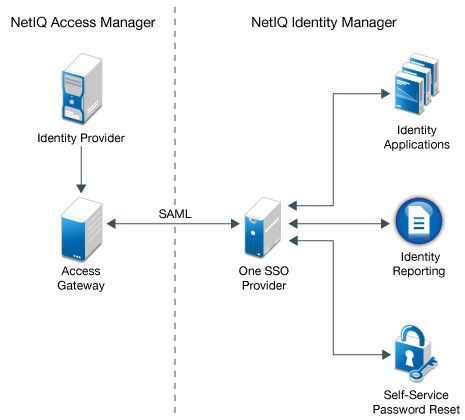
Cloud identity management is the administration of digital identities and permissions used to access cloud-based systems. It can include user accounts, authentication, single sign-on (SSO), access policies, privileged accounts and machine identities such as application service accounts.

Identity management is closely related to identity and access management (IAM). IAM covers the broader set of policies and tools used to establish identities, authenticate users and decide what they are permitted to do. In a cloud environment, these controls may be spread across a cloud provider, business applications and an organisation’s own directory services.

Why it matters

Cloud services make it easier to provide access quickly, but they can also make access harder to track. Accounts may be created in different systems, permissions can accumulate over time, and former employees or suppliers may retain access if offboarding is incomplete.

Weak identity controls can increase the risk of account compromise, data exposure and disruption. Strong controls help an organisation:

  • Confirm that users are who they claim to be.
  • Limit access to the systems and information each identity needs.
  • Remove or change access promptly when roles or circumstances change.
  • Monitor sign-ins and permission changes for suspicious activity.
  • Demonstrate how access is managed during audits and compliance reviews.

Core principles for cloud identity management

Use a central identity source where practical

A central identity provider can help organisations manage authentication and access policies consistently across multiple cloud services. It can also make it easier to disable an account or change a user’s access in one place. Integration should be planned carefully: cloud services, legacy systems and third-party applications may not all support the same features.

Enable single sign-on

SSO allows users to sign in once through an identity provider and access approved applications without managing a separate password for each service. This can improve the user experience and make it easier to apply consistent security controls. SSO should be paired with strong authentication and well-protected administrator accounts; by itself, it does not prevent account compromise.

Require multi-factor authentication

Multi-factor authentication (MFA) asks users to prove their identity using more than one factor, such as a password and an authenticator app or security key. It can reduce the risk of stolen passwords being used to access an account. Prioritise MFA for administrators, remote access and accounts that can reach sensitive data. Where available, consider phishing-resistant methods such as passkeys or security keys.

Apply least privilege

Give each user, application and service only the permissions needed to perform its tasks. Avoid broad, permanent permissions when narrower or time-limited access will do. Review roles regularly, especially in cloud platforms where a single permission may expose sensitive data or allow major configuration changes.

Manage the identity lifecycle

Access should follow a person’s relationship with the organisation. When someone joins, they should receive the access required for their role. When they change roles, their permissions should be reviewed. When they leave, accounts, sessions, tokens and other credentials should be revoked promptly.

Automating these steps through joiner, mover and leaver processes can reduce delays and human error. The process should cover employees, contractors, suppliers and other third parties, not just permanent staff.

Don’t overlook non-human identities

Applications, scripts, virtual machines and automation tools often use identities to communicate with other systems. These non-human identities can have significant access, yet they may be less visible than employee accounts.

Maintain an inventory of service accounts, API keys, certificates and other credentials. Assign an owner and a clear purpose to each one, restrict its permissions, and set a process for rotation and revocation. Avoid embedding long-lived secrets in code or configuration files. Where possible, use managed identities or short-lived credentials supplied by the cloud platform.

Use context and monitor access

Authentication decisions can take account of more than a password. Depending on the organisation’s needs and technology, policies may consider factors such as the device, location, sign-in risk or sensitivity of the application. This supports a zero-trust approach: access is evaluated rather than assumed simply because a user is inside a network.

Logging and monitoring are also essential. Record sign-ins, failed authentication attempts, privilege changes and unusual activity. Alerts should be prioritised so that security teams can investigate meaningful risks without being overwhelmed by noise. Logs are most useful when they are retained securely and reviewed as part of a defined incident-response process.

Common challenges

  • Too many separate accounts: Different cloud services may create disconnected identity stores, making oversight difficult.
  • Excessive permissions: Access granted for a short-term task can remain in place long after it is needed.
  • Unmanaged credentials: Old keys, tokens and service accounts can remain active without a clear owner.
  • Inconsistent policies: Different teams may configure authentication and access controls in different ways.
  • Incomplete offboarding: Removing an employee from one system does not necessarily revoke access to every connected service.

Addressing these challenges starts with visibility. Identify the cloud services in use, map how identities are created and authenticated, and establish who is responsible for each type of access.

A practical starting plan

  1. Build an identity inventory. List users, administrators, third parties, applications and service accounts, along with the systems they can access.
  2. Protect high-risk accounts first. Require strong MFA, reduce standing privileges and review recovery methods for administrator accounts.
  3. Standardise access rules. Define role-based access where appropriate and document how exceptions are approved.
  4. Automate lifecycle processes. Connect identity changes to HR and supplier processes where possible, and test that access is removed correctly.
  5. Review permissions regularly. Ask managers and system owners to confirm that access remains necessary, paying particular attention to privileged access.
  6. Monitor and improve. Use audit logs and incident findings to identify gaps, refine policies and test recovery procedures.

Governance, privacy and compliance

Cloud identity controls should form part of an organisation’s wider security and data-protection arrangements. In the UK, organisations handling personal data should consider their obligations under the UK GDPR and Data Protection Act 2018, including the need for appropriate security measures. The controls required will depend on the organisation, the data involved and the services being used.

Keep policies and evidence proportionate and current. Document who approves access, how privileged permissions are controlled, how long records are retained and how access reviews are completed. Cloud providers may offer security features, but the organisation remains responsible for configuring them appropriately and understanding the division of responsibilities.

Conclusion

Effective identity management is a foundation of cloud security. Centralised authentication, MFA, least-privilege access, reliable lifecycle processes and careful management of service identities can reduce avoidable risk while making access easier to administer.

There is no single configuration that suits every organisation. The best approach begins with a clear picture of identities and permissions, then improves controls according to the sensitivity of the systems and data involved. Regular reviews help ensure that access remains appropriate as people, applications and cloud environments change.


Cloud Identity and Access Management: Six Frequently Asked Questions

  1. What is identity management in cloud computing?
  2. What is authentication management in cloud computing?
  3. What are the 5 pillars of IAM?
  4. What is IAM practices in the cloud?
  5. Is CyberArk Pam or IAM?
  6. What is cloud-based identity?

What is identity management in cloud computing?

Identity management in cloud computing is the process of creating, verifying and managing the identities that access cloud services, applications and data. It includes authenticating users, assigning appropriate permissions, and updating or removing access when roles change or accounts are no longer needed. Strong cloud identity management helps ensure that people and services can access only the resources they need, while supporting security, monitoring and compliance.

What is authentication management in cloud computing?

Authentication management in cloud computing is the process of verifying the identity of users, devices and applications before they access cloud services. It includes setting up and managing sign-in methods, such as passwords, single sign-on and multi-factor authentication, as well as applying policies that determine when additional verification is required. Effective authentication management helps prevent unauthorised access while giving legitimate users secure, straightforward access to the resources they need.

What are the 5 pillars of IAM?

The five pillars of Identity and Access Management (IAM) are commonly described as identity governance and administration, access management, privileged access management, identity security and directory services. Together, they cover the full identity lifecycle: creating and managing user accounts and permissions, verifying users at sign-in, protecting powerful administrator accounts, detecting and responding to identity-related risks, and providing a reliable directory of users, devices and services. The exact terminology can vary between organisations and frameworks, but the central aim is to ensure that the right identities have the right access to the right resources at the right time.

What is IAM practices in the cloud?

Cloud IAM practices are the policies and processes used to manage digital identities and control access to cloud services. They typically include verifying users with multi-factor authentication, applying least-privilege permissions, using single sign-on where appropriate, reviewing access regularly, and promptly updating or removing access when roles change or people leave. Good IAM practices also cover non-human identities, such as applications and service accounts, and include monitoring sign-ins and permission changes to help detect suspicious activity.

Is CyberArk Pam or IAM?

CyberArk is best known for Privileged Access Management (PAM), which controls and monitors access to powerful accounts, such as administrator and service accounts. PAM is a specialised part of the broader Identity and Access Management (IAM) field. CyberArk also offers identity security capabilities beyond traditional PAM, so it may be described as an IAM or identity security provider, but its core specialism is PAM.

What is cloud-based identity?

Cloud-based identity is the digital identity used to access online services, applications and resources hosted in the cloud. It may represent a person, such as an employee or customer, or a non-human account, such as an application or service. Cloud identity systems manage how these identities are verified and what they are allowed to access, often using features such as single sign-on, multi-factor authentication and access policies.

SailPoint Lifecycle Manager: Managing Identity from Joiner to Leaver

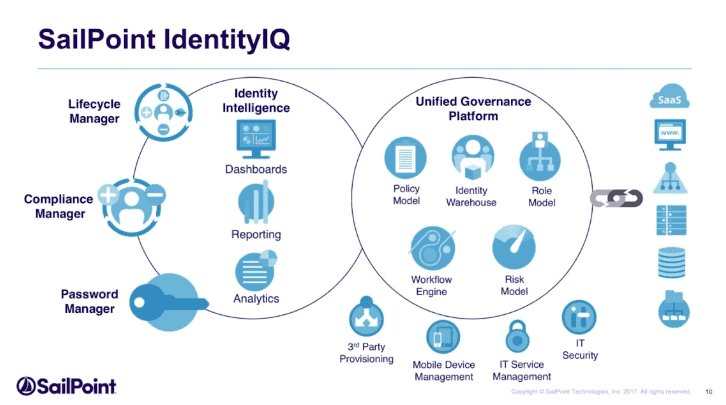
When someone joins an organisation, changes role or leaves, their access to business systems needs to change accordingly. If these updates are handled manually, access can be delayed, overlooked or left in place for too long. SailPoint Lifecycle Manager helps organisations manage these identity changes and the access associated with them.

Lifecycle Manager is commonly associated with SailPoint IdentityIQ, SailPoint’s identity governance and administration platform. Its purpose is to help automate and govern identity processes throughout an employee’s or other user’s relationship with an organisation. Exact features depend on the SailPoint product, configuration and licensing in use.

What is SailPoint Lifecycle Manager?

SailPoint Lifecycle Manager supports identity lifecycle management: the processes that create, update and deactivate digital identities as people’s circumstances change. It can help connect information from sources such as HR systems with access controls across business applications and IT environments.

A typical lifecycle is often described as:

  • Joiner: A new employee or other user receives an identity and the access needed for their role.
  • Mover: A change in department, position or responsibilities prompts a review and update of access.
  • Leaver: When a person leaves, their accounts and access are disabled, removed or otherwise handled according to policy.

These processes can apply to employees, contractors, partners and other identities, depending on an organisation’s requirements and implementation.

How it works

Lifecycle Manager can use identity data and configured business rules to initiate or support access-related actions. For example, when an HR record indicates that a new employee has started, the system may create or update an identity, assign access based on the person’s role and route exceptions for approval.

When someone changes roles, the organisation can use defined policies and workflows to determine which permissions should be added, changed or removed. When a person leaves, a configured process can help revoke access across connected systems. Some tasks may be automated, while others require approval or administrator involvement.

Common capabilities

  • Lifecycle workflows: Configure processes for identity creation, role changes and departures.
  • Access requests: Enable users or managers to request access, subject to the organisation’s approval rules.
  • Approvals and policy checks: Route requests to appropriate decision-makers and apply configured controls.
  • Provisioning and de-provisioning: Support the granting, changing or removal of access in connected applications.
  • Role-based access: Use job roles or other identity attributes to help determine appropriate access.
  • Audit records: Keep records of relevant requests, decisions and changes to support oversight and review.

The available functions depend on the SailPoint product and the way it has been configured. Not every application or identity process will necessarily be automated.

Benefits for organisations

A well-designed lifecycle management process can make access changes more consistent and reduce reliance on manual administration. Automation can help teams handle routine tasks more efficiently, while approvals and audit records provide greater visibility into who has access and why.

Timely changes are also important for security. Removing access when it is no longer needed can reduce the risk of dormant or excessive permissions. Meanwhile, assigning access in line with roles can help employees get the tools they need without granting more access than their work requires.

Implementation considerations

SailPoint Lifecycle Manager is not a substitute for clear access policies or reliable identity data. Before implementing it, organisations should consider the quality of information in their source systems, the applications that need to be connected and the rules that should govern access.

  • Define lifecycle events and decide which systems should respond to each event.
  • Review roles and access rules regularly, especially where responsibilities change frequently.
  • Set clear approval routes and identify who is accountable for access decisions.
  • Test workflows carefully, including exceptions and delayed or incomplete source data.
  • Monitor access changes and review whether automated processes are working as intended.

Conclusion

SailPoint Lifecycle Manager helps organisations govern identity and access changes across the joiner, mover and leaver lifecycle. By combining configured workflows, approvals and provisioning processes, it can support more consistent access management and improve visibility for security and compliance teams. The greatest value comes from aligning the technology with accurate identity data, well-defined policies and regular oversight.


9 Key Benefits of SailPoint Lifecycle Manager for Automated Access Management

  1. Automates joiner, mover and leaver processes
  2. Speeds up access provisioning
  3. Helps remove access promptly when roles change
  4. Supports role-based access management
  5. Provides configurable approval workflows
  6. Improves visibility of access changes
  7. Keeps useful audit records
  8. Can reduce repetitive administration
  9. Helps apply access policies consistently


Key Drawbacks of SailPoint Lifecycle Manager

  1. Can be complex to configure and maintain.
  2. Implementation may require significant time and expertise.
  3. Licensing and integration costs can be high.
  4. Poor-quality identity data can undermine automation.

Automates joiner, mover and leaver processes

SailPoint Lifecycle Manager automates joiner, mover and leaver processes, helping ensure that access is granted, updated or removed as people join the organisation, change roles or leave. By reducing reliance on manual tasks, it can speed up routine changes, improve consistency and help prevent users from retaining access they no longer need.

Speeds up access provisioning

SailPoint Lifecycle Manager can speed up access provisioning by automating routine steps in the joiner, mover and leaver process. When a person joins or changes role, configured workflows can use identity information and business rules to assign the access they need, while routing exceptions for approval. This reduces reliance on manual requests and repetitive administration, helping people get appropriate access sooner and enabling IT teams to focus on more complex tasks.

Helps remove access promptly when roles change

SailPoint Lifecycle Manager can help organisations remove access promptly when an employee changes role. By triggering access reviews or updates based on changes to identity data, it helps ensure permissions that are no longer needed are withdrawn, reducing the risk of excessive access while supporting a smoother transition into new responsibilities.

Supports role-based access management

SailPoint Lifecycle Manager supports role-based access management by helping organisations assign permissions according to a person’s job role and responsibilities. This can make it easier to provide appropriate access when someone joins or changes position, while reducing the risk of excessive or unnecessary permissions. When roles and access rules are kept up to date, the approach can also make access decisions more consistent and easier to review.

Provides configurable approval workflows

SailPoint Lifecycle Manager provides configurable approval workflows, allowing organisations to tailor access requests to their own policies and responsibilities. Requests can be routed to the appropriate managers, system owners or security teams, with approval steps adjusted according to the type or sensitivity of access. This helps ensure decisions are made by the right people, while creating a clear record of approvals for later review.

Improves visibility of access changes

SailPoint Lifecycle Manager improves visibility of access changes by recording and tracking identity-related updates, such as access requests, approvals and changes made when someone joins, changes role or leaves. This gives administrators and managers a clearer view of who has access to particular systems, how that access was granted and when it changed. Better visibility can make access reviews more effective, support audit requirements and help organisations identify permissions that may no longer be appropriate.

Keeps useful audit records

SailPoint Lifecycle Manager can keep useful records of access requests, approvals and changes, giving organisations a clearer view of how permissions were granted or removed. These records can help administrators investigate issues, review access decisions and provide evidence for internal audits or compliance checks. Their usefulness depends on the system’s configuration and the quality of the information recorded.

Can reduce repetitive administration

SailPoint Lifecycle Manager can reduce repetitive administration by automating routine identity and access tasks, such as creating accounts for new starters, updating permissions when someone changes role, and removing access when they leave. This can save IT teams time, reduce manual data entry and help ensure changes are handled more consistently. Organisations should still review workflows and exceptions to make sure access remains appropriate.

Helps apply access policies consistently

SailPoint Lifecycle Manager helps organisations apply access policies consistently by using defined rules and workflows to guide how access is requested, approved, granted and removed. This can reduce reliance on informal, manual decisions and help ensure that people in similar roles are treated in the same way. Regular reviews and appropriate oversight remain important to keep those policies accurate and aligned with changing business needs.

Can be complex to configure and maintain.

One potential drawback of SailPoint Lifecycle Manager is that it can be complex to configure and maintain. Setting up workflows, access policies, approval routes and integrations to suit an organisation’s needs may require specialist knowledge and careful planning. As systems, roles and business processes change, configurations also need regular review and upkeep. Without sufficient expertise and ongoing resources, the implementation can become difficult to manage and may not deliver the intended benefits.

Implementation may require significant time and expertise.

Implementing SailPoint Lifecycle Manager can take considerable time and specialist expertise. Organisations need to connect it to their identity sources and business applications, define access rules and workflows, and test that changes are handled correctly across different user scenarios. Complex environments or inconsistent identity data can add to the effort, so careful planning and experienced technical support may be needed before the system is fully operational.

Licensing and integration costs can be high.

One potential drawback of SailPoint Lifecycle Manager is the cost of licensing and integration. Organisations may need to budget not only for the software itself, but also for connecting it to existing applications, configuring workflows and maintaining integrations as systems change. These costs can be especially significant in complex IT environments or where specialist implementation support is required, so it is worth assessing the full cost of ownership before committing.

Poor-quality identity data can undermine automation.

Poor-quality identity data can undermine SailPoint Lifecycle Manager’s automation. If source systems contain inaccurate, incomplete or outdated details—such as job titles, departments or employment status—the platform may assign inappropriate access, miss changes or trigger the wrong workflow. Organisations should regularly validate identity data and establish clear ownership for correcting errors, so automated decisions are based on reliable information.

Global Compliance Software: A Guide for International Businesses

Operating across borders can open up new markets and opportunities, but it also brings a complex set of legal and regulatory responsibilities. Requirements may differ between countries, industries and even regions within the same country. Global compliance software helps organisations manage these obligations in a more structured and consistent way.

What is global compliance software?

Global compliance software is technology designed to help businesses identify, organise and monitor their compliance responsibilities across multiple jurisdictions. Depending on the product, it may support areas such as data protection, financial controls, employment practices, health and safety, environmental standards, trade regulations and industry-specific requirements.

Rather than replacing legal or compliance professionals, the software gives them tools to manage information, coordinate tasks and maintain evidence. Its features can range from a central register of obligations to automated workflows, audit records and risk dashboards.

Why does global compliance matter?

International businesses often face overlapping requirements. A company might need to follow local employment laws while also meeting group-wide policies, contractual commitments and regulations that apply to its sector. Keeping track of changes across different locations can be challenging, particularly when information is spread across spreadsheets, email and separate systems.

Weak compliance processes can lead to financial penalties, operational disruption, disputes and damage to an organisation’s reputation. They can also make it harder to demonstrate that appropriate controls are in place. A well-managed compliance programme helps businesses understand their responsibilities and respond to issues in a timely, documented way.

Common features

Capabilities vary, but global compliance platforms may include:

  • Regulatory and obligation registers: A structured record of relevant laws, standards, policies and other requirements.
  • Change monitoring: Tools to help teams track regulatory developments and assess whether internal processes need to change.
  • Risk assessments: Workflows for identifying, evaluating and prioritising compliance risks across business units or locations.
  • Task management: Assigned actions, deadlines, reminders and approval processes to support accountability.
  • Policy management: Document control, review cycles, version histories and employee acknowledgements.
  • Training records: Ways to assign learning, monitor completion and retain evidence of participation.
  • Incident and case management: Secure processes for recording concerns, investigations, actions and outcomes.
  • Audit support and reporting: Records and reports that help teams review controls and prepare evidence for internal or external audits.
  • Integration: Connections with systems such as identity management, human resources, finance, document storage and enterprise risk platforms.

Benefits for multinational organisations

A central platform can give authorised teams a more consistent view of compliance activity across the organisation. Local teams can manage jurisdiction-specific requirements, while group functions can monitor common risks, overdue actions and emerging issues.

Automation may reduce repetitive administration, such as sending reminders or routing approvals. Clear ownership and audit trails can also make it easier to understand who completed an action, when it was completed and what evidence supports it. These capabilities can improve coordination, although they do not guarantee compliance on their own.

Another potential benefit is better-informed decision-making. When compliance information is organised and current, leaders may be better placed to consider regulatory risk when entering a new market, launching a product or changing a business process.

Choosing the right software

The most suitable platform depends on an organisation’s size, sector, locations and existing processes. Before comparing products, businesses should define the problems they need to solve. For example, the priority may be tracking regulatory changes, managing policies, coordinating audits or improving visibility of obligations across subsidiaries.

Useful questions to ask vendors include:

  • Can the platform support the jurisdictions and regulatory areas relevant to the business?
  • How are legal and regulatory updates sourced, checked and communicated?
  • Can local teams adapt workflows without weakening central oversight?
  • What reporting, audit trails and evidence-management features are available?
  • How does the software protect sensitive information and control user access?
  • Can it integrate with the organisation’s existing systems?
  • What support, training and implementation services are included?
  • How are product changes, data retention and service continuity managed?

It is also important to assess usability. If the system is difficult to navigate, staff may avoid using it or maintain separate records elsewhere. A pilot involving both central and local teams can help test whether the platform fits real working practices.

Implementation: people and processes matter

Buying software is only one part of building an effective compliance programme. Organisations should first agree on responsibilities, approval routes and definitions of key terms. They should then decide which data to migrate, how to handle existing records and who will maintain the system over time.

Training should be tailored to different users. A compliance manager may need detailed reporting and administration skills, while other employees may only need to complete assigned tasks or acknowledge policies. Clear guidance can help staff understand how the platform supports their role and where to raise questions.

Businesses should also review the quality of the information entered into the system. Inaccurate obligation records, unclear ownership or outdated policies can undermine even the most capable software. Regular reviews help keep the platform relevant as the organisation and its regulatory environment change.

Limitations to keep in mind

Global compliance software cannot interpret every legal issue in context or replace qualified advice. Regulatory obligations may depend on a company’s activities, customers, data, contractual relationships and local circumstances. Organisations should confirm that information is relevant to their situation and involve legal or compliance specialists where appropriate.

Nor does a central dashboard prove that controls are working. Effective compliance still depends on suitable policies, informed people, practical procedures, management oversight and a willingness to address problems. Software can support these elements by making responsibilities and evidence easier to manage.

The future of global compliance software

Platforms are increasingly exploring automation, analytics and artificial intelligence to help organise large volumes of regulatory information and identify patterns. These tools may assist with research or prioritisation, but their outputs need appropriate review. Businesses should understand how automated recommendations are produced, what information they rely on and how errors can be corrected.

As organisations face changing expectations around data use, supply chains, sustainability and responsible technology, compliance systems are likely to become more connected with wider risk management. The aim is not simply to collect more data, but to help people identify relevant obligations and take timely, well-documented action.

Conclusion

Global compliance software can help international businesses bring obligations, tasks and evidence into a more manageable framework. The right solution can improve visibility, support consistent processes and make coordination across locations easier. Its value, however, depends on choosing a platform that fits the organisation, maintaining reliable information and combining technology with knowledgeable people and effective governance.


Global Compliance Software: FAQs on Leading Tools, Key Functions and Top Concerns for 2026

  1. What are the top 10 global compliance concerns for 2026?
  2. What is the best GRC tool?
  3. What does global compliance do?
  4. What is the best compliance software?

What are the top 10 global compliance concerns for 2026?

The top 10 global compliance concerns for 2026 will vary by industry and jurisdiction, but key priorities include: (1) data privacy and cross-border data transfers; (2) artificial intelligence governance and evolving AI regulations; (3) cyber security and incident-reporting obligations; (4) anti-money laundering and counter-terrorist financing; (5) international sanctions and export controls; (6) anti-bribery and corruption; (7) sustainability reporting and environmental claims; (8) supply chain due diligence, including human rights and forced labour risks; (9) employment law and whistleblower protection; and (10) international tax transparency and reporting. Global compliance software can help organisations track relevant regulatory changes, assign responsibilities and maintain evidence, but requirements must be assessed against each business’s activities and locations.

What is the best GRC tool?

There is no single “best” GRC (governance, risk and compliance) tool for every organisation. The right choice depends on factors such as your industry, size, locations, regulatory obligations, existing systems and budget. Compare platforms for the capabilities you need—such as risk assessments, compliance tracking, audit management, reporting and integrations—and consider usability, security, implementation support and scalability. A shortlist, followed by a demonstration or pilot with the teams who will use the software, can help you find the best fit for your organisation.

What does global compliance do?

Global compliance helps an organisation meet the laws, regulations, industry standards and internal policies that apply to its operations in different countries. Global compliance software supports this work by bringing obligations, policies, risks, tasks and evidence together in one place, helping teams track changes, assign responsibilities and monitor progress. It can improve oversight and record-keeping, but it does not replace legal advice or the need for effective processes and informed staff.

What is the best compliance software?

The best compliance software is the one that fits your organisation’s regulatory requirements, size, industry and day-to-day processes. Look for a platform that covers the jurisdictions and compliance areas relevant to your business, keeps records and audit trails, assigns actions clearly, and provides useful reporting. Security, integration with existing systems, ease of use, reliable regulatory updates and quality customer support also matter. Before choosing, define your priorities, compare providers and test shortlisted products with the teams who will use them. No software can guarantee compliance or replace expert legal advice, so consider how well the platform supports your people, policies and controls.

Cloud Computing Identity and Access Management

As organisations move applications, data and infrastructure to the cloud, controlling who can access each resource becomes increasingly important. Cloud computing identity and access management (IAM) provides the policies and tools needed to verify identities and grant appropriate access. Done well, IAM helps protect sensitive information while allowing people and services to work efficiently.

What is cloud IAM?

Identity and access management is the process of managing digital identities and deciding what they are permitted to do. In a cloud environment, IAM controls access to services such as virtual machines, databases, storage, applications and administrative settings.

An identity might represent a person, such as an employee or contractor, or a non-human entity, such as an application, server or automated process. IAM typically combines authentication—checking that an identity is genuine—with authorisation—deciding which actions that identity can perform.

Why IAM matters in the cloud

Cloud platforms make it possible to create and access resources quickly, sometimes across multiple regions, accounts or providers. This flexibility can also make access harder to oversee. Permissions may accumulate as people change roles, temporary accounts may remain active, and automated services may be given more access than they need.

Weak or poorly managed access can increase the risk of data exposure, account takeover and disruption to services. Strong IAM helps organisations reduce these risks, maintain clearer oversight and support regulatory and internal security requirements. It is also an important part of the shared responsibility model: cloud providers secure their underlying platforms, while customers are responsible for managing many aspects of access to their own cloud resources.

Core IAM components

  • Identities: User accounts and service identities that need access to cloud resources.
  • Authentication: The process of verifying an identity, using methods such as passwords, security keys, certificates or multi-factor authentication (MFA).
  • Authorisation: The rules that determine which resources an identity can access and what actions it can take.
  • Roles and policies: Sets of permissions assigned according to a user’s responsibilities or a service’s purpose.
  • Federation and single sign-on: Ways to connect cloud services to an organisation’s existing identity system, so users can sign in through a familiar, centrally managed process.
  • Logging and monitoring: Records of sign-ins and access changes that help teams investigate activity and identify unusual behaviour.

Principles for effective cloud access

Apply least privilege

Give each identity only the access needed to perform its tasks—and only for as long as it is needed. Avoid broad permissions for convenience. Where possible, use time-limited access for sensitive or administrative tasks.

Use MFA for important accounts

MFA adds another verification step beyond a password. It is particularly valuable for administrator accounts, remote access and systems containing sensitive information. Stronger methods, such as security keys or passkeys, can offer better protection against phishing than passwords alone.

Separate everyday and administrative accounts

People who manage cloud environments should use standard accounts for routine work and separate privileged accounts for administrative tasks. This reduces the impact of a compromised everyday account and makes privileged activity easier to monitor.

Manage non-human identities carefully

Applications and automated workloads often need credentials to communicate with cloud services. These credentials should be scoped to specific tasks, stored securely and rotated or replaced according to a defined process. Avoid embedding long-lived secrets in source code, scripts or configuration files. Where available, use managed identities or short-lived credentials.

Review access regularly

Access should change when people join, move roles or leave. Regular reviews can uncover unused accounts, excessive permissions and outdated access arrangements. Automated provisioning and de-provisioning can help, but changes should still be checked and monitored.

Common challenges

Cloud IAM can become complex when an organisation uses several cloud providers, identity systems and business applications. Different platforms may use different terminology and permission models. Misconfigured policies can also be difficult to spot, particularly when permissions are inherited or combined across multiple roles.

Another challenge is balancing security with usability. Excessive restrictions can slow legitimate work, while overly broad access creates unnecessary risk. Clear ownership, well-designed roles and a documented approval process help teams find a workable balance.

Building a stronger IAM programme

A practical starting point is to inventory cloud accounts, identities and privileged access. Next, identify critical systems and sensitive data, then review who can reach them and what they can do. Prioritise MFA, least privilege and the removal of unused accounts. Establish processes for access requests, approvals, role changes and periodic reviews.

Monitoring is essential as well. Collect and review authentication events, permission changes and other relevant audit records. Alerts can help highlight suspicious sign-ins or unexpected changes, while regular testing can reveal gaps in policies and procedures.

Conclusion

Cloud computing identity and access management is more than a set of permissions: it is an ongoing process for managing identities, controlling access and responding to change. By combining strong authentication, least privilege, careful management of service identities and regular reviews, organisations can make cloud access more secure and accountable without preventing people from doing their work.


Cloud Identity and Access Management (IAM): 7 Frequently Asked Questions

  1. Is IAM a good career?
  2. What is identity and access management in cloud computing?
  3. What are the 5 pillars of IAM?
  4. What are the benefits of IAM in the cloud?
  5. What is IAM role in cloud computing?
  6. What is consumer identity and access management in the cloud?
  7. What are the top 10 IAM tools?

Is IAM a good career?

Yes, identity and access management (IAM) can be a rewarding career, particularly as organisations rely on cloud services and need to protect access to systems and data. IAM roles range from administration and engineering to security architecture, governance and consultancy, offering opportunities to develop both technical and problem-solving skills. Knowledge of cloud platforms, authentication methods, access controls and security standards can be valuable, while clear communication is also important when working with users and teams across an organisation. As with any career, prospects depend on experience, interests and the needs of the job market, but IAM offers a range of routes for people interested in cybersecurity and cloud computing.

What is identity and access management in cloud computing?

Identity and access management (IAM) in cloud computing is the system of policies and tools used to verify who is accessing cloud resources and control what they are allowed to do. It manages identities such as employees, administrators and applications, using measures such as authentication, multi-factor authentication and role-based permissions. Effective cloud IAM helps ensure that each identity has only the access it needs, reducing the risk of unauthorised access to data and services.

What are the 5 pillars of IAM?

The five pillars of identity and access management (IAM) are commonly described as identity lifecycle management, authentication, authorisation, access governance and auditing. Together, they cover creating, updating and removing identities; verifying that users and services are who they claim to be; granting only the permissions they need; reviewing and managing those permissions over time; and recording access activity for monitoring and investigation. The terminology can vary between frameworks, but these principles help organisations manage cloud access securely throughout an identity’s lifecycle.

What are the benefits of IAM in the cloud?

Cloud IAM helps organisations protect cloud resources by ensuring users and services can access only what they need. It can reduce the risk of unauthorised access and data breaches through measures such as multi-factor authentication, role-based permissions and timely removal of outdated accounts. Centralised identity management also makes it easier to manage access across cloud services, support compliance requirements and review activity through audit logs. With well-designed IAM, organisations can strengthen security while making sign-in and access processes more consistent for staff.

What is IAM role in cloud computing?

An IAM role in cloud computing is a set of permissions that defines what an identity can do with specific cloud resources. Rather than being tied directly to one person, a role can be assigned temporarily to a user, application or service when access is needed. For example, a role might allow an application to read files from a particular storage area without granting access to other services. Using roles helps apply the principle of least privilege and makes it easier to manage access consistently.

What is consumer identity and access management in the cloud?

Consumer identity and access management (CIAM) in the cloud is the set of cloud-based tools and processes used to manage customer identities and their access to an organisation’s websites, apps and digital services. It enables customers to register, sign in and manage their accounts, while helping organisations protect personal information and control access. CIAM commonly includes features such as single sign-on, multi-factor authentication, consent management and integration with other services. As customer-facing systems can handle large numbers of users, a well-designed CIAM solution should balance security and privacy with a straightforward sign-in experience.

What are the top 10 IAM tools?

The top 10 IAM tools depend on your cloud platforms and requirements, but widely used options include Microsoft Entra ID, AWS Identity and Access Management (IAM), Google Cloud IAM, Okta, Ping Identity, IBM Security Verify, SailPoint, CyberArk, One Identity and Auth0. They cover different needs, from cloud permissions and single sign-on to identity governance, privileged access management and customer identity. Compare them based on compatibility with your environment, security features, ease of administration, integration options and cost.